Shopper Questions and Conversion on Shopify: What Works

Shoppers who ask a question on a product page are usually close to buying, and the store that answers it publicly, quickly and with proof tends to win that sale. On Shopify, the fix is not a bigger discount. It is to find the questions that stall your visitors, answer them where the visitor is looking, and let verified customers do part of the answering. This guide shows how, with the numbers to set expectations and a plan you can run this week.
TL;DR
- Unanswered questions are a quiet conversion leak: the shopper doesn’t complain, they just leave. Answering them on the product page removes the hesitation.
- Shoppers trust answers from people who bought. PowerReviews’ survey found 94% value answers from verified buyers, against 45% for answers from the brand.
- Visitors who interact with Q&A convert at much higher rates, but that is a correlation. Treat it as a signal of intent, not a promised lift.
- Keep the widget light and never hide awkward questions. A slow page or a curated-looking feed cancels the trust you are trying to build.
- Start with the ten questions your support inbox gets most, publish the answers, then let new questions flow in.
Table of Contents
- Why shopper questions decide conversions
- What the Q&A data actually says
- The questions that hold shoppers back
- How to collect the questions you don’t know about
- Answer in public, and let buyers answer too
- Where to place Q&A on the product page
- Keep the page fast
- A perspective from Peers: questions are the cheapest proof you have
- Add video and verified proof alongside Q&A
- See it on your own store
- A 30-day plan
- FAQ
- Sources
Why shopper questions decide conversions
In a physical store, a customer picks the item up, checks the label, asks the person at the shelf. Online, every one of those moments turns into a question the page must answer by itself. If it doesn’t, the visitor has three options: guess, ask and wait, or leave. Most leave.
The baseline is not generous. Shopify’s own conversion rate data puts the average Shopify store at about 1.4%, with the top 20% of stores at 3.2% or higher and the top 10% at 4.7%. That means for a typical store, roughly 98 of every 100 visitors leave without buying. Some are browsing, some are comparing, and some are stuck on one small doubt.
That last group is the one you can win back. According to the Baymard Institute figures compiled here, the average cart abandonment rate is 70.22%, and 19% of abandoners cite a lack of trust, such as worries about site security or payment details. Extra costs revealed late (40%) and slow delivery estimates (20%) are the other big reasons. Notice what those have in common: they are all unanswered questions. How much is shipping? When will it arrive? Can I trust this store with my card?

A good product page answers those before the visitor has to ask. Shopper questions are how you find out which answers are missing.
What the Q&A data actually says
The research on product Q&A is useful, but you should read it carefully.
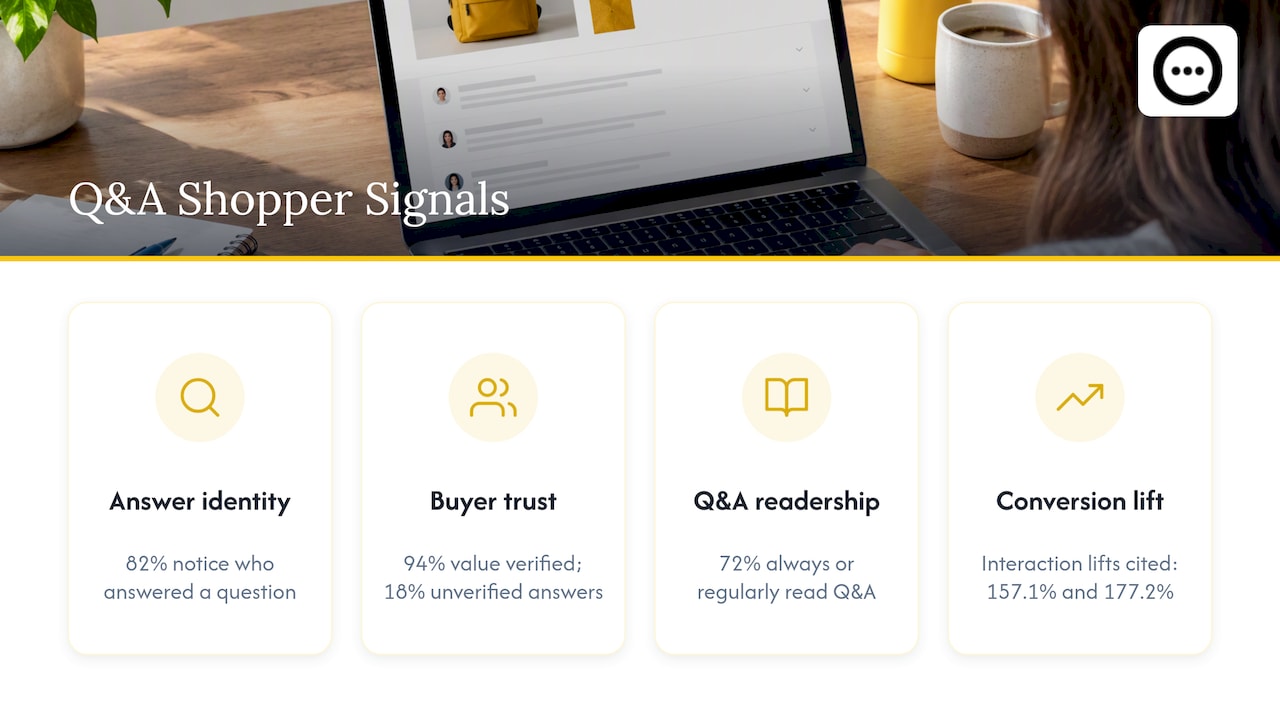
PowerReviews surveyed more than 7,500 U.S. consumers and found two things worth building on. First, 82% of consumers notice the small print showing who answered a question. Second, 94% value answers from verified buyers, while only 18% value answers from people who aren’t verified as having bought the product. The same page reports a 157.1% conversion lift among visitors who interact with Q&A.
A separate UGC marketing roundup from Enrich Labs cites similar PowerReviews figures: 72% of shoppers always or regularly read Q&A, and Q&A interaction is associated with a conversion lift of 177.2%.
Before you quote those numbers in a slide deck, remember what they measure. Visitors who open the Q&A section are already motivated. They have a specific concern and they are looking for a reason to say yes. So the lift partly reflects who clicks, not only what Q&A does. The honest takeaway is this: engaged shoppers want answers, they want them from buyers, and a page with no answers gives them nothing to engage with.
The questions that hold shoppers back
Most stores get the same handful of question types again and again. Sort yours into these buckets and you will see where the page is thin.
| Question type | Typical examples | Where the answer belongs |
|---|---|---|
| Fit and size | Does it run small? Will it fit a 6-foot person? | Next to the size selector, backed by buyer answers |
| Materials and use | Is it machine washable? Is it safe for sensitive skin? | Product description plus Q&A |
| Shipping and returns | When will it arrive? What if it doesn’t work? | Directly under the add-to-cart button |
| Comparison | What’s the difference between these two models? | Q&A and a short comparison block |
| Proof | Does it look like the photos? | Customer video and photo reviews |
The shipping and returns row deserves priority. The same Baymard data shows extra costs and delivery speed are the top two stated reasons for abandoning a cart, so a plain shipping and returns summary on the product page removes two of the biggest objections before checkout.
How to collect the questions you don’t know about
You already have a list. Start there, then build a system.
- Mine your support inbox. Export the last 90 days of emails, chat logs and social DMs. Tag each message with the product and the question type. The ten most repeated questions are your first ten Q&A entries.
- Check live chat and search. If your store has on-site search, the queries that return nothing or get rephrased show what shoppers can’t find.
- Read your returns reasons. Every “not as expected” return is a question that wasn’t answered. Our guide on reducing returns with Q&A covers how to turn those reasons into pre-purchase answers.
- Open a question box on the page. Make it a single field. Every extra form field cuts the number of questions you receive.
- Ask after delivery. Buyers who have the product in hand are the best people to answer the next shopper’s questions. A short follow-up email with a link to answer questions, or to record a short video review, brings in the authentic responses shoppers value most.
If you want a fuller framework, we laid one out in our Q&A strategy for Shopify.
Answer in public, and let buyers answer too
A private reply helps one person. A public answer helps every future visitor who has the same doubt. That is the whole economic logic of product Q&A: one answer, written once, works on the page every day.
A few rules make the answers worth reading:
- Answer fast. A question sitting unanswered for a week tells the next visitor nobody is home.
- Be specific. “Yes, it fits most laptops” is weak. “Yes, it fits laptops up to 15.6 inches; the sleeve interior is 15.9 by 11 inches” closes the sale. Only use real dimensions from your own product data.
- Label who is answering. Since 82% of shoppers check who gave the answer, mark brand replies as brand replies and customer answers as verified buyer answers.
- Invite verified buyers in. Where a customer who bought the item can answer, the shopper believes it more. This is where a Q&A tool earns its place; we explain the workflow in replying to Shopify Q&A.
- Answer with video when words fall short. Showing how a zipper closes or how a serum feels takes ten seconds of video and saves a paragraph of text.
Do not hide the awkward questions
The temptation is to approve only the flattering ones. Resist it. The Enrich Labs guide, citing a 2022 PowerReviews analysis, reports that 96% of shoppers actively look for negative reviews and 52% specifically filter for one-star ratings. A feed that shows only praise reads as curated, and shoppers discount it.
Moderation should remove spam, abuse and private data, not honest criticism. If someone asks “does the color fade after washing?” and a buyer says “a little after a few months,” the shopper who still buys is a customer unlikely to return the item.
Where to place Q&A on the product page
Placement changes whether anyone sees it. Three positions work well on most Shopify themes:
- Below the add-to-cart area, as a short preview of the two or three most-asked questions with a “see all” link.
- After the description and reviews, as the full searchable list.
- Inside the media gallery or a carousel, when the answers come as short customer videos.
On mobile, where most Shopify traffic arrives, keep the question preview collapsible and make the input field large enough to tap. If you want to add a Q&A block without editing theme code, our walkthrough on adding product Q&A on Shopify without theme edits lists four ways to do it. For a wider view of where proof belongs across the store, see five Shopify spots for social proof.
Keep the page fast
Every widget you add is extra code. Shopify’s store speed analysis found that slower Largest Contentful Paint goes hand in hand with lower conversion, and the figure often quoted from it is roughly a 3.5% drop for each additional 100 milliseconds. A Q&A or video block that drags the page down can erase the gain it was meant to deliver.
What to check before you install anything:
- Does the widget load after the main content, or does it block it?
- Are videos loaded on demand rather than all at once?
- Does your speed score change when you add it? Test the same product page before and after.
- Is it built for Shopify specifically, or a generic script that carries extra weight?
Speed also feeds how easily shoppers find you in the first place. If you are working on that side too, resources on Shopify SEO optimization can help you plan the performance and content work together.
A perspective from Peers: questions are the cheapest proof you have
We built Peers for Shopify stores only, and what we see across product pages is consistent. Stores invest in photos, copy and ads, then leave the page’s real objections to chance. A shopper wonders about one detail, finds nobody to ask, and goes back to the search results.
Our view is that a question from a real shopper and an answer from a verified customer is stronger than any line of copy you can write yourself, because it isn’t written by you. That is why we focus on post-purchase video reviews and live Q&A between shoppers and customers who bought. The video shows the product in someone’s hands. The Q&A lets the next visitor ask what the video didn’t cover.
Three habits separate the stores that get value from this: they answer quickly, they leave honest answers visible, and they treat every question as a prompt to improve the page. A recurring question means the listing is missing something. Fix the listing and the question stops arriving, which is the best outcome of all.
If you want to compare formats, our piece on video testimonials versus text reviews goes into when each one wins.
— Leo
Add video and verified proof alongside Q&A
Questions bring doubts to the surface. Reviews and video settle them. Shoppers who ask “is it really this size?” are best served by a customer holding the product on camera.
Collecting those videos is easier than most owners expect. A short 15 to 20 second clip is enough, and a QR code on the packaging insert can send buyers straight to the upload page. Our guides cover collecting video reviews via QR code and the QR code method in detail. Once you have clips, you can embed post-purchase video reviews without theme code.
One caution for U.S. stores: reviews should come from real customers. Checking that a reviewer actually bought the item protects you and persuades shoppers. Our post on verifying customer reviews after purchase walks through four checks.
See it on your own store
Peers puts post-purchase video reviews and shopper Q&A directly on your Shopify product pages, with moderation tools, customizable design, mobile support and analytics so you can see how shoppers engage. There is a Free plan, and Peers Growth costs 15 USD per month. You can install Peers from the Shopify App Store and try it on one product page first.
A 30-day plan
Week 1: gather. Export support questions, returns reasons and chat logs. Pick your ten most common questions across your five best-selling products.
Week 2: publish. Write specific answers, use real measurements, and place a shipping and returns summary near the add-to-cart button. Add the Q&A block to those product pages.
Week 3: invite. Email recent buyers and ask them to answer questions or record a short clip. Answer new questions within a day.
Week 4: measure. Compare those product pages against similar ones without Q&A. Look at conversion rate, add-to-cart rate and return rate. Keep the comparison fair: same traffic sources, same period, no other big changes. Because the average Shopify store converts at about 1.4%, even a modest gain on your best sellers is meaningful.
FAQ
What is a good conversion rate for a Shopify store?
Shopify’s own data puts the platform average at roughly 1.4%, with the top 20% of stores at 3.2% or higher and the top 10% at 4.7% (Shopify). The 2.5% figure you often see is a general e-commerce reference point, not a Shopify average. Compare yourself with your own history and your product category before judging.
Does product Q&A really increase conversion?
Visitors who interact with Q&A convert far more often, with PowerReviews reporting a 157.1% lift. That figure mostly reflects motivated shoppers choosing to engage, so don’t expect the same gain on your whole store. The practical benefit is that answered objections stop shoppers from leaving.
Should I delete negative or awkward questions?
No. Remove spam, abuse and personal details, but leave honest criticism and answer it calmly. Shoppers actively look for negative feedback, and a feed with only praise looks edited.
Who should answer shopper questions?
Both you and verified buyers. Brand answers are fast and accurate, while verified buyer answers carry more weight with shoppers, since 94% say they value them. Label each answer so shoppers know the source.
Sources
- How Q&A Eliminates Uncertainty and Boosts Ecommerce Sales (PowerReviews)
- Jaki jest dobry średni wskaźnik konwersji w e-commerce w 2026 roku? (Shopify)
- Cart Abandonment 2026: 70.22% Rate by Industry
- Store Speed and Conversion: What the Data Shows (Shopify)
- UGC Marketing: Complete Guide 2026 (Enrich Labs)