Shopify Q&A: Up to 100 Instant Answers and Public Video Replies

Reply to private product questions inside Shopify Inbox, where you can type a fresh answer or edit an AI-suggested reply before sending. Feed recurring questions into your Knowledge Base so instant answers can handle them automatically next time. For public on-page questions and verified video answers, you’ll need a dedicated Q&A and review widget like Peers, since Shopify’s native tools don’t publish shopper Q&A directly on product pages.
TL;DR:
- Quick replies use one word shortcuts on desktop, iOS, and Android; instant answers draw from the Knowledge Base and support up to 100 questions.
- AI suggestions require an English admin and storefront, an active Inbox conversation, and no more than 200,000 products; review and edit each draft before sending.
- Verify the variant, inventory, regional shipping, returns, and discount terms before answering; repeated AI errors call for correcting product details or Knowledge Base entries.
- Shopify has no native public product Q&A; Shop review replies go through Sales channels, then Shop, then Reviews, and cannot exceed 1,000 characters.
- For recurring purchase questions, publish 15 to 20 second video answers beside the relevant product question, with moderation approval before publication.
Table of Contents
- Step-by-step: reply from Shopify Inbox on desktop and mobile
- Quick replies, instant answers, and AI-suggested replies: practical rules
- Public product Q&A vs. Shop product reviews: reply workflows
- Pre-reply verification checklist
- Combining Inbox with Peers for public Q&A and verified video answers
- How to manage and moderate Q&A content for brand safety and quality
- Strategies for integrating video replies within Q&A for enhanced engagement
- How to track the impact of Q&A replies on sales and customer confidence
- Using Peers specifically for embedding video replies to Q&A on Shopify product pages
- Author perspective: quick wins to reduce reply time and improve accuracy
- Peers: embed verified video Q&A on your Shopify product pages
- FAQ
- Sources
Step-by-step: reply from Shopify Inbox on desktop and mobile
Shopify Inbox is where most pre-purchase questions land, and the reply process is the same core motion whether you’re at a desk or on your phone.
On desktop, open your Shopify admin and go to Inbox, then select the conversation you want to answer. Type your own message, or review and edit a suggested reply if one appears, then click Send. On mobile, open the conversation in the Inbox app and tap Send after writing or editing your response. Staff can reply from either desktop or mobile, and the conversation thread keeps history so you’re never answering blind.
A few habits make this workflow faster and more accurate:
- Search past conversations by customer name, email, or keyword before replying, so you don’t repeat an answer you already gave someone else.
- Attach product links, discount codes, images, or videos directly in the chat window when a visual answer beats a paragraph of text.
- Skim the customer’s browsing or order context, when visible, before typing a response, since it often answers half the question for you.
- Edit AI-suggested replies rather than sending them unread, even when they look correct, because the underlying product data can be outdated.
This single screen covers the bulk of day-to-day Q&A traffic. The harder decisions come later, when you decide which answers deserve to become permanent, searchable FAQs instead of one-off replies.
Quick replies, instant answers, and AI-suggested replies: practical rules
These three tools sound similar but solve different problems, and mixing them up slows your team down instead of speeding it up.
- Quick replies are one-word shortcuts you or your staff type to pull in a saved response. Create one in Inbox settings, then trigger it from the lightning-bolt menu inside any conversation, personalize it, and send. They work on desktop, iOS, and Android, and the shortcut itself can only be a single word.
- Instant answers are customer-facing suggested questions that appear in your storefront chat widget, often handled automatically once your Inbox agent is active. You can create up to 100 of them, and they pull from your Knowledge Base to close recurring information gaps for good.
- AI-suggested replies draft an answer for staff to review inside a live conversation. They require an English-language admin and storefront, an active Inbox with at least one conversation, and a catalog of 200,000 products or fewer. Suggestions only appear when a customer message is unanswered and Shopify has enough processed store information to answer it, which means policies or newly added products sometimes won’t trigger a suggestion yet.
Pro Tip: Use quick replies for speed on repetitive questions, instant answers to permanently close information gaps, and AI-suggested replies strictly as a drafting aid you edit before sending.
The common failure mode is treating a suggested reply as a finished answer; understanding best practices can be found in our Product Inquiry Support: A Complete Guide for CX Teams. Editing it doesn’t change the source data behind it, so if the suggestion is wrong, the fix belongs in your product details or Knowledge Base, not in a one-off edit.
Public product Q&A vs. Shop product reviews: reply workflows
These are two separate systems inside Shopify, and merchants who treat them as interchangeable end up missing replies in one or the other.
Shop product reviews live under Sales channels, Shop, Reviews in your admin. Select a review, write a reply of up to 1,000 characters, and send it. The reviewer gets a push notification, and your reply may be screened before it publishes.
Public, on-page product Q&A is different. Shopify doesn’t offer a native feature for shoppers to post and get public answers directly on a product page, so this typically runs through a dedicated app with its own moderation queue.
- Reply to Shop reviews from Sales channels > Shop > Reviews, keeping responses under 1,000 characters.
- Treat a public Q&A app’s moderation queue as a separate daily task from Inbox, not an afterthought.
- Escalate a private Inbox answer into a public Q&A entry whenever more than one shopper asks the same thing.
Pre-reply verification checklist
A wrong answer about size, price, or shipping costs more goodwill than a slow one, so a short check before hitting send is worth the extra thirty seconds.
- Confirm the exact variant the customer is asking about: SKU, size, color, price, and current inventory, rather than relying on the parent product page description.
- Check that the shipping window, return policy, and any discount code you’re about to mention are still active and apply to this customer’s region.
- If an AI-suggested reply has been wrong more than once on the same topic, update the product record or add a short entry to your Knowledge Base instead of correcting it manually each time.
You can create up to 100 instant answers for your Inbox chat widget, pulled from your Knowledge Base query log, which gives most stores enough room to cover their actual top questions without guessing.
Variant-level mistakes are the most common and the most avoidable, since the information already exists in your product record. The fix is almost always a habit, not a tool.
Combining Inbox with Peers for public Q&A and verified video answers
Private replies solve one customer’s question. They don’t help the next hundred shoppers who land on the same product page with the same doubt, which is where a public layer earns its place.
A workable sequence looks like this:
- Answer the question privately in Inbox the first time it comes up, using the verification habits above.
- Once the same question repeats, add a short, tested entry to your Knowledge Base so instant answers catch it automatically.
- For the handful of questions that shape purchase decisions most (fit, durability, real-world use), publish a short verified video answer and shopper Q&A directly on the product page using Peers.
Our app embeds post-purchase video reviews and shopper Q&A on Shopify product pages, with moderation tools, customizable design, and mobile-friendly playback. It gives shoppers a public, verified answer at the exact moment they’re deciding whether to buy, rather than only after they’ve opened a chat.
How to manage and moderate Q&A content for brand safety and quality
Public Q&A only builds trust when it’s accurate, on-brand, and free of spam, which means moderation isn’t optional once questions go live on a product page.
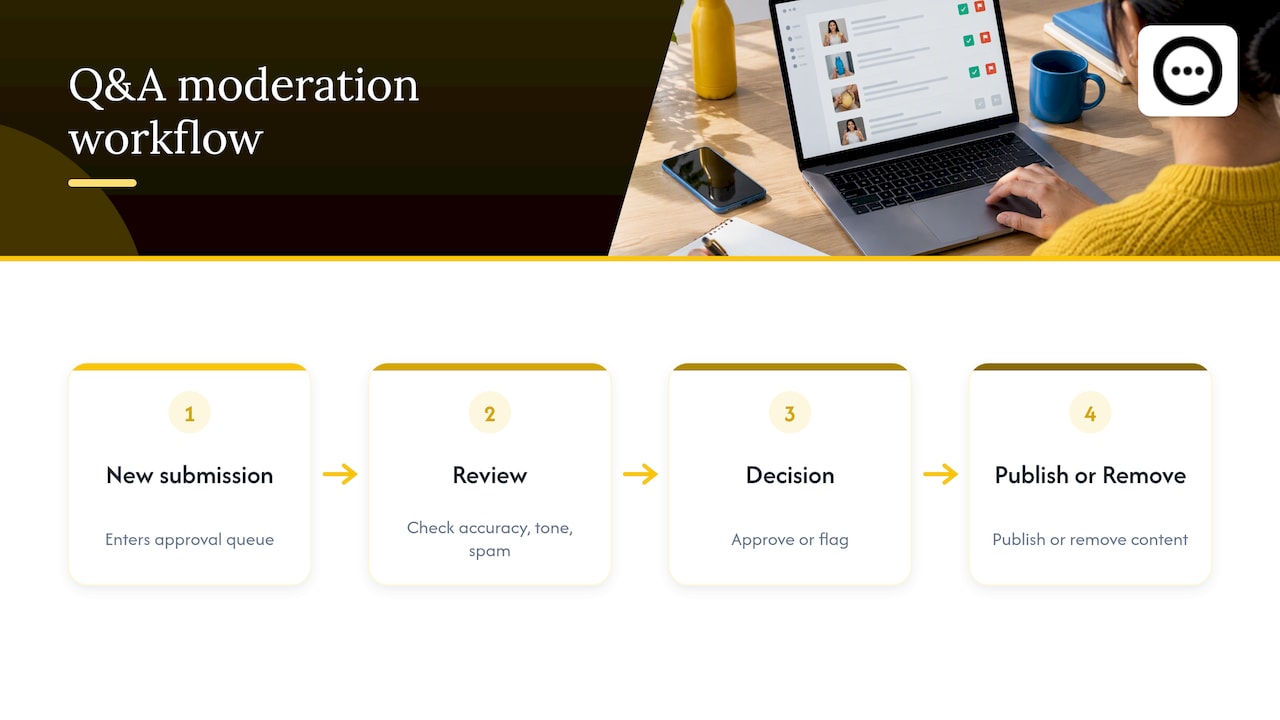
Set a review step before anything publishes: check that the answer matches your current product details, that tone fits your brand voice, and that no reply contains a competitor mention, a pricing error, or language you wouldn’t want attached to your store. Flag and remove off-topic or abusive submissions quickly, since a visible unanswered or inappropriate question sitting on a high-traffic product page does more damage than no Q&A section at all.
Assign moderation to a specific person or rotation rather than leaving it to whoever happens to notice. A weekly pass works for most catalogs, but a product launch or a seasonal spike in traffic justifies a daily check for the first week or two. Keep your approval criteria consistent across the whole catalog, not just your bestsellers, since a shopper researching a lower-traffic product deserves the same accuracy standard.
When a Q&A platform includes built-in moderation tools, use them to queue new submissions for approval before they go live rather than publishing automatically. That single gate catches most of the errors and off-brand language before a customer ever sees them, and it’s far easier to maintain than retroactively editing or deleting content that’s already visible.
Strategies for integrating video replies within Q&A for enhanced engagement
Text answers tell a shopper what’s true. A short video shows them, which is why video replies tend to hold attention longer on a product page than another paragraph of copy.
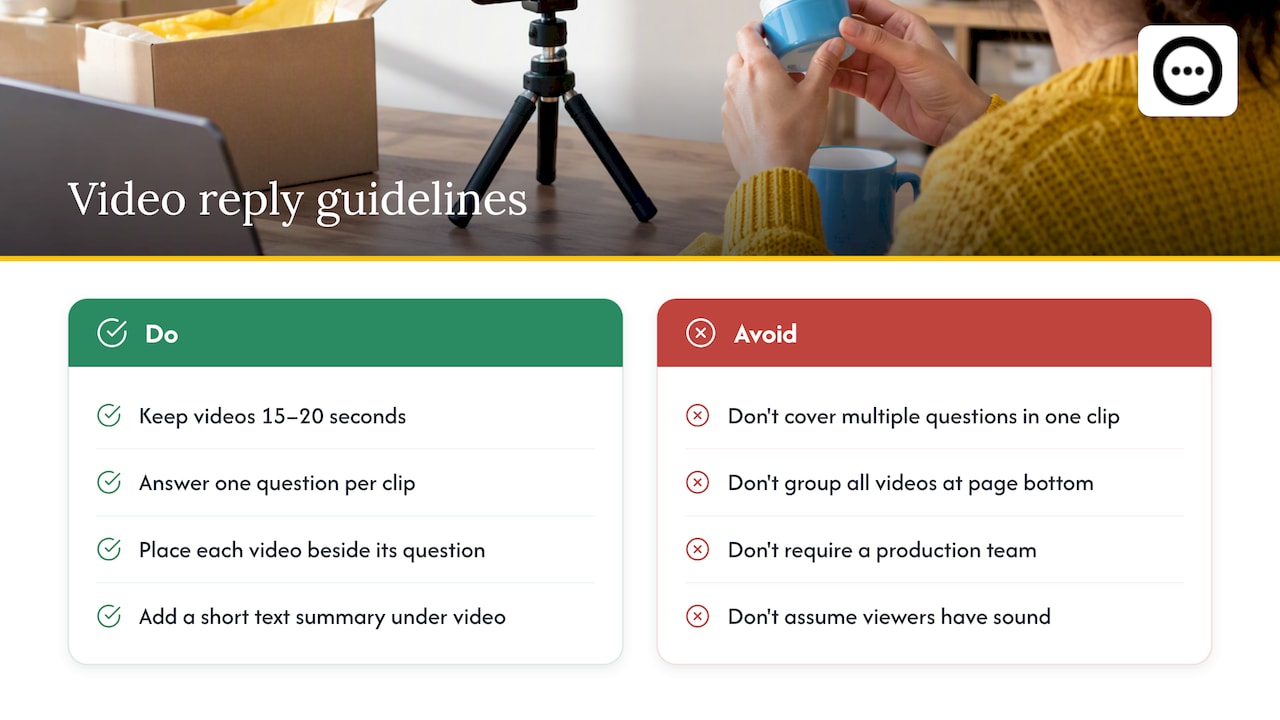
Keep video answers short, in the 15 to 20 second range, and focused on one question each rather than trying to cover everything a shopper might wonder about in a single clip. A customer holding up the product to show scale, texture, or fit answers a doubt that a spec sheet can’t. Prioritize the questions that come up most often in your Inbox conversations and reviews, since those are the ones most likely to stall a purchase decision for other shoppers too.
Place video answers near the specific question they address rather than grouping all video content at the bottom of the page, so a shopper scanning for one answer doesn’t have to watch several clips to find it. Pair each video with a short text summary underneath, since not every visitor will have sound on or time to watch.
Collecting these clips doesn’t require a production team. A QR code placed in a post-purchase email or packing slip can prompt recent buyers to record a quick answer to a common question using their own phone, which keeps the content authentic and keeps your production cost close to zero.
How to track the impact of Q&A replies on sales and customer confidence
Replying faster feels productive, but the only way to know if it’s working is to connect your reply activity to what happens next in the shopper’s journey.
Start with conversion rate on product pages that carry public Q&A or video answers compared to pages that don’t. A meaningful gap, even a modest one, tells you the format is doing real work rather than just looking good. Track repeat questions in your Inbox and Knowledge Base query logs over time. A dropping volume of repeat questions on a given topic usually means your instant answers or on-page Q&A are catching shoppers before they need to ask.
Watch for a lift specifically on products where you’ve added verified video answers versus similar products without them, since that comparison isolates the effect of the format rather than general traffic trends. Analytics built into a Q&A or review platform can usually surface this at the product level without extra setup, which matters for a small team that doesn’t have time to stitch together spreadsheets. Review the numbers monthly rather than daily. Shopper behavior around trust signals shifts slowly, and a daily glance mostly produces noise.
Using Peers specifically for embedding video replies to Q&A on Shopify product pages
This app connects directly to a Shopify product page and gives shoppers a place to see verified video answers and ask their own questions without leaving the page they’re already considering.
Setup runs through the Shopify admin, and once installed, the widget surfaces post-purchase video reviews alongside shopper Q&A in a layout customizable to match a store’s design. Moderation tools help approve content before it publishes, so public answers stay accurate and on-brand without constant manual oversight. The widget is built to play cleanly on mobile, which matters given how much product research happens on a phone.
Because the videos come from verified customers rather than staff scripts, they carry a kind of credibility a written FAQ can’t match. For example, a shopper weighing whether a jacket runs small can watch someone who actually bought it answer that exact question, on the same page where they’re deciding to buy. Built-in analytics can track engagement at the product level, which feeds back into sales-impact tracking as described above.
Author perspective: quick wins to reduce reply time and improve accuracy
Two habits move the needle fastest: pair quick replies with a weekly Knowledge Base update instead of letting saved replies go stale, and collect one short verified video answer per top FAQ using a QR-code prompt in your post-purchase flow. Measure reply-to-conversion lift and adjust your instant answers based on what the query log actually shows.
— Leo
Peers: embed verified video Q&A on your Shopify product pages
This app is designed to put shopper trust where purchase decisions actually happen: on the product page, not buried in a chat history. It embeds post-purchase video reviews and shopper Q&A directly beside the buy button, with moderation tools and a design that matches the store, set up natively inside Shopify.
Inbox handles one shopper at a time. We help every future visitor see a verified answer before they ever need to ask, which cuts hesitation at the exact moment it costs you a sale. Start on our Shopify app page with the Free plan, or move to Peers Growth at $15 per month for more capacity.
FAQ
How do I reply to a customer question in Shopify Inbox?
Open Inbox in your Shopify admin, select the conversation, and type your answer or edit a suggested reply before sending. On mobile, do the same inside the Inbox app, tapping Send once your reply is ready.
What’s the difference between quick replies and instant answers?
Quick replies are one-word shortcuts staff type to insert a saved response during a live conversation. Instant answers are customer-facing suggested questions in your chat widget, pulled from your Knowledge Base, and you can create up to 100 of them.
Why isn’t Shopify suggesting an AI reply for a conversation?
AI-suggested replies require an English-language admin and storefront, an active Inbox with at least one conversation, and a catalog of 200,000 products or fewer. Suggestions can also fail to appear when store information for that product or policy hasn’t been fully processed yet.
How do I reply to a product review in Shop?
Go to Sales channels, then Shop, then Reviews in your Shopify admin, select the review, and write a reply of up to 1,000 characters. The reviewer receives a push notification once your reply is sent.
Does Shopify let shoppers post public Q&A directly on a product page?
Shopify doesn’t include a native feature for shoppers to post questions that appear publicly on a product page. Merchants who want that typically add a dedicated Q&A and video review app, such as Peers, to handle the display and moderation.