How to Reduce Returns With Q&A on Your Shopify Store
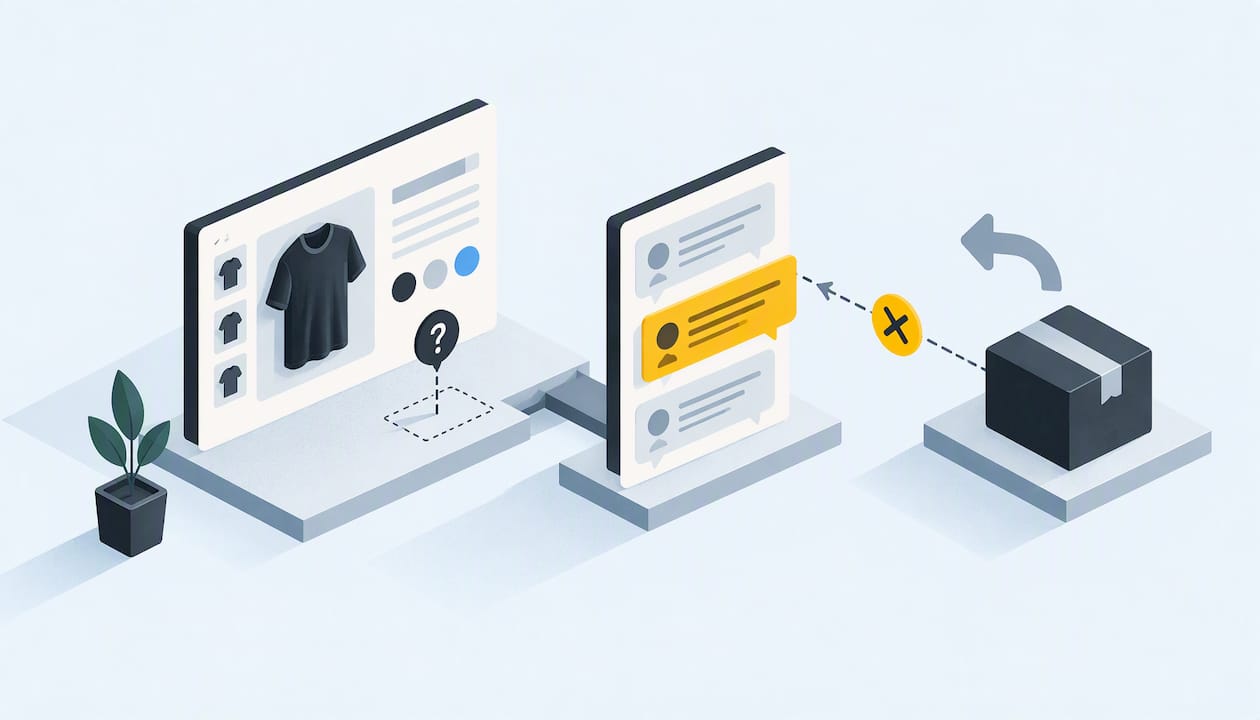
Most returns are not shipping problems. They are questions that nobody answered before checkout. A shopper guesses about fit, material or compatibility, guesses wrong, and sends the item back. A product page that answers those questions with real customers’ voices, through shopper Q&A and video reviews, removes the guess. This guide shows how to find the questions that drive your returns, answer them where the decision happens, and measure whether it worked.
TL;DR
- “Product not as expected” is the most common return reason, so the fix usually belongs on the product page, not in the returns workflow.
- Every repeated pre-purchase question is a content gap. Treat it as evidence, not as a support ticket.
- Answers from verified past buyers, in text or short video, carry more weight than copy written by the brand.
- Shopify’s self-serve returns handle the process after a return starts. Q&A works earlier and aims to prevent it.
- Start small: pick your five most-returned products, collect the questions, answer them publicly, and compare return rates after a full cycle.
Table of Contents
- Why returns begin before the order
- What Q&A fixes that product descriptions cannot
- A five-step method to cut returns with Q&A
- Why video answers beat text for expectation-setting
- Where Q&A sits next to Shopify’s returns tools
- Our perspective at Peers
- Getting started with Peers on Shopify
- How to answer well
- Measuring whether it worked
- FAQ
- Sources
Why returns begin before the order
Returns are expensive and growing. The National Retail Federation and Happy Returns project $849.9 billion in total retail returns for 2025, with an estimated 19.3% of online sales coming back. The Returnless 2025 benchmark puts the average e-commerce return rate at 23.5%, and says processing can eat 20% to 40% of an item’s original value.
Those numbers explain why merchants reach for better labels, carriers and policies. But look at the reasons. In the same Returnless report, “product not as expected” tops the list, and 49% of shoppers blame online descriptions that did not match reality. A separate Akeneo survey reported by Just Style found that 43% of consumers had returned something in the past year because the information they saw before buying was incorrect.
So the shopper did not do anything unreasonable. They made a reasonable guess with too little information. RevenueHunt makes the same argument: most returns come from shoppers choosing the wrong product for themselves, not from damage or delay.
That is good news for a store owner. You cannot control a carrier, but you can control what a shopper knows before they click Add to cart.
What Q&A fixes that product descriptions cannot
A description is written by the person who knows the product best, which makes it a poor guide to what a stranger doesn’t know. Customers ask things the brand never thought to write down:
- “Will this fit over a sweater?”
- “Is the fabric see-through in white?”
- “Does this work with my 2023 model?”
- “How loud is it, really?”
- “Is the color closer to the photo or to the swatch?”
These are diagnostic questions. BuyScout’s guide to using customer questions frames a repeated question as evidence that the page is missing something, not as a request for yet another FAQ block. That shift matters. A long static FAQ answers what you imagined. Live Q&A answers what shoppers actually ask.
There is a second benefit: the answer comes from someone who owns the product. A shopper who reads “I’m 5’4” and the medium runs slightly long" from a verified buyer gets a data point no size chart provides. If you want to see how that conversation is structured, our piece on turning product questions into sales goes deeper.
The information-hunting problem
Usability research from Baymard points to what happens when answers are hard to find. Shoppers who have to hunt for details like return policies and sizing information are more likely to abandon the purchase or to guess wrong on fit. In its furniture research, Baymard found that users struggle to connect listed dimensions with the parts of the product they describe, and those who stay unsure either leave or misjudge the fit, which raises the odds of a return.
Baymard’s preferred fix is an annotated image with dimensions on the product itself. If you cannot produce one for every item, a visible Q&A area where past buyers answer sizing questions is a practical second line of defense.
A five-step method to cut returns with Q&A
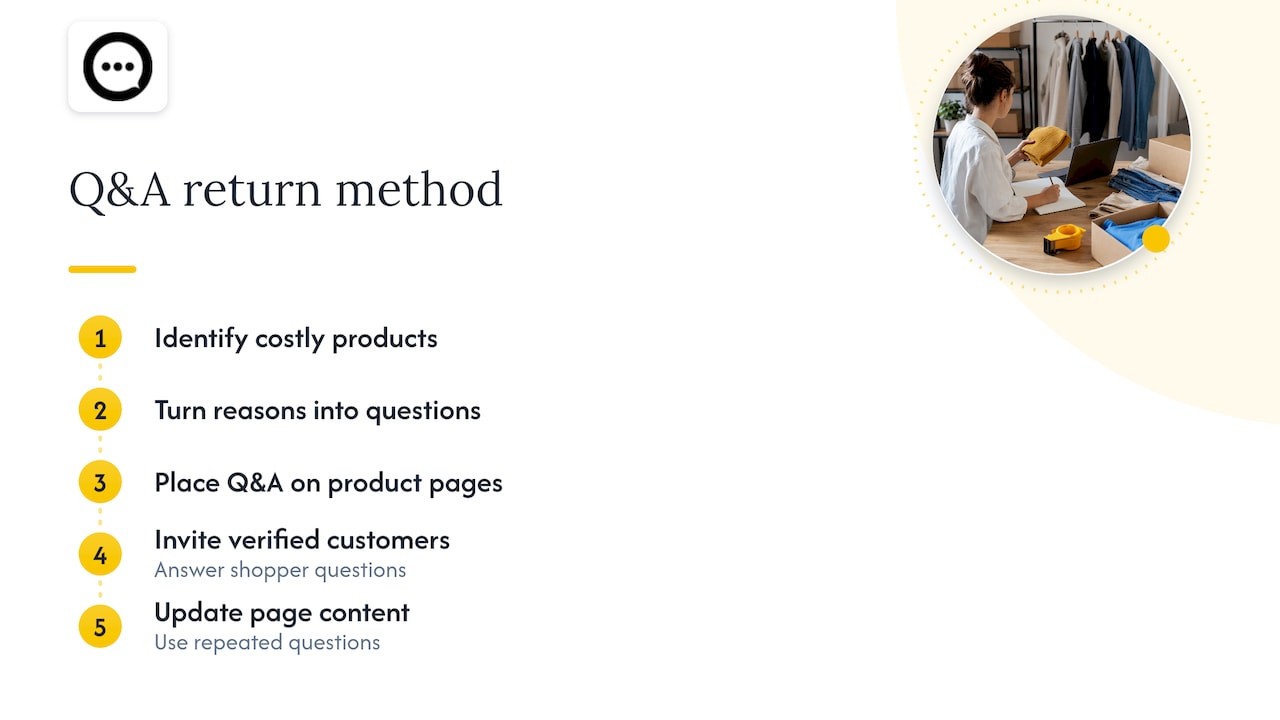
1. Find the products that cost you the most
Open your Shopify admin and sort by return volume per product, not overall. Shopify’s returns documentation explains where you manage returns and exchanges from the Orders page. Pull the last 90 days and pick the five products with the highest return rate and meaningful sales. Ignore one-off outliers.
2. Read the return reasons as questions
For each product, list the stated return reasons and support emails. Rewrite each one as the question the shopper should have asked before buying. “Too small” becomes “Does this run small?” “Looks different” becomes “What does the color look like in daylight?” You now have a starter list of questions that predict returns.
3. Put the questions where the decision happens
Answers buried in a footer or a separate help center do not help at the moment of doubt. Place Q&A on the product page, close to the price and the Add to cart button. Video testimonials placed right below the pricing section improved conversion by 27% according to the figures Zebracat compiled, which is a useful reminder that placement is part of the content. If your page hides clips low on the screen, our note on not hiding video reviews below the fold covers the rollout.
4. Answer with verified customers, not only with the brand
You can answer in your own voice, and sometimes you should, especially for facts like materials or compatibility. For experience questions (fit, comfort, real-life size), invite people who bought the item. Their answers read as testimony, not marketing. Be careful about what you publish: our guide on publishing Q&A with consent lays out three ways to do it without overstepping.
5. Turn answered questions into page changes
A question that appears three times is no longer a Q&A item. It belongs in the description, the size guide or the photos. Q&A is both a conversion tool and a free research panel. Update the page, keep the thread public, and watch whether the question stops arriving.
Why video answers beat text for expectation-setting
Text can say “true to size.” A 15-second clip shows a real person in the item, at their height, in their living room, under their lighting. That is the exact gap behind “not as expected.”
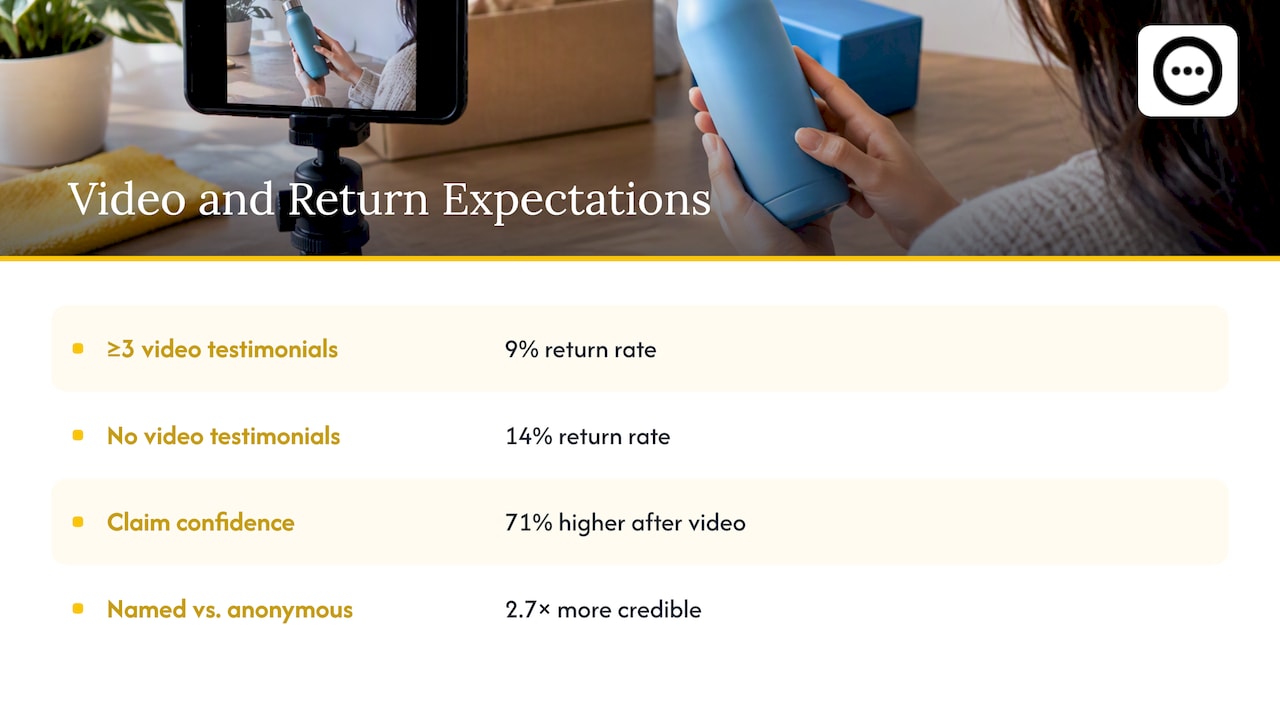
The numbers from vendor-compiled research point the same way, though treat them as directional rather than guaranteed for your store. Zebracat’s roundup reports that products with at least three authentic video testimonials saw a 9% return rate against 14% for products without, and that shoppers were 71% more confident in product claims after watching video than after reading text reviews. It also reports that testimonials with real names and locations were 2.7 times more credible than anonymous ones.
The lesson is not that any video will do. Authenticity is the point: real buyers, real names, unscripted. Read our walkthrough on collecting video reviews with a QR code for a low-effort way to capture them, or on short verified clips collected through QR codes for the details of length and verification.
Comparing ways to reduce pre-purchase uncertainty
| Approach | What it fixes | Limit |
|---|---|---|
| Longer product descriptions | Missing basic facts | Written from the brand’s view; shoppers skim |
| Annotated size and dimension images | Fit and scale confusion | Needs design time per product |
| Static FAQ block | Questions you predicted | Goes stale; misses new questions |
| Text reviews | General satisfaction | Rarely answers a specific doubt |
| Shopper Q&A from verified buyers | Specific, real doubts | Needs a steady flow of questions and replies |
| Video reviews | Look, fit, scale and real use | Needs collection effort |
| Return policy changes | Cost of a return | Does not prevent the return |
The strongest product pages combine several of these. Q&A and video are the two that grow from customer behavior, so they keep improving after you set them up.
Where Q&A sits next to Shopify’s returns tools
Shopify lets customers request returns from their order status page through self-serve returns and cancellations, which reduces the time you spend handling requests. You need to activate it in your admin first. That is good process hygiene, and you should have it.
But it works after the shopper is already unhappy. Think of two layers:
- Before the order: Q&A and video reviews on the product page reduce wrong-fit purchases.
- After the order: self-serve returns and a clear policy make the unavoidable returns cheap and calm.
A store that only does the second layer will run a smooth operation for a return rate that is still too high.
Our perspective at Peers
We built Peers for Shopify stores only, so we see the same pattern across product pages: shoppers rarely leave because of a bad product. They leave, or they return, because one small doubt stayed unanswered.
We think of a question as the most honest feedback a store gets. Someone typed it at the exact moment they were deciding. If three people ask whether a jacket fits over a hoodie, the page has a gap, and the quickest repair is a short answer from someone who bought it. That is why Peers puts post-purchase video reviews and shopper Q&A on the product page itself, with moderation tools so you stay in control of what appears.
We would also warn against expecting magic. Q&A will not rescue a product that is poorly made or badly photographed. What it does is let honest expectations form before the sale. Some shoppers will decide the product is not for them, and that is a good outcome: a lost sale costs less than a return. Track your return rate by product before and after, give it a full buying cycle, and let the data decide what stays.
— Leo
Getting started with Peers on Shopify
Peers installs from the Shopify App Store with a simple code snippet copy-paste. According to its App Store listing, it is built for mobile and designed not to affect your site’s load speed. It collects video reviews by emailing customers offers on future purchases in exchange for a clip, and it puts shopper Q&A next to those reviews on the product page.
The free plan includes unlimited review collection and publishing. The Peers Growth plan costs $15 per month and adds unlimited product reviews and branding removal. If you want to see the setup steps first, read how to embed post-purchase video reviews without theme code or add product Q&A without theme edits. You can try Peers from the Shopify App Store and start with the five products that return most.
How to answer well
How you reply shapes whether people keep asking. A few habits that hold up:
- Be specific. “Fits true to size” is weak. “I’m 5’10” and 170 lbs, and the large had room in the shoulders" is useful.
- Be honest about downsides. An answer that admits a limit builds trust and filters out the wrong buyers.
- Answer fast at first. Early replies teach shoppers that asking works. Our guide to instant answers and public video replies shows how to keep up when volume grows.
- Reuse the best answers. Move recurring ones into the description or size guide.
- Keep it public. One answer helps every future shopper with the same doubt.
Video works especially well for apparel, home goods and anything where scale matters. The sizing issue is real: in the Returnless data, clothing is the most returned category, with 60% of shoppers likely to return items over size and fit. Also plan for peaks. The same report says return volume rises 44.5% during the December to February season, so collect answers before the holidays, not during them.
Measuring whether it worked
Do not judge by feel. Set up a simple comparison:
- Record the return rate and top return reasons for your five target products over the previous 90 days.
- Add Q&A and video reviews, and answer the first batch of questions.
- After a comparable period, compare return rate, the share of “not as expected” reasons, and conversion on those pages.
- Check the questions asked. If the same one keeps appearing, fix the page.
Seasonality, promotions and product changes can all move these numbers, so compare similar periods and be cautious about crediting any single change. Also watch the sales side. If conversion falls slightly while returns fall more, you are likely selling to better-matched buyers.
For the rest of the customer journey, retention matters as much as conversion. A shopper who keeps a product that fits is more likely to buy again, and this overview of how to increase customer retention is a useful companion for planning what happens after the first order.
FAQ
Does product Q&A really reduce returns?
It addresses the leading cause of returns: shoppers buying with wrong expectations. We can’t promise a specific percentage for your store, because results depend on your products and traffic. The sound approach is to test it on your highest-return products and compare rates over a full cycle.
Which products should I start with?
Start with items that sell steadily and come back often, usually apparel, footwear, and anything where size, color or compatibility is a common worry. Sort your returns by product and choose the top five. Low-volume items will not give you enough questions to learn from.
Should I use Q&A or video reviews?
Use both when you can. Q&A answers a specific doubt, while video shows the product in real use. Video clips collected after purchase often also prompt new questions, so the two feed each other.
Can I moderate what shows on my product pages?
Yes. Peers includes moderation tools, so you decide which reviews and answers are published. Reviewing early submissions also helps you spot recurring questions that belong in your product copy.
What does Peers cost?
The free plan includes unlimited review collection and publishing. The Peers Growth plan is $15 per month and includes unlimited product reviews and branding removal. Details are on the Shopify App Store listing.
Sources
- Return Benchmark 2025, Returnless
- 2025 Retail Returns Landscape, NRF
- Poor product information behind rising returns, Just Style
- Your return rate is a merchandising problem, RevenueHunt
- How to Use Customer Questions to Improve Shopify Product Pages, BuyScout
- Footer return and shipping links, Baymard
- Always provide a dimensions image, Baymard
- 80+ Video Testimonials Statistics, Zebracat
- Returns and exchanges, Shopify Help Center
- Self-serve returns and cancellations, Shopify Help Center
- Setting up self-serve returns, Shopify Help Center
- Peers, Shopify App Store