5 Shopify Spots for Social Proof: Start With Video Reviews

Social proof reliably increases conversions on Shopify, and the highest-return formats are customer reviews, visual user-generated content, and lightweight crowd signals like recent-purchase notifications. Add star ratings and photo or video reviews to product pages first, then layer in real-time activity notifications once you have enough order volume to make them believable. Automate collection through post-purchase email flows so proof keeps building without manual chasing.
TL;DR:
- Customer reviews and star ratings are most effective for reducing uncertainty and building trust at the point of purchase.
- Visual user-generated content, such as photos and videos, provide authentic proof that’s harder to fake and more convincing than text alone.
- Real-time purchase notifications work best when based on genuine data and are limited in frequency to prevent skepticism or annoyance.
- Proper placement of social proof is crucial, with the highest impact coming from above the fold, within image galleries, and at checkout or in email sequences.
- Automated collection and moderation of reviews, using responsive widgets and targeted triggers, maximize volume and relevance without manual effort.
Table of Contents
- Which Types of Social Proof Work Best on Shopify?
- Where Should You Place Social Proof on a Shopify Store?
- How Do You Add Social Proof to Shopify Step by Step?
- How Do You Measure the ROI of Social Proof?
- What Mistakes Damage Trust When Using Social Proof?
- Why Do Video Reviews and Shopper Q&A Build More Trust Than Text?
- How Do You Choose the Best Social Proof App for Shopify?
- Where does social proof fit in your optimization roadmap?
- Add Video Reviews and Shopper Q&A With Trypeers
- Sources
- FAQ
Which Types of Social Proof Work Best on Shopify?
Not every trust signal earns its spot on a product page. Each format answers a different buyer question, and matching the right one to the right doubt is what separates a page that converts from one that just looks busy.
Star ratings and written reviews solve the most basic problem: “Does this actually work?” A high average star rating next to the price removes hesitation faster than any product description can, because it’s not you making the claim. Shopify’s own guidance points to reviews as one of the five core social proof strategies retailers should lean on, alongside user photos and activity signals.
User-generated photos and video go a step further, showing the product in a real kitchen, on a real body, in real lighting. Text can be written by anyone; a customer’s own photo is harder to fake and easier to trust. Video reviews add another layer, letting shoppers see how a product moves, sounds, or fits before they commit.
Real-time purchase and viewer notifications (“Jamie in Ohio just bought this”) tap into urgency and herd behavior at once. They work, but only when the numbers are real. Fabricated or wildly frequent pop-ups tend to backfire, since shoppers now recognize the pattern from years of seeing it misused.
Trust badges, press mentions, and expert endorsements matter most for higher-consideration purchases, where a buyer needs external validation beyond peer opinion.
Aggregate metrics (10,000+ reviews, “50,000 customers served”) give skimmers a fast, low-effort signal of scale without requiring them to read anything.
- Star ratings and reviews: reduce uncertainty at the point of decision
- Photo and video UGC: prove authenticity visually
- Purchase/viewer notifications: create urgency through crowd behavior
- Badges and press mentions: build authority for bigger purchases
- Aggregate counts: give skimmers a quick credibility shortcut
Where Should You Place Social Proof on a Shopify Store?
Placement determines whether social proof gets seen at all. A five-star badge buried at the bottom of a product page might as well not exist.
- Above the fold on product pages. Put the star rating and a one-line review snippet right beside the price and add-to-cart button. This is the single highest-traffic spot on the page, and it’s where objection handling needs to happen first.
- Inside the image gallery. Mix customer photos and short video clips into the main gallery rather than tucking them into a separate tab. Shoppers scroll through images anyway, so let real customer content interrupt the polished product shots.
- Collection pages and the homepage. A “Most Loved” or best-seller strip does double duty: it guides indecisive shoppers toward proven winners and signals that other people are buying confidently.
- Near the cart and checkout. Security badges and a brief trust line reduce last-second hesitation, especially for first-time buyers who haven’t built confidence in your brand yet.
- Email and post-purchase sequences. Testimonials embedded in abandoned-cart emails and follow-up sequences reinforce the same message a second and third time, often to the exact shopper who almost converted once already.
How Do You Add Social Proof to Shopify Step by Step?
Getting social proof live on a Shopify store isn’t complicated, but the sequence matters. Skip the collection step and you’ll have nothing to display. Skip moderation and you’ll display the wrong things.
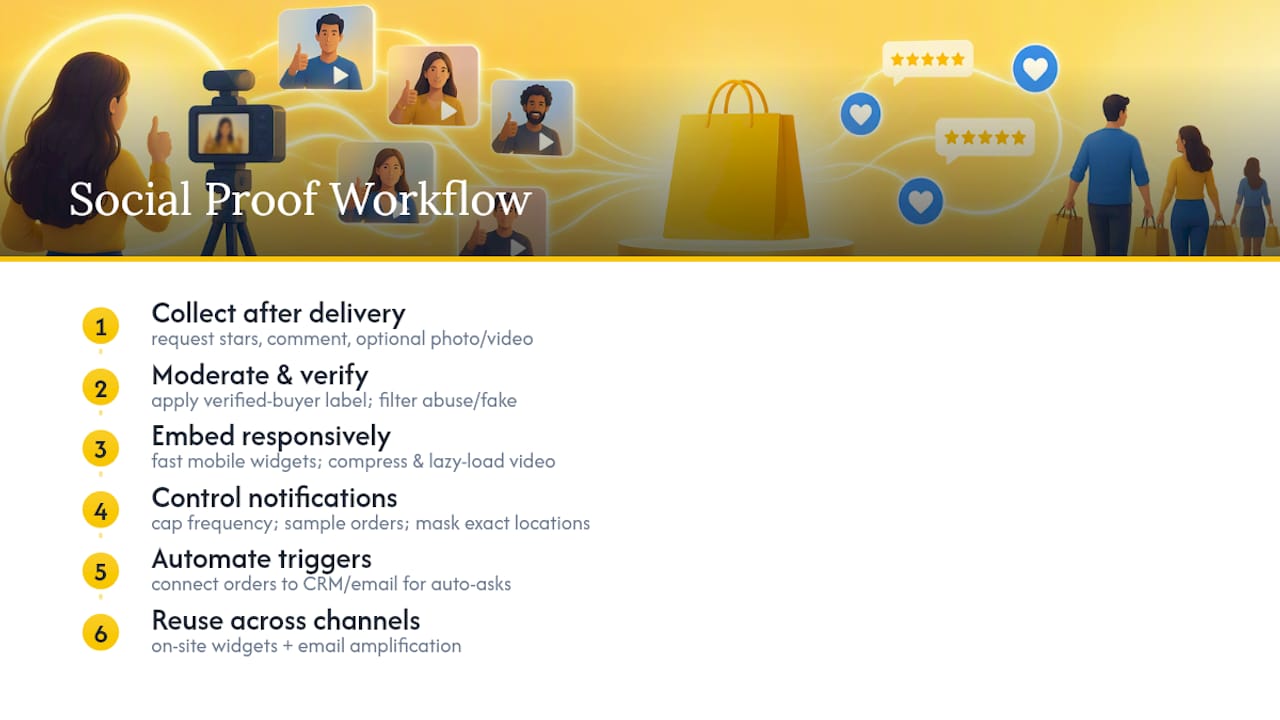
Start with collection timing. Send review requests a reasonable time after delivery, once a customer has actually used the product, not the day it ships. Ask for a star rating, a short written comment, and optionally a photo or video, since bundling the ask increases the odds of getting richer content in one pass.
Moderate and verify before anything goes live. Verified-buyer labels matter because shoppers have learned to discount anonymous five-star reviews. Mask personal details like full names and locations to the degree your review app allows, and filter out reviews that are off-topic, abusive, or clearly fake.
Embed proof with performance in mind. Choose responsive widgets that load fast on mobile, since most Shopify traffic is now mobile-first. Video especially needs attention here: compress files, lazy-load the player, and show a poster image rather than autoplaying, so you don’t tank your page speed scores while trying to build trust.
Set sane rules for activity notifications. Cap frequency so pop-ups don’t feel like spam, and sample real order data rather than showing every single transaction. Mask exact locations to city or region level for privacy.
Automate the whole pipeline. Connect Shopify order data to your CRM or email platform so review requests trigger automatically after delivery instead of relying on someone remembering to send them. Salesforce recommends this kind of automated, CRM-driven approach specifically because it increases both the volume and relevance of the testimonials you collect, since you can target requests toward customers most likely to have had a great experience.
Pro Tip: Bundle your review request with a small incentive like a discount on the next order. Response rates jump noticeably when there’s a reason to act beyond goodwill, and you get usable proof faster.
A well-built stack, as Omnisend’s Shopify guide lays out, typically pairs a review collection app, on-site activity notifications, and email amplification so the same proof gets reused across multiple touchpoints instead of living in one place.
How Do You Measure the ROI of Social Proof?
Adding reviews and badges means nothing if you can’t prove they moved the needle. Track a small set of KPIs before and after each change.
- Conversion rate and add-to-cart rate on pages where you added or repositioned proof
- Average order value (AOV), since crowd signals sometimes nudge shoppers toward higher-priced variants they see others buying
- Assisted revenue, tracked through Shopify Analytics, to capture proof’s influence even when it isn’t the last click before purchase
- UTM-tagged links in email campaigns and landing pages, so you know exactly which testimonial email or notification drove a session
Run A/B tests on specific variables rather than changing everything at once: test rating visibility on versus off, review placement above versus below the fold, or notification frequency at different intervals. Omnisend and Shopify’s own analytics tools both support this kind of UTM-and-cohort attribution. Give each test a baseline period and a test period of comparable length and traffic volume before drawing conclusions. Two weeks of data on a low-traffic store won’t tell you much; give it enough volume to separate a real effect from noise.
What Mistakes Damage Trust When Using Social Proof?
The fastest way to destroy the credibility you’re trying to build is to fake it. Shoppers today have seen enough manipulated review counts and pop-up urgency tricks to spot them fast, and the moment they suspect it, every other trust signal on your page loses value too.
- Use outcome-specific testimonials with real names and photos when possible; “Great product!” convinces no one, while “Fixed my dry skin in two weeks” gives a shopper something concrete to relate to
- Rotate testimonials and UGC regularly so returning visitors don’t see the same three reviews on every visit
- Never fabricate purchase counts or manufacture urgency that isn’t real
- Match the trust signal to the anxiety on that specific page: security badges belong near checkout, outcome-driven testimonials belong near case studies or comparison content
- Add alt text to review images for accessibility, and get explicit consent before publishing a customer’s photo or video
CXL’s research on social proof backs the rotation and specificity points directly: outcome-specific testimonials outperform generic praise, and refreshing proof on a consistent cycle prevents banner blindness, where repeat visitors stop registering content they’ve seen too many times.
Why Do Video Reviews and Shopper Q&A Build More Trust Than Text?
Text reviews ask a shopper to imagine. Video reviews show them. A ten-second clip of a real customer using a product on their own kitchen counter or their own skin creates a kind of recall that a paragraph of text rarely matches, because the shopper is watching proof rather than reading a claim.
Shopper Q&A adds something reviews alone can’t: it answers the specific question a hesitant buyer actually has, right where they’re standing. Instead of scrolling through fifty reviews hoping one mentions sizing for their exact use case, they see a real answer to a real question a previous buyer already asked.
Video reviews and embedded Q&A convert curiosity into action because they meet the buyer’s actual objection in the moment, not three scroll-lengths later. A shopper who sees someone like them ask “does this work for curly hair?” and get a direct answer from a verified customer is far closer to buying than one staring at a star rating alone.
Getting this right on the technical side matters, too. Video needs to load fast on mobile, use compressed files or an adaptive player, and lazy-load with a poster image so it doesn’t tank page speed while it’s busy building trust.
How Do You Choose the Best Social Proof App for Shopify?
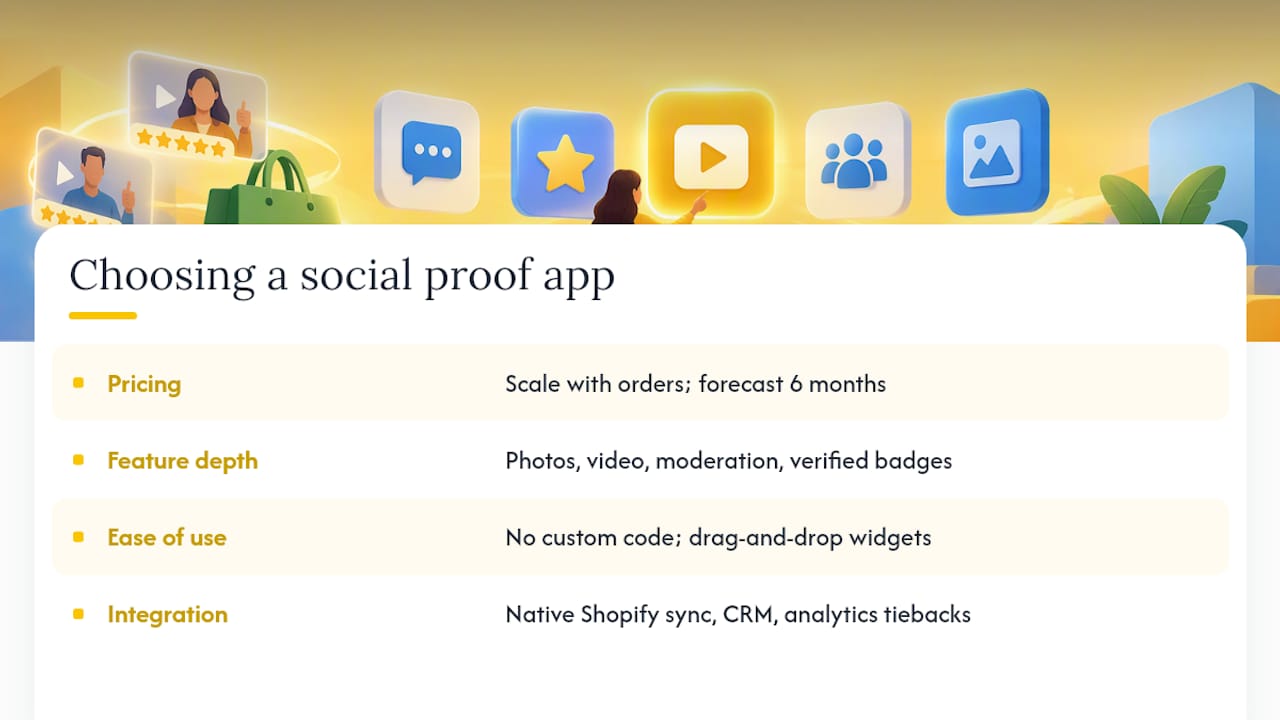
Picking a social proof app comes down to four practical filters: pricing, feature depth, ease of setup, and how cleanly it integrates with the rest of your stack.
Pricing should scale with your order volume, not punish you for growing. Many apps charge based on monthly orders or review volume, so run the math on where you’ll be in six months, not just today.
Feature depth varies more than it looks on a pricing page. Some apps handle only star ratings and text. Others support photo and video collection, moderation queues, verified-buyer badges, and on-site activity notifications in one place. Decide which formats you actually need before comparing tools, since paying for video capability you never use is wasted spend.
Ease of use affects how fast you actually launch. A tool that requires custom code to embed widgets will sit half-installed for weeks; one with drag-and-drop theme editor blocks gets live the same day.
Integration is where a lot of otherwise good apps fall short. Look for native Shopify order data syncing, CRM or email platform connections for automated review requests, and analytics that tie proof back to conversion, not just review counts. A platform built specifically for Shopify, rather than adapted from a generic ecommerce plugin, tends to handle theme compatibility and mobile rendering with fewer headaches.
Where does social proof fit in your optimization roadmap?
Social proof is the fastest lever you’ll ever pull, but only once the fundamentals are solid. If your return rate is high or your price doesn’t match perceived value, no amount of glowing reviews fixes that. Reviews just make the problem visible faster.
Before investing heavily, check three things: traffic volume (enough to gather reviews at a reasonable pace), existing review count (a handful is a starting point, not proof), and return rate (a red flag if it’s climbing). If those check out, start small: add ratings and one UGC gallery, measure for a few weeks, then scale whatever moved conversion. Don’t build the whole stack on day one.
— Leo
Add Video Reviews and Shopper Q&A With Trypeers
Text reviews tell a shopper what happened. Video reviews and live shopper Q&A let them see it and ask their own question before they buy, which is exactly the gap Trypeers was built to close. Trypeers embeds authentic post-purchase video reviews and verified shopper Q&A directly on your Shopify product pages, so buyers get real answers from real customers instead of scrolling through anonymous star ratings hoping for relevance.
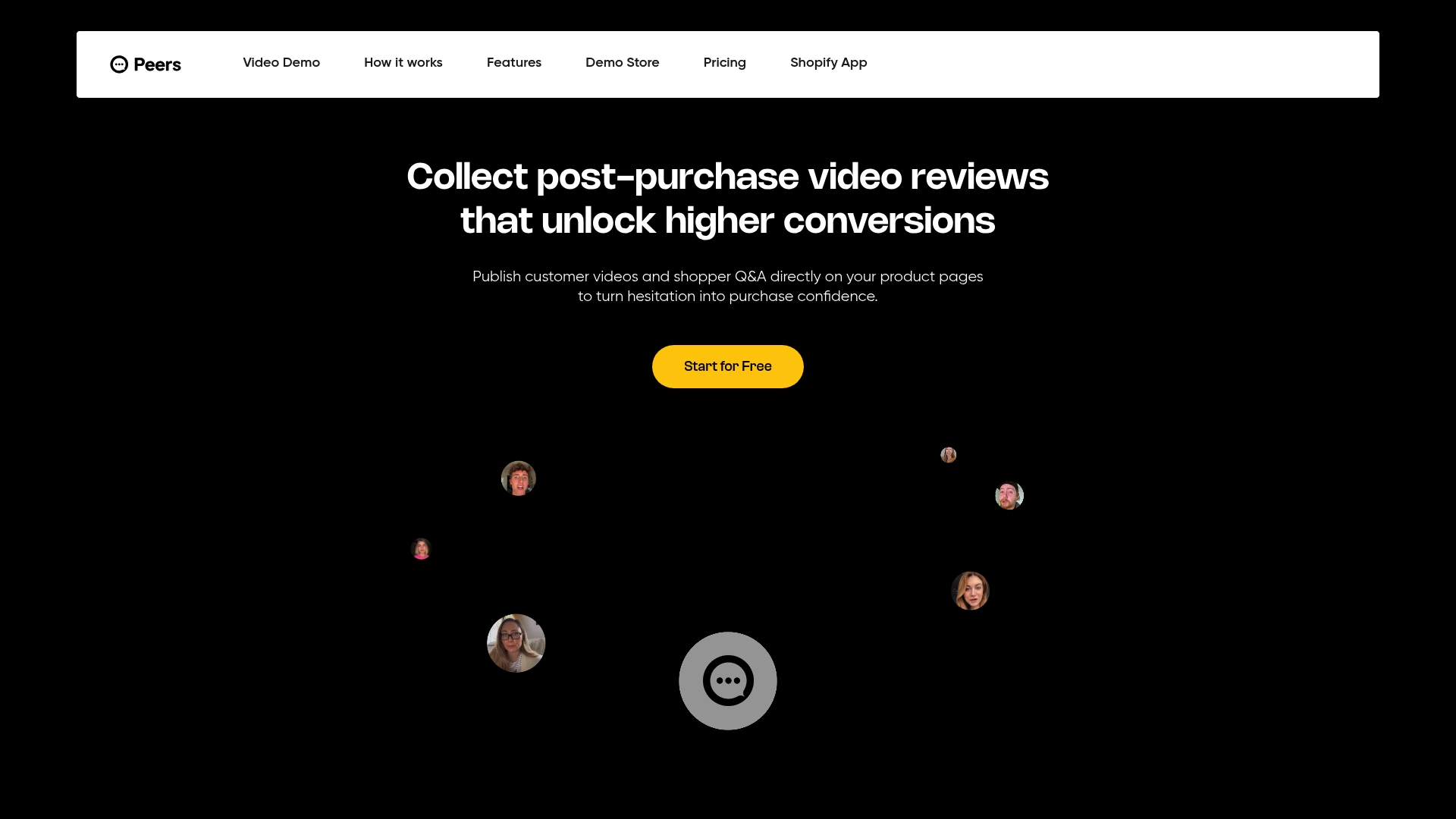
The setup includes full moderation tools so you control what goes live, customizable design that matches your theme instead of looking bolted on, mobile-ready playback, and analytics that show how proof is actually influencing engagement. Trypeers offers plans suitable for stores ready to scale video-based trust across more products; current pricing details are available on the Trypeers website. Visit the Trypeers product page to see how it works on a live product page, or start on the free plan today and see what shoppers ask when they’re given the chance.
Sources
- Use Social Proof and Retail Psychology to Sell More (2026) - Shopify
- Social Proof: What Is It and Examples (Salesforce)
- Social proof Shopify strategies (Omnisend)
- Social proof evidence and testing guidance (CXL)
FAQ
How do I add social proof to Shopify?
Install a review or UGC collection app, embed the widgets above the fold near your price and CTA, and connect order data to an email flow that automatically requests reviews after delivery. Trypeers takes this further by embedding video reviews and shopper Q&A directly on the product page for a more visual form of proof.
Is it safe to give your Social Security number to Shopify?
Shopify may request a Social Security number or tax ID only when setting up payouts through Shopify Payments, which is standard practice for verifying business identity and complying with tax reporting rules. It’s collected through Shopify’s secure payment settings, not through public-facing store pages, so it’s never exposed to shoppers.
What is a social proof example?
A common example is a product page showing a star rating, a customer photo wearing the item, and a line showing an aggregate purchase count. Another is a real-time notification showing a recent purchase from another shopper, which nudges a hesitant buyer toward the same decision.
What is social proof in ecommerce?
Social proof in ecommerce refers to trust signals, like reviews, user photos, purchase notifications, and expert endorsements, that show real customers have already bought and validated a product. Shopify identifies it as one of the most reliable psychological tools for increasing conversions, because it lets other buyers do the convincing instead of the brand.