Avoid FTC Penalties: 4 Post Purchase Checks to Verify Shopify Reviews

The most reliable path is to collect reviews through Shop where you can, and pair that with a review app that matches every submission to a real Customer ID, Order ID, and Product ID. Add an explicit consent checkbox for any photo or video review, since the FTC now bans fake or purchased reviews outright. The checklist below turns this into a same-day audit.
TL;DR:
- Verifying reviews requires matching each submission to a real customer order ID, customer ID, and product ID, with explicit consent for media uploads.
- Shop’s own review system enforces strict ID matching and content screening, often causing imported reviews to disappear if data is incomplete or mismatched.
- Businesses should implement ongoing moderation, velocity checks, and fraud detection tools to identify suspicious review patterns such as review spikes or repeated phrasing.
- Post-purchase video reviews demand a secure upload process with explicit consent, tie-in to order data, and thorough moderation to meet FTC and platform compliance.
- Building a reliable review process involves continuous verification, not a one-time setup, especially for media content like videos, which carry more weight in establishing authenticity.
Table of Contents
- Quick checklist: immediate steps to audit and verify reviews
- How Shop verifies reviews and what the badge means
- Practical methods to verify reviews on Shopify
- Moderation, fraud indicators, and automated checks
- Legal and privacy considerations: FTC rule, consent, and data handling
- Syncing verified badges to Shop and your storefront
- Practitioner perspective: implementing video-based verified reviews
- Where store owners get review verification wrong
- How Peers helps verify and showcase authentic video reviews
- Sources
- FAQ
Quick checklist: immediate steps to audit and verify reviews
Start with the settings you already have before installing anything new.
- Enable partner review sync in Shop settings if you use a partner review app.
- Run a CSV or app audit that matches each review’s email, order ID, product, and timestamp against your order history.
- Confirm your review app has read access to order data and purchase verification turned on.
- Apply moderation rules that flag duplicates, sudden review spikes, and reviews mentioning the wrong product.
- Add an explicit consent checkbox for any photo or video submission at the point of upload.
Pro Tip: Run your first audit on a single product category before rolling verification rules out storewide: it surfaces mismatches fast without overwhelming your moderation queue.
How Shop verifies reviews and what the badge means
Shop’s own review system has stricter rules than most merchants expect. For a partner app’s reviews to show up inside Shop and carry the Verified by Shop badge, Shop requires each review to be linked to a Customer ID, Order ID, and Product ID. Without all three, the review stays in your app’s admin panel but never reaches the Shop surface.
This is why CSV-imported or migrated reviews so often disappear from Shop: they arrive without a matching order record, so Shop has no way to confirm a real purchase happened. Shop also applies its own content and eligibility screening on top of the ID match, which means the count you see in your review app’s dashboard can differ from what actually displays inside the Shop app. If your numbers do not line up, check eligibility before assuming a sync error.
Practical methods to verify reviews on Shopify
You have four workable methods, and most stores end up combining two or three of them.
- Turn on Shop-collected reviews. They verify automatically against Shopify’s own order records, but they only cover shoppers who check out through Shop.
- Use a review app with purchase matching. Check that the app’s permissions include order read scopes, and confirm its matching rules, typically email address, Order ID, and purchase timing.
- Run a CSV audit before publishing legacy reviews. Compare imported review data against your order export and flag any gap between review volume and verified purchases.
- Build a consent and metadata flow for video or photo reviews. Capture the order reference at submission and route every file through a moderation queue before it goes live.
If you are evaluating or building a review app, a few developer requirements are not optional. Shopify apps that touch customer data must implement the mandatory compliance webhooks, customers/data_request, customers/redact, and shop/redact, and verify HMAC signatures on every request. Shopify’s developer forums flag missing or incorrect webhook handling as one of the most common reasons apps fail review or mishandle deletion requests.
Pro Tip: Ask any review app vendor to show you their matching logic in plain language before you sign up: “we check email and order timing” is a real answer, “we verify everything” is not.
Moderation, fraud indicators, and automated checks
Fake reviews tend to announce themselves once you know the pattern. Watch for a burst of reviews arriving within hours of each other, repeated phrasing across multiple reviews, mentions of a product you do not sell, or an account with no matching order history.
- Duplicate detection catches near-identical wording submitted under different names.
- Velocity checks flag unusual spikes, like 20 reviews in a day for a product that normally gets two.
- IP and email blacklists block repeat offenders from resubmitting.
- Spam scoring weighs review length, link content, and account age together.
Audit tools can compare reviewer emails, products, and purchase timing against your order history and publish a match-rate badge on your storefront, which gives shoppers a transparent signal rather than a blanket claim of authenticity. When you do find fraud, pull the order invoice and timestamp, compare the reviewer’s email to the order email, and document why a review was removed. Avoid suppressing every negative review on sight: a documented, consistent moderation policy protects you far more than silence does.
Legal and privacy considerations: FTC rule, consent, and data handling
The FTC’s final rule bans the sale or purchase of fake reviews and testimonials and allows civil penalties for knowing violations. The rule also applies a “should have known” standard, so ignoring obvious red flags, like a reviewer with no purchase record, can create liability even without direct involvement in writing fake content.
For photo and video reviews, consent is not a courtesy. Collect an explicit checkbox at submission and state clearly how the content will be used, whether that is on your product page, in ads, or in email marketing. Merchants should also confirm that any app handling this content correctly processes Shopify’s compliance webhooks and honors data deletion requests. A consent checkbox without a working deletion process is a gap that regulators and platforms both notice.
Syncing verified badges to Shop and your storefront
Once your matching data is clean, displaying it correctly is mostly a testing exercise. Shop needs the same three identifiers, Customer ID, Order ID, and Product ID, before a partner review can carry the Verified by Shop badge, which is why bulk CSV imports so often fail this step.
Before syncing your full review library, publish one verified review end to end and confirm it appears correctly in both Shop and your storefront. Check your app’s permissions are still active, then move to bulk sync only after that single test passes. On the storefront itself, decide where verification messaging lives, a verified-buyer badge on individual reviews, or an aggregate audit badge showing your overall match rate.
Practitioner perspective: implementing video-based verified reviews
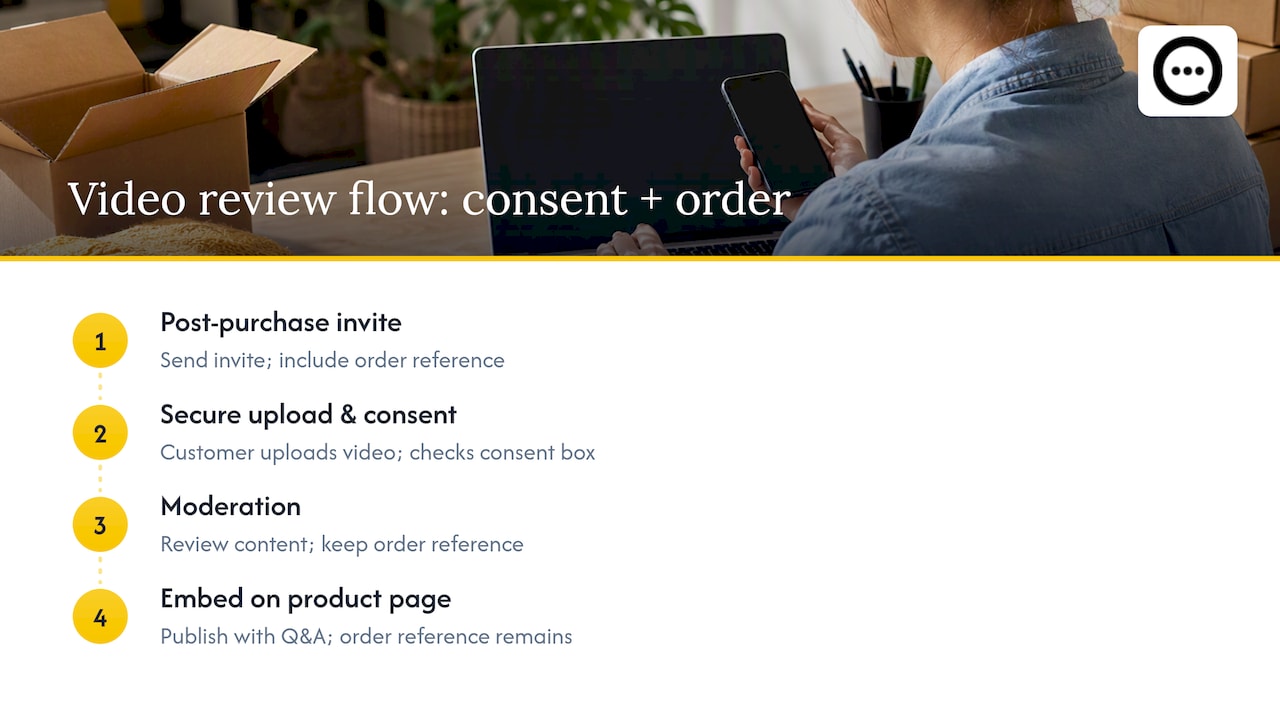
Video reviews raise the stakes on consent because the content is more personal and harder to anonymize than text. A workable flow looks like this: invite the customer after purchase, collect the video through a secure upload with a consent checkbox, route it through moderation, then embed it alongside shopper Q&A on the product page. The order reference travels with the file the entire way, so every video that goes live is tied to a real transaction rather than an open submission form.
Where store owners get review verification wrong
Most advice on this topic treats verification as a one-time setup: flip on a setting, install an app, done. That undersells the actual work, which is ongoing matching and moderation, not a checkbox you tick once. The stores that get burned are usually the ones that imported years of legacy reviews by CSV and assumed the badge would follow automatically.
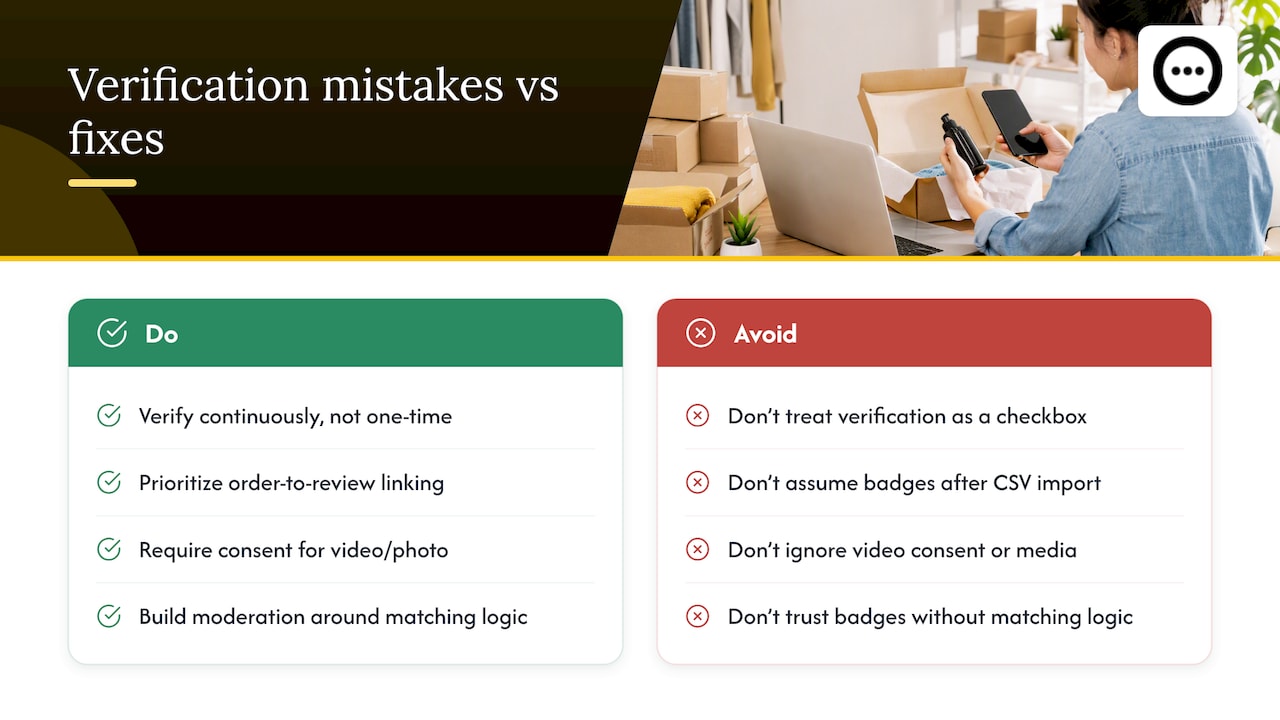
The bigger blind spot is video and photo content. Store owners spend real effort verifying text reviews against order data, then treat video submissions as an afterthought, sometimes without even a consent checkbox. That is backwards: video is the format regulators and shoppers scrutinize hardest, because a face and a voice carry more weight than a star rating. If you only fix one thing after reading this, fix your video consent flow before you fix your text-review matching.
Prioritize the order-to-review link first, then build moderation rules around it. Badges and audit scores are worth having, but they are only as honest as the matching logic underneath them.
— Leo
How Peers helps verify and showcase authentic video reviews
Peers is built specifically for Shopify stores that want post-purchase video reviews and shopper Q&A on their product pages, with moderation tools and customizable embeds handled inside the app. It fits directly into the verification workflow described above: every video invite goes out after a purchase, consent is captured at upload, and the media stays tied to the order rather than floating in as an anonymous submission.

That means less manual audit work for your team and a clearer trust signal for shoppers who want to see a real customer before they buy. Peers offers a Free plan and a Growth plan, so you can test the workflow on a handful of products before rolling it out storewide. Visit the Peers Shopify listing to set up your first post-purchase video invite.
Sources
- Federal Trade Commission Announces Final Rule Banning Fake Reviews and Testimonials | Federal Trade Commission
- TallySeal Reviews Audit - See how many of your reviews come from real, verified… | Shopify App Store
FAQ
How to get customer reviews on Shopify?
You can collect reviews automatically through Shop after checkout, or install a review app that sends post-purchase requests by email. Pairing either method with purchase matching, checking the reviewer’s order against your order history, keeps the reviews you collect verifiable from the start.
Why is Shopify asking me to verify my identity?
Shopify verifies merchant identity to reduce fraud and comply with financial and legal regulations around payments and account ownership. This is separate from customer review verification, which checks that a reviewer actually purchased the product rather than confirming who the store owner is.
Is Shopify still worth it in 2026?
That depends on your business model and margins rather than review verification specifically, so there is no single answer that fits every store. What review verification does affect is trust and conversion: shoppers are more likely to buy when they can see reviews tied to real, verified purchases.
How to check if a Shopify store is legit?
Look for a verified-buyer badge or audit score on its reviews, check that the store has clear contact and return information, and be cautious of a product page with only glowing, similarly worded reviews. Shopify’s own guidance on spotting fake reviews recommends checking for these patterns before trusting a listing.