Pre-Purchase Questions on Shopify: What Shoppers Ask

Pre-purchase questions on Shopify are the things a shopper wants to know before clicking “Add to cart”: will it fit, when will it arrive, what if it’s wrong, and did anyone like you actually enjoy it. If your product page leaves those unanswered, the shopper leaves to look for the answer somewhere else, or doesn’t come back. This guide lists the questions that come up most, shows where each answer belongs on a Shopify product page, and explains how to let real customers answer the ones you can’t.
TL;DR
- Shoppers’ questions fall into a few groups: fit and suitability, price and shipping, returns, payment safety, and proof that other buyers were happy.
- Answer the basics on the product page itself, not only in a footer or a separate FAQ page.
- Policies (shipping, returns) should be short, plain and visible next to the buy button.
- The questions you did not predict are best answered by real customers, in public, with video where it helps.
- Keep a running list of every question your store receives and fix the page, not just the reply.
Table of Contents
- The questions shoppers ask before they buy
- Product fit: “Will this work for me?”
- Price, shipping and delivery: “What will I really pay, and when?”
- Returns and refunds: “What if I don’t like it?”
- Payment and safety: “Is it OK to pay here?”
- Social proof: “Did other people like it?”
- FAQ page or product Q&A?
- Perspective: let customers answer, in public
- Turn the questions into a routine
- Collecting answers and video from real buyers
- Try it on your store
- Pre-purchase checklist for a product page
- FAQ
- Sources
The questions shoppers ask before they buy
Most hesitation comes down to a handful of worries. Common pre-purchase questions include whether an item suits the shopper’s situation, how it differs from alternatives, when it will arrive and where it ships, what happens if it is wrong, and whether other customers had a good experience.
Another way to sort them comes from a 2026 ecommerce FAQ guide, which groups them into shipping, returns, payments, product-specific concerns, and orders or accounts. Under those headings sit very practical examples: delivery time, tracking, lost parcels, refunds, exchanges, payment security, instalments, sizing, ingredients, compatibility and care.
Here is the version we use when we audit a product page:
| Shopper’s real question | What they are afraid of | Where the answer should live |
|---|---|---|
| Will this work for me? | Buying the wrong size, model or type | Description, size chart, compatibility list, Q&A |
| What will I really pay? | Surprise fees at checkout | Price area, shipping line under the button |
| When does it arrive? | A late gift or a lost parcel | Delivery estimate near the buy button |
| What if I don’t like it? | Being stuck with it | Return summary on the product page |
| Is it safe to pay here? | Fraud, a store that disappears | Familiar payment options, contact details |
| Did other people like it? | Being the first to be disappointed | Reviews, video reviews, shopper Q&A |
The rest of this article goes through each row.
Product fit: “Will this work for me?”
This is the question that varies the most by product, and the one your description is least likely to cover fully. Nielsen Norman Group says product descriptions should answer shoppers’ questions about how an item meets their needs, and its examples range from clothing details and furniture dimensions to care, toy sizing, food storage and hotel facilities.
A few practical rules follow:
Label every dimension. Baymard’s research notes that clearly labelled dimensions stop shoppers making assumptions, and that external and feature-specific measurements matter most for large items, luggage, furniture and other size-dependent products. “Medium” tells nobody anything. “Fits a 15-inch laptop, 16 in wide” does.
Name what it works with. The same Baymard research says compatibility can be decisive for accessories, connected products, spare parts and consumables, and that pages should list explicit supported models or systems rather than vague series names. If you sell phone cases, filters or refills, list the exact models.
Cover the basics in one scan. Shopify’s buyer-guide advice recommends covering what the product is, available types, features, benefits, use cases, FAQs, price, size, materials, durability, compatibility, warranty coverage and customer reviews. You don’t need every item for every product, but if one is missing and shoppers keep asking, add it.

Show the product, not just describe it
Nielsen Norman Group’s ecommerce research says effective product pages combine text and other media to communicate details, availability, price and a clear purchase path. For fit questions, that usually means a photo of the product in use next to something familiar, a short demo clip, and a size chart that sits on the page rather than behind a link.
If your product pages are carrying a lot of this and still aren’t converting, a developer who knows Shopify themes can help restructure the layout, for example with Shopify design and development work on the product template.
Price, shipping and delivery: “What will I really pay, and when?”
Surprise costs are the quickest way to lose a shopper at checkout. Shopify’s trust research says shoppers should be able to find the total price, including discounts and fees early in the purchase, and that clear shipping costs and an explanation of who pays duties and taxes on international orders also help.
For stores that sell into Europe, the rules are firmer. The EU’s Your Europe guidance says shoppers should be told the total price including taxes and charges, delivery costs, and payment and delivery arrangements before they buy. Its shipping page adds that sellers should disclose cross-border delivery options and their prices, and deliver within 30 days unless another time was agreed. These are EU rules, so they apply to sales to EU consumers, not universally. If you ship to Europe, check the current requirements for your situation.
What to put on the product page
- A one-line shipping note under the price: cost or free-shipping threshold, and a realistic delivery window.
- A statement of who pays duties and taxes if you ship internationally.
- Order tracking information, which Shopify lists among useful trust-building features, alongside language and currency switching for international stores.
Keep delivery estimates realistic. A promise you miss costs more trust than a slower date you meet.
Returns and refunds: “What if I don’t like it?”
Shoppers read your return policy to find out how much risk they are taking. Shopify’s advice is to make it clear and easy to understand and to include return-policy information on the product page, not just in the footer.
Some US states also regulate this. Connecticut, for example, requires online sellers in the state to clearly display their refund or exchange policy, including whether refunds or exchanges are offered and, if so, the form, timing, fees and other conditions. The law took effect June 6, 2024. Requirements differ by state, so check where you sell.
A good product-page return summary is three lines:
- The window (days from delivery).
- The condition the item must be in.
- Who pays return shipping, and how the refund is issued.
Link to the full policy for the details. Returns also tie back to fit questions: when shoppers get real answers before buying, fewer items come back. We cover that in how to reduce returns with Q&A.
Payment and safety: “Is it OK to pay here?”
A new store has to earn this one. Shopify says familiar payment methods such as PayPal and Shop Pay can reassure shoppers. Beyond that, make it easy to find who you are: a contact page with a real email, a clear policy set, and an about page. The EU’s guidance says shoppers should be able to see the trader’s identity and contact details before buying, which is a sensible standard for any store.
Social proof: “Did other people like it?”
This is the question your own copy can’t answer, because you’re the seller. Shopify’s CRO guidance recommends displaying reviews, ratings, video testimonials and user-generated content throughout the journey, and linking to FAQs and warranty details. Its point is that trust signals should not be confined to a footer or a single reviews page. They belong next to the decision.
One caution: reviews and testimonials should reflect real product experiences and comply with applicable consumer-review rules, including disclosure of any material connection between the store and the reviewer. Verified, post-purchase reviews are the safest route.
Text stars tell a shopper that someone was satisfied. A short video tells them what the product looks like in a real kitchen, on a real person, at real size. We compare the two in video testimonials vs reviews.
FAQ page or product Q&A?
A store FAQ is the right home for policy questions that apply to every order: shipping zones, payment methods, account help. It’s written once by you.
Product questions are different. They’re specific (“Does the lid fit the 32 oz bottle?”), they pile up over time, and you can’t predict them all. An FAQ answers what you thought of. Q&A answers what shoppers actually ask. The two work together, and we break down the split in Q&A vs FAQ on Shopify.
If you want a plan for turning those questions into a system, see our Q&A strategy for Shopify and the data behind shopper questions and conversion.
Perspective: let customers answer, in public
We built Peers around a simple observation: a shopper trusts another shopper more than a brand’s own copy. So instead of asking store owners to write ever longer descriptions, we put two things directly on the product page: post-purchase video reviews from verified customers, and a Q&A where shoppers can ask questions and verified buyers answer.
Three things matter to us here.
The answer should be visible to the next shopper. A reply by email helps one person. A public answer helps everyone who lands on that page afterward.
Verified beats anonymous. When the person answering has bought the product, the answer carries weight a seller’s reply can’t. That’s why we focus on post-purchase content and give store owners moderation tools to keep what’s published accurate and on-brand.
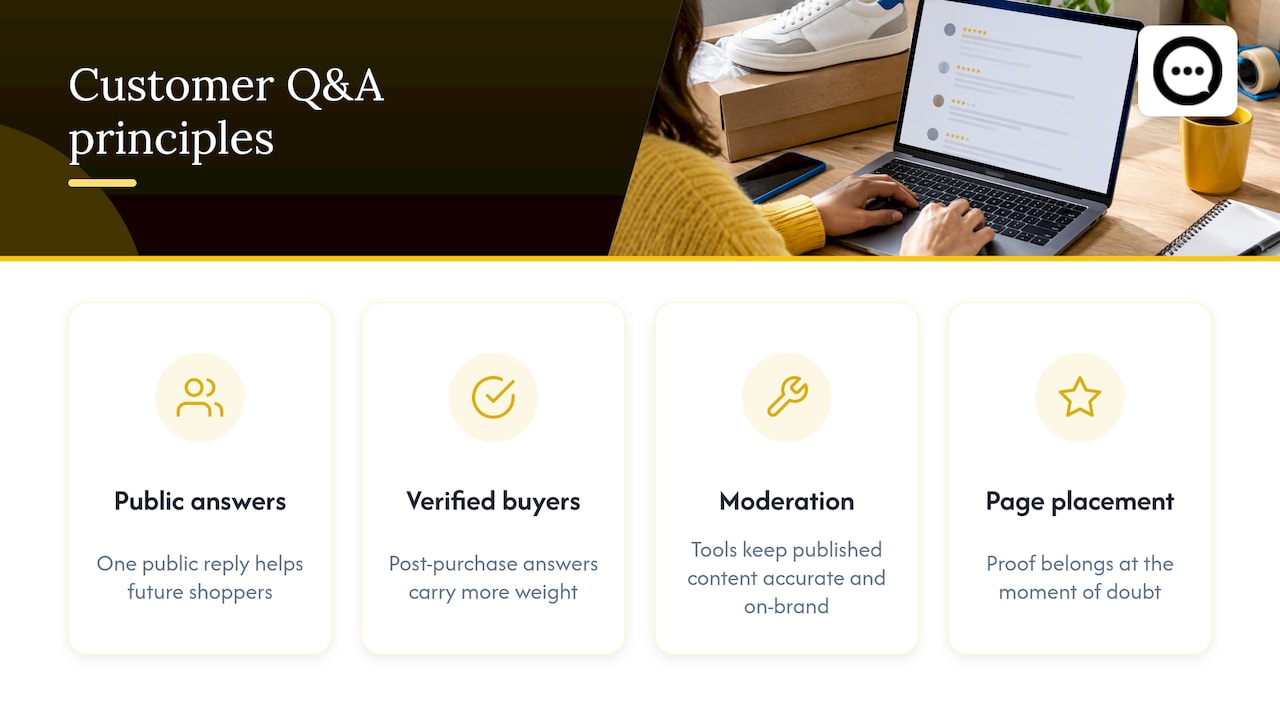
Don’t bury it. Proof placed below the fold or on a separate page misses the shopper at the moment of doubt. We wrote about this in stop hiding clips below the fold.
Peers is built only for Shopify, so setup is meant to be quick and the design customizable to match your theme, with mobile compatibility and analytics so you can see what shoppers engage with.
— Leo
Turn the questions into a routine
You don’t need a big project. A monthly loop is enough.
- Collect. Pull every pre-purchase question from email, chat, social comments and product Q&A.
- Group. Sort them into the six groups in the table above.
- Fix the page first. If three people asked about dimensions, add dimensions to the page. Don’t just reply.
- Answer the rest publicly. Product-specific questions go into Q&A where the next shopper can see them.
- Check the result. Look at whether the same question keeps recurring. If it does, the answer isn’t where shoppers look.
If you want a marketing-side view of how product pages connect to search traffic and sales, this guide on how to optimize product pages for sales is a reasonable companion.
Collecting answers and video from real buyers
The hardest part of social proof is getting it. Customers rarely write reviews unprompted, and long forms put them off. Short video is easier than most owners expect. Our approach is a QR code on the packaging or insert that takes the buyer straight to a quick recording; the walk-through is in 3 steps from QR code to product page, and the details on 15 to 20 second verified clips.
Once shoppers start asking questions, you can reply fast. Our write-up on instant answers and public video replies shows how a single answer can serve every shopper who asks the same thing later. And if you are worried about touching your theme code, there are four ways to add product Q&A without theme edits.
Try it on your store
Peers is a Shopify app that adds verified post-purchase video reviews and shopper Q&A to your product pages. There is a Free plan, and Peers Growth is $15 per month. You can install it from the Peers page on the Shopify App Store and start with your best-selling product, the one that gets the most questions.
Start small: one product, one week of watching which questions come in, then decide whether to roll it out across the catalog.
Pre-purchase checklist for a product page
Before you move on, run your top product through this list:
- Can a shopper see the total price and a shipping line without scrolling far?
- Are all dimensions and compatibility details labelled with specifics?
- Is there a plain-language return summary near the buy button?
- Do you show payment methods shoppers already know?
- Is there at least one real customer voice, ideally on video, above the fold or close to it?
- Is there somewhere for shoppers to ask a question and see other answers?
- Are your reviews real, verified and properly disclosed where required?
If you answer “no” to two or more, you’ve found your next afternoon’s work.
FAQ
What are the most common pre-purchase questions on Shopify stores?
They usually cover fit or suitability, total price and shipping cost, delivery time, returns, payment safety, and whether other customers were happy. Product-specific ones such as sizing, ingredients, compatibility and care come on top of those. Track what your own shoppers ask, because the mix differs by category.
Where should I answer pre-purchase questions: FAQ page or product page?
Both, but the product page matters more. Put the facts a shopper needs to decide, such as dimensions, shipping line and return summary, next to the buy button, and keep the FAQ for store-wide policies. Product-specific questions are better handled in a Q&A on the page itself.
Do I have to display my return policy on the product page?
Shopify recommends including return-policy information on the product page. Legal requirements vary by place: Connecticut, for instance, requires online sellers there to clearly display refund or exchange policies. Check the rules for the states or countries you sell to.
Are video reviews better than text reviews for answering questions?
Video shows size, texture and real-life use in a way text can’t, so it answers fit questions faster. Text reviews still help with quick scanning, so the strongest pages use both. Whatever you use, reviews should reflect real experiences and disclose any material connection.
How much does it cost to add shopper Q&A and video reviews with Peers?
Peers has a Free plan, and Peers Growth costs $15 per month. You install it from the Shopify App Store, so you can try it on one product before committing.
Sources
- Questions Shoppers Ask Before Buying: Shopify Guide
- Ecommerce FAQ Page Guide (2026)
- Tips for Better Product Descriptions on Websites, Nielsen Norman Group
- Ecommerce UX Product Pages, Nielsen Norman Group
- Product descriptions research, Baymard Institute
- Buyers Guide: How To Create One for Your Store, Shopify
- What Makes Customers Trust an Online Store?, Shopify
- CRO Checklist: 9 CRO Steps for Ecommerce Stores, Shopify
- Shipping and delivery, Your Europe
- Information you should get when buying, Your Europe
- Chapter 735c, Refund, Exchange and Discount Policies, Connecticut General Assembly
- Optimize product pages for higher sales and SEO