Q&A vs FAQ on Shopify: What Each One Does Best

An FAQ is a set of answers you write in advance for questions every shopper asks, such as shipping, returns and sizing policy. A Q&A is a live thread on a product page where real shoppers ask real questions and get real answers. On Shopify you want both: the FAQ handles the stable, store-wide facts, and the Q&A handles the unpredictable doubts that show up right before someone clicks “add to cart.”
This guide explains the difference in practical terms, shows where each belongs in your theme, covers what changed with FAQ schema in 2026, and gives you a simple plan for running both.
TL;DR
- FAQ is store-authored, static and best for policies and product basics. Q&A is shopper-driven, specific to one product and works as social proof.
- Research from Baymard found that 70% of sites get the FAQ and Q&A combination wrong, so offering both is still an edge.
- Google stopped showing FAQ rich results in May 2026. Write FAQs for readers, not for a search snippet.
- Seed your Q&A with the questions your support inbox and live chat already receive, and answer fast.
Table of Contents
- The difference in one table
- What an FAQ does well on Shopify
- What Q&A does well on Shopify
- Why the hybrid model wins
- Q&A schema and FAQ schema on Shopify in 2026
- A practical setup for a Shopify store
- Technical pitfalls to avoid
- What to measure
- Our perspective: treat Q&A as proof, not just content
- Run both on your product pages with Peers
- FAQ
- Sources
The difference in one table
| FAQ | Q&A | |
|---|---|---|
| Who writes it | You, the store | Shoppers ask, you and past buyers answer |
| Scope | Store-wide or category-wide | One specific product |
| Typical content | Shipping times, returns, materials, care | “Does this fit a 16-inch laptop?” “Is the color closer to navy or black?” |
| Main job | Reduce support load, remove friction | Build trust, answer last-minute doubts |
| Freshness | Goes stale unless you review it | Refreshes itself as questions arrive |
| Where it lives | Dedicated page, or a block on the product page | On the product page, near the buy button |
| Tone | Official, neutral | Conversational, specific |
The core difference is intent. An FAQ is a self-service information hub that reduces support friction. A Q&A is a social proof mechanism: it shows a hesitant shopper that other people had the same doubt and got a straight answer.
What an FAQ does well on Shopify
FAQs shine when the answer is the same for everyone and rarely changes. Think of:
- Shipping methods, delivery windows and international rules
- Return and exchange windows
- Payment options and order changes
- Care instructions and materials for a product line
- Warranty terms
These questions are predictable, so you can answer them once and keep the answer consistent. That consistency matters: if your returns policy says one thing in the footer and another in an FAQ, you have created a support ticket.
Where to put FAQs
You have three common placements:
- A dedicated FAQ page linked from your header or footer. Good for policy questions and as a destination for support emails.
- A product-specific FAQ block on the product template, for questions that apply to that item (sizing logic, compatibility, setup).
- Collection or category pages, where a short FAQ can help shoppers choose between similar items. Search Engine Journal’s guidance on FAQs for product and category pages argues there is a real role for both product Q&A and FAQs on collection pages.
You can build a basic FAQ with Shopify’s theme editor and no extra tooling: a page, a few collapsible rows or a custom section. Store-wide policies are the safest thing to manage this way.
Where FAQs fall short
The main risk of relying only on an FAQ is that it answers the questions you predicted, not the ones shoppers actually have. A policy page will never tell someone whether a backpack fits a specific laptop, or whether a serum stings on sensitive skin. Those situational, high-intent edge cases are exactly what stops a purchase. Practitioners also find that trying to fake dynamic Q&A with static FAQ pages or metaobject-driven blocks leaves a gap, because the content still comes from one voice: yours.
What Q&A does well on Shopify
Product Q&A puts a question box on the product page and lets the answers pile up in public. It does three things an FAQ cannot.
It surfaces objections you did not know you had. Every question is a data point about what is blocking a sale. If five people ask whether a jacket runs small, your size guide is not doing its job.
It adds credibility. An answer from a verified buyer reads differently from marketing copy. Shoppers can tell the difference between “our fabric is breathable” and “I wore it on a humid July hike and it was fine.”
It stays current. Product changes, new colorways, supply tweaks: the thread picks up new questions without you rewriting a page.
If you want a deeper playbook on this, our Q&A strategy for Shopify walks through turning product questions into sales, and adding product Q&A without theme edits covers four ways to get it live.
Where Q&A falls short
Q&A has costs too. An empty Q&A box looks worse than none. Unanswered questions look like neglect. Answers from strangers can be wrong, so you need moderation. And publishing a shopper’s words or video publicly raises a consent question, which we cover in publishing Q&A with consent.
Why the hybrid model wins
The practical answer to “Q&A or FAQ?” is both, in different places:
- Site-authored FAQs handle static, factual information, either on a dedicated page or as a product-specific block.
- Community-driven Q&A sits directly on the product page and handles the nuanced, real-world usage questions.
Baymard’s research on product page FAQs and Q&As describes them as irreplaceable companions to product descriptions, and found that 70% of sites fail to offer them well. That study dates from 2017, so treat the exact percentage as a historical benchmark. The principle has aged fine: shoppers still look for the basics and the specifics, and they look in different places.
A simple rule of thumb for deciding where a question belongs:
- Would the answer be identical for every product and every shopper? FAQ.
- Does the answer depend on one product, one use case or one body type? Q&A.
- Does it appear in both forms? Write the FAQ answer once, and link to it from the Q&A reply.
For a wider view of where trust signals belong on your store, see five Shopify spots for social proof.
Q&A schema and FAQ schema on Shopify in 2026
This is where many older guides are now wrong, so it is worth being precise.
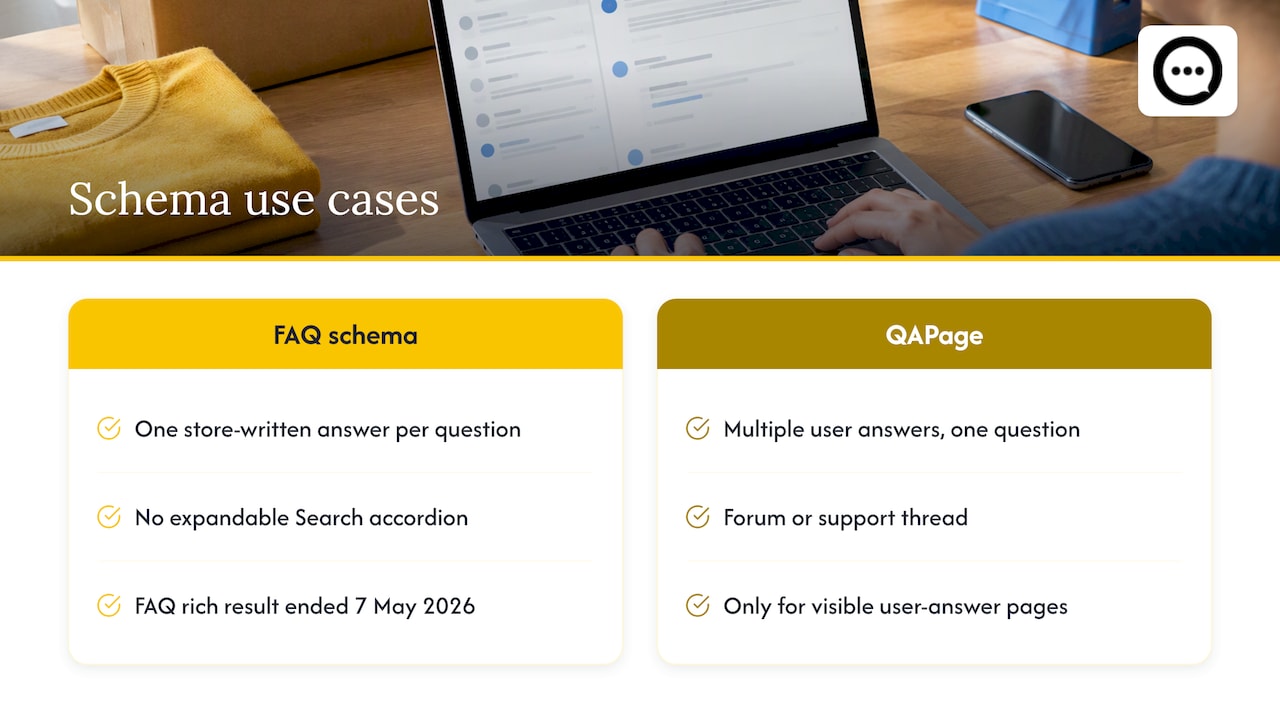
Google’s documentation changelog states that the FAQ rich result feature is no longer shown in Google Search results, and that the related documentation was removed. Industry coverage dates the end of the appearance to 7 May 2026, including for government and health sites that had kept it. In plain terms: adding FAQ markup will not give you the expandable accordion under your listing.
QAPage is a separate type. It is meant for pages where users submit several answers to one question, like a forum or support thread, and it remains in Google’s guidelines for that use. A typical store FAQ, where you write one answer per question, is not that. A product Q&A thread with multiple community answers is closer, but it is only appropriate when the page really is built around a question with user-submitted answers. Do not mark up content that is not visible on the page.
What Shopify gives you out of the box
Shopify’s theme can generate product structured data automatically. According to Shopify’s ecommerce schema guide, the structured_data Liquid filter outputs JSON-LD for product and article pages, but the default covers only the basics, and fields like FAQs typically need to be added separately. A merchant thread on adding FAQ schema dynamically makes the practical point well: the code is the easy part, and the hard part is that FAQ schema needs real Q&A content for each product. There is nothing in your product data to pull from.
So is structured Q&A still worth it?
Yes, for a different reason. Clear question-and-answer pairs are easy for AI search tools to parse and quote. The strategic priority has shifted from chasing a snippet to being readable by generative engines that answer product questions. If you want to go deeper on that side, this playbook on FAQ schema and AI search visibility covers the post-deprecation landscape. My advice is to keep your markup honest, keep answers visible on the page, and measure by sales rather than rich results.
A practical setup for a Shopify store
Here is a sequence that works for most small and mid-size stores.
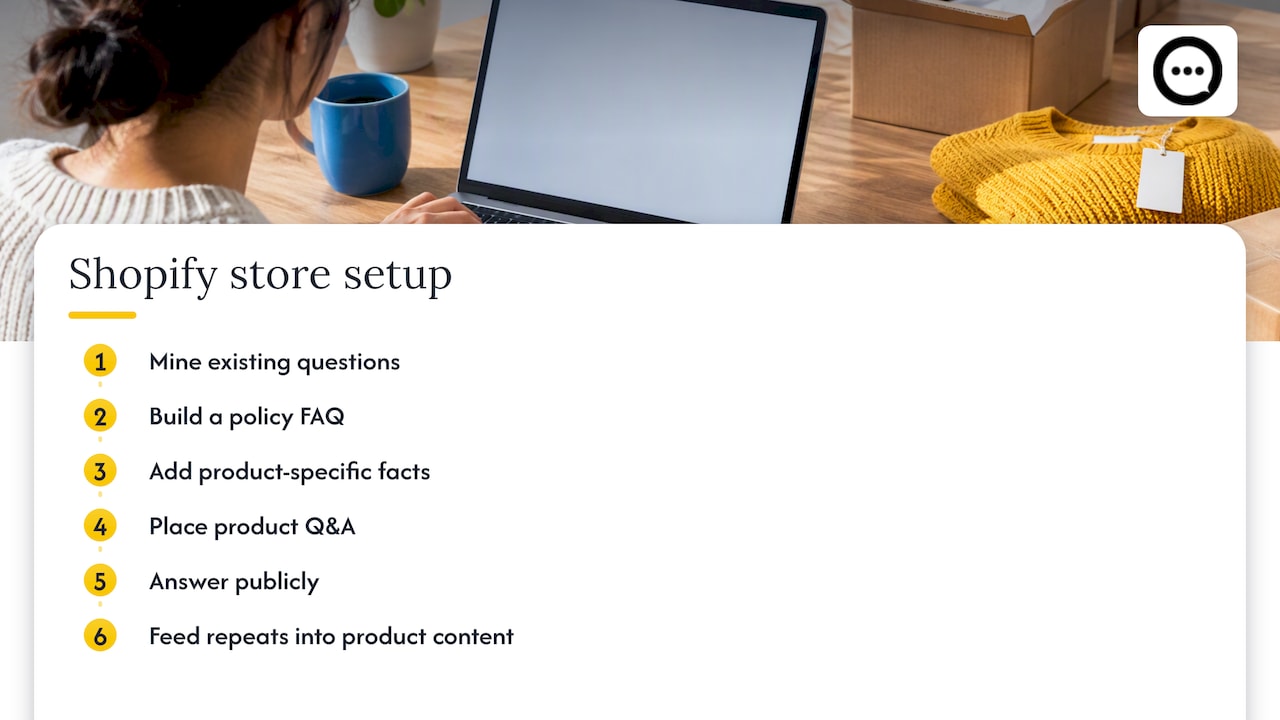
Step 1: Mine the questions you already get
Export the last 60 to 90 days of support email, live chat and social DMs. Tag each question as either policy (store-wide) or product-specific. Those are your two content piles. The real questions from chat and email point straight at the hesitation that causes cart abandonment.
Step 2: Build the FAQ page for policy questions
Write short, direct answers. Put the answer in the first sentence, and link to the full policy for detail. Group questions under clear headings: shipping, returns, payments, orders. Review it quarterly, or whenever a policy changes.
Step 3: Add product-specific facts as a block
For your top-selling products, add a short block of the three or four questions that come up most. Keep it factual: sizing, compatibility, materials, setup. This is still site-authored content, so treat it as an FAQ.
Step 4: Put Q&A where the buying decision happens
Place the Q&A widget on the product page, below the add-to-cart area or next to reviews, not buried in a footer tab. Seed it before launch with the product-specific questions from step 1, answered properly, so shoppers never see an empty box.
Step 5: Answer fast and in public
Speed matters more than polish. A reply within a day tells the next visitor that someone is home. Where a written answer is not enough, a short video reply can show the product in use, which is something we cover in replying to Shopify Q&A with instant answers and video.
Step 6: Feed the loop back
When the same question gets asked three times, fix the source: update the product description, the size chart or the photos. Then promote the best Q&A to your FAQ if it applies store-wide.
Technical pitfalls to avoid
A few things trip up Shopify merchants when they add dynamic blocks.
- Conditional visibility in app blocks. Developers have reported that using available_if logic on an app block can remove the section from the theme instead of hiding it. The merchant then has to re-add the block in the theme editor. If you work with a developer, ask them to handle visibility inside the app’s own rendering logic.
- Placement limits. Theme app extensions can behave differently depending on which section you add them to, so test on a duplicate theme before publishing.
- Duplicate content. Do not paste the same answer into the FAQ, the product description and every Q&A reply. Write it once and link.
- Unverified answers. Decide who is allowed to answer. A moderation step prevents a stranger’s guess from becoming public fact on your product page.
What to measure
Do not judge either format by page views alone. Track:
- Support tickets per order after you launch or improve the FAQ. It should fall.
- Conversion rate on products with Q&A versus those without.
- Questions asked per product, which shows which pages carry the most doubt.
- Time to first answer, an operational number you control.
When you read Shopify analytics, remember that visitors and sessions are different: a session is a group of interactions within a timeframe, while visitors counts unique people. A shopper who returns twice to read your Q&A is one visitor and two sessions, so the two metrics tell you different things about engagement.
Our perspective: treat Q&A as proof, not just content
We built Peers for Shopify stores only, and what we see is that most merchants file FAQ tools under “content.” We think that undersells them. The questions on a product page are the exact moments of hesitation, and the answers are the cheapest conversion work you can do.
The pattern we recommend is simple. Keep your FAQ boring and accurate. Make your Q&A human and visible. And when a buyer is willing to show the product in use, let that answer be a short video from a verified customer, because seeing a real person with the item settles doubts that text cannot. A store that does this gets two benefits at once: fewer repeat questions for the support team, and a product page that answers like a knowledgeable friend rather than a brochure.
One caution from experience: do not launch an empty widget. Seed it, answer every question, and moderate before anything goes public.
— Leo
Run both on your product pages with Peers
If you want the Q&A side handled without touching theme code, Peers on the Shopify App Store embeds post-purchase video reviews and shopper Q&A directly on your product pages, with moderation tools, customizable design and mobile support. There is a Free plan, and the Peers Growth plan is $15 per month. If you are weighing formats, our comparison of video testimonials vs text reviews is a good next read.
FAQ
Is Q&A better than an FAQ for conversions?
They solve different problems, so neither replaces the other. An FAQ removes friction around policies, while a product Q&A answers the specific doubt that blocks one purchase. If you can only build one first, start with the format that matches your support inbox: mostly policy questions point to an FAQ, mostly product questions point to Q&A.
Does FAQ schema still work on Shopify?
Not for rich results. Google stopped showing FAQ rich results in May 2026, so markup will not produce the accordion in search. Clear question-and-answer content is still useful because AI search tools can parse it, but write it for shoppers first.
Should I use QAPage schema for my product Q&A?
Only if the page truly fits it: a question with multiple user-submitted answers, visible on the page. A store-written FAQ does not qualify. If you are unsure, a developer or SEO specialist can check your markup against Google’s current structured data documentation.
Where should the Q&A go on a Shopify product page?
Place it close to the buying decision, near the reviews or beneath the add-to-cart section, not in a hidden footer tab. Keep your general FAQ on its own page and link to it from the product page for shipping and returns.
Sources
- Google Search Central: documentation updates
- Google FAQ structured data guidelines 2026: rich results removed
- Baymard: provide both site-authored FAQs and community-driven Q&As
- Search Engine Journal: FAQs on product or category pages
- Shopify: ecommerce schema guide
- Shopify Community: adding FAQ schema dynamically
- Shopify Developer Community: available_if on app blocks