Video Review Scripts for Shopify: Requests, Prompts and Templates

A good video review script is not a speech for the customer to read. It is a short request that tells them what to film, a handful of prompts that pull out useful detail, and a line of consent wording that keeps you safe. Below you get all three, ready to paste into your post-purchase emails and adapt to your products.
TL;DR
- Script the ask and the prompts, never the opinion. Customers who read praise aloud produce reviews shoppers do not believe.
- Use a three-message sequence (heads-up, invitation, reminder) and tell people exactly what to film, for about 30 to 60 seconds.
- Give 4 to 5 prompts built around what a shopper cannot see in your catalog photos: size, fit, setup, limits, comparison.
- Disclose any reward, never tie it to a positive rating, and get usage rights in writing at submission.
- Put the finished clips high on the product page, in space reserved so the layout does not jump.
Table of Contents
- What a video review script actually is
- The post-purchase request sequence
- The prompt card: questions that produce useful clips
- A simple 30-second structure customers can follow
- Make recording easy: remove every step you can
- Disclosure, consent and incentives
- Where the finished clips should live
- Turn the same script into shopper Q&A
- Perspective: why we keep the script out of the customer’s mouth
- Try it on your store
- A worked example: one script, start to finish
- Common script mistakes to avoid
- FAQ
- Sources
What a video review script actually is
When merchants search for “video review scripts,” they usually imagine one of two things: lines for a customer to read on camera, or lines for the merchant to film their own testimonial. Neither works well for a Shopify store.
Research on online video reviews points to why. Academic work on consumer video reviews finds that shoppers value other consumers’ experiences, social reassurance, product demonstrations and expert advice, and that credibility depends on the reviewer seeming expert, honest and fair. A customer reading your copy sounds like none of those things.
So the script you control has four parts:
- The request message that gets the customer to record.
- The prompt card, a few questions that shape what they say.
- The recording brief, the practical limits: length, light, sound, one product.
- The consent line that covers how you will use the clip.
Everything else, the words of the review itself, belongs to the customer.
The post-purchase request sequence
Timing matters more than cleverness. Ask once the customer has had time to use the product, not at checkout. For a candle or a tee that may be a week after delivery. For a blender, a mattress or a skincare routine, wait long enough for a real opinion. Then send three short messages.
Message 1: the heads-up
Send this with the shipping confirmation or just after delivery.
Subject: Your [product] has landed
Hi [first name], your [product] should be with you now. Once you’ve had a few days with it, we’d love to hear how it’s going. We’ll send a quick link, and you can answer in a short video if you feel like it. No need to do anything yet.
This message asks for nothing. It only warns the customer that a request is coming, which makes the real invitation feel expected rather than random.
Message 2: the invitation
This is the one that carries the work. Name the length, the topic, and the reward if you offer one.
Subject: 30 seconds on your [product]?
Hi [first name], how are you getting on with your [product]?
Other shoppers are deciding whether to buy it, and they trust people who own it far more than they trust us. Would you record a short video, 30 to 60 seconds is plenty, telling them what it’s really like?
Here is what helps most:
- Why you chose it
- What you’d tell someone about to buy
- One thing you’d change, if anything
Film near a window if you can, and hold the phone steady. You can record right from this link: [link]. It’s completely optional, and you can also just leave a written review.
[If applicable: As a thank-you for sharing, we’ll send [reward]. It does not depend on what you say.]
The wording tracks guidance from one 2026 review-request guide: invite an honest experience rather than scripted praise, keep participation optional, explain how the media will be used, and ask about details a shopper cannot see in catalog images.
Message 3: the gentle reminder
Send it four to seven days later, and only to people who have not responded.
Subject: Still happy to hear from you
Hi [first name], no pressure at all. If you have 30 seconds to tell future shoppers about your [product], here’s the link again: [link]. If now isn’t the time, thank you for shopping with us.
One reminder is enough. A second starts to feel like nagging, and the customer who is annoyed by you is the one who writes the one-star review.
The prompt card: questions that produce useful clips
The single best line you can put on a prompt card is a question that invites practical detail. One widely used example is: “What would you want another shopper to know about using it?” It works because it lets the customer share practical details, limitations or praise in their own words.
Build a card of four or five prompts and show them next to the record button. Choose from these groups.
Before the purchase
- What made you pick this one over others you looked at?
- What were you worried about before you bought?
These address the hesitation your next visitor is feeling right now. A clip that says “I wasn’t sure about the size, here’s how it fit” answers a question the product description cannot.
In use
- Show us how you use it. What does a normal day with it look like?
- What surprised you, good or bad?
Demonstration is where video beats text. A customer pouring, unboxing, wearing or assembling the product shows scale, texture and effort in seconds.
The honest close
- Who would you recommend this to, and who should skip it?
- If you could change one thing, what would it be?
The “who should skip it” prompt is the one most merchants are afraid of, and it is the one that builds the most trust. A review that names a limit makes every other sentence in it more believable.
Prompts by product type
| Product type | Best prompt | What the shopper learns |
|---|---|---|
| Apparel | “What’s your height and size, and how does it fit?” | Real fit on a real body |
| Home goods | “Show it next to something familiar for scale.” | Actual dimensions |
| Skincare and beauty | “How long have you used it, and what’s your skin type?” | Context for results |
| Gadgets and tools | “What was setup like, start to finish?” | Effort and learning curve |
| Food and drink | “How would you describe the taste to a friend?” | Flavor in plain words |
| Gifts | “How did the person react?” | Emotional payoff |
If you sell regulated or sensitive goods, set guardrails in the prompts themselves. Enterprise UGC guidance suggests prohibiting health claims, before-and-after transformations and unsafe usage in those categories, so do not ask “Did it clear your skin?” if you cannot publish the answer.
A simple 30-second structure customers can follow
Most people freeze at “record a review.” Give them a shape and the fear fades. Put this on the recording screen or in the email as a loose outline:
- Who you are (5 seconds). “Hi, I’m Dana, I’ve had this for two weeks.”
- The verdict (10 seconds). “I bought it because… and so far…”
- The detail (10 seconds). One specific thing: fit, taste, noise, setup.
- The advice (5 seconds). “If you’re deciding, I’d say…”
That adds up to about 30 seconds. Offering a range of 30 to 60 seconds gives people permission to go a little longer without feeling that a ten-minute performance is expected. Short clips also play better on mobile product pages, where most Shopify traffic is viewed.
Recording tips worth including
Keep these to three lines, not a lecture:
- Face a window, not a lamp behind you.
- Hold the phone at eye level, in portrait or landscape, whichever is easier.
- Find a quiet room. Clear audio matters more than sharp video.
Make recording easy: remove every step you can
The best script fails if the customer has to download an app, create an account or email a large file. Each step loses people. A few ways to cut friction:
- Use a link or QR code, not an attachment. A code on the packing slip or insert lets a customer record from their phone the moment the product is in their hands. Our walkthrough on capturing 15 to 20 second verified video reviews with QR codes shows the setup, and this three-step guide from QR code to product page covers the full path.
- Accept what phones produce. If customers upload from a phone, the file may be large. Check the limits before you promise anything; we cover them in our guide to upload sizes and formats.
- Offer a written fallback. Some customers are camera-shy. A text option keeps their feedback instead of losing it.
- Pre-fill what you know. If the link already identifies the order and product, the customer never has to type a thing, and you can show a verified-buyer label.
Disclosure, consent and incentives
This is where scripts can go wrong, so put the caution in the wording itself. This section is general information for US merchants, not legal advice. If you run ads with customer clips or sell in a regulated category, check the details with a qualified attorney.
Disclose rewards
If you give a discount, gift card or free product for a video, say so in the request and on the published review. The FTC’s guidance on endorsements treats an incentive as a material connection that readers should know about, and the agency’s 2015 action over misrepresented online reviews concerned failing to disclose such connections and presenting reviews as unbiased when they were not.
Write it plainly in your script: “As a thank-you, we’ll send you a $10 credit for submitting a video, whatever you say in it.” The reward is for the act of submitting, never for positive sentiment.
Keep it optional and unfiltered
Do not make rewards depend on a favorable rating, and do not ask only your happiest customers. Send the invitation to everyone who bought, so the clips you publish reflect real experience. For more on fair collection, see this piece on how to get reviews without breaking the rules.
Capture usage rights at submission
Add a single checkbox with plain language before the customer hits submit:
I agree that [Store name] may display my video and first name on its website and in marketing, including ads. I can ask for removal at any time at [email].
If you might use clips in paid ads, say so explicitly. Keep a record of each agreement. Our five-step video testimonial consent checklist and four privacy checks before customer videos go live walk through what to store and what to review. For a US-focused look at the rules, see our FTC-compliant one-click testimonial guide.
Where the finished clips should live
A strong script leads to strong clips, and strong clips are wasted if they sit at the bottom of the page. Shoppers who are hesitating need the proof near the buy button, not after the footer. Our post on the Shopify video review rollout explains why burying clips below the fold costs you.
Two practical points:
- Reserve space. Shopify’s own documentation advises reserving space for app-injected content with App Blocks and CSS, so the page does not shift and make customers lose their place or tap the wrong element.
- Skip theme code where you can. You can embed post-purchase video reviews without touching theme code, and you can publish within the size and length limits without a developer. Once clips are live, customizing the widget to match your theme keeps the page looking like yours.
Turn the same script into shopper Q&A
The prompts above also work in reverse. Instead of asking customers what they think, let prospective buyers ask a question on the product page and let verified customers answer it. The questions your visitors actually type, “Does it run small?” or “Is it loud?”, are the best script you will ever get for your next request email. Pull the five most repeated questions each month and rewrite your prompt card around them.
Perspective: why we keep the script out of the customer’s mouth
We built Peers for Shopify stores only, and one lesson shaped almost everything: shoppers can tell when a review has been coached. The moment a customer sounds like your product page, the clip stops working as proof and starts working as an ad, and visitors scroll past ads.

So our advice is to script everything around the review and nothing inside it. Write a warm, specific request. Give people prompts that point at things only an owner knows. Let them be a little awkward, a little critical, and fully themselves. A clip where someone says the strap is stiff for the first week but softens up is worth more than ten flawless five-star lines, because it tells the next buyer you are not hiding anything.
The second lesson is about consent. Collect it at the moment of submission, in plain language, and store it. It takes one checkbox and saves you from the hard conversation later.
— Leo
Try it on your store
If you want to put these scripts to work without building the plumbing yourself, Peers on the Shopify App Store lets you collect post-purchase video reviews and shopper Q&A and show them on your product pages, with moderation tools, customizable design and engagement analytics. There is a free plan, and Peers Growth is $15 per month. You can see how it looks on the demo store before you install anything.
A worked example: one script, start to finish
Say you sell a travel backpack. Here is how the pieces fit together for one order.
Day 0, order ships. The customer gets your heads-up message.
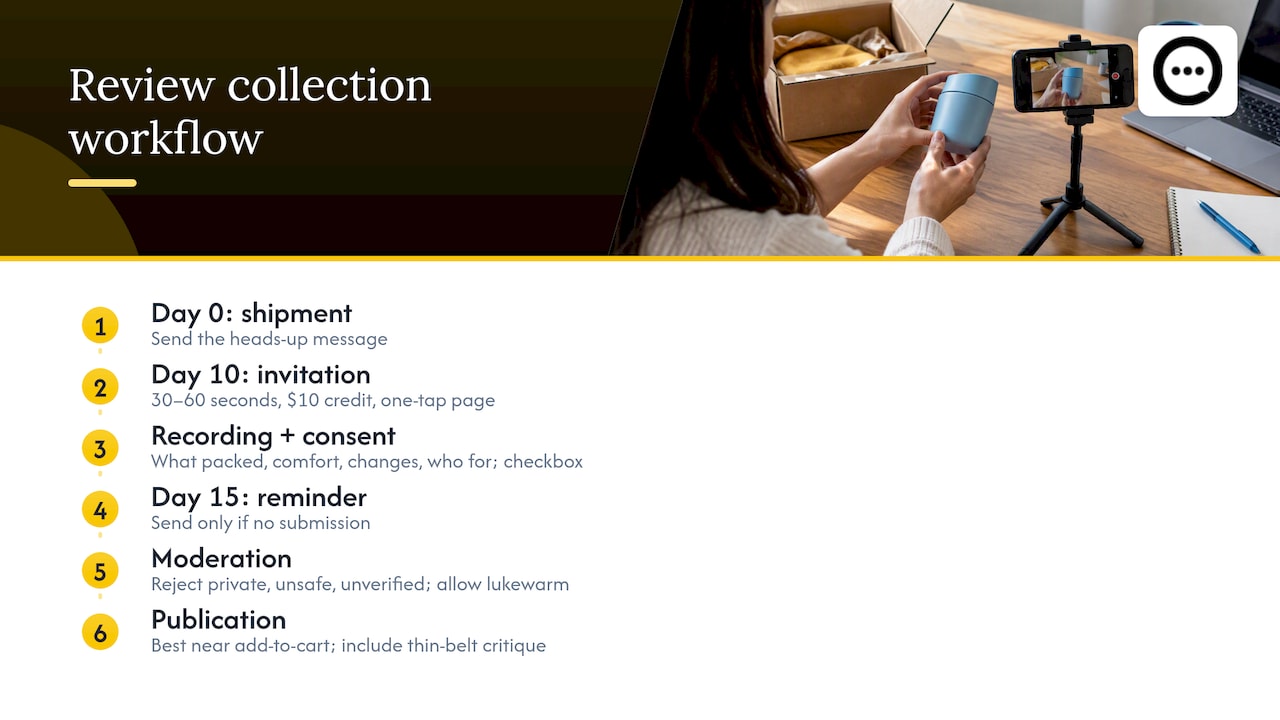
Day 10, invitation. The subject line reads “30 seconds on your pack?” The body asks why they chose it, what they carry in it and whether anything bugs them. It names the 30 to 60 second range, mentions the $10 thank-you credit, and links to a one-tap recording page.
On the recording page. The customer sees four prompts: What did you pack in it? How does it feel after a few hours? What would you change? Who is it for? Beneath them sits the consent checkbox.
Day 15, reminder. Sent only if there is no submission.
Moderation. You watch each clip before it goes live, rejecting anything with private information, unsafe use, or claims you cannot stand behind. You do not reject a clip because it is lukewarm.
Publication. The best clips appear near the add-to-cart button on the pack’s page. The one that says the hip belt is thin goes up too. Visitors who were worried about comfort now see a real person addressing the worry honestly, and that is the moment a hesitant shopper becomes a buyer.
Track what happens. Note how many invitations lead to a recording, how many recordings pass moderation, and whether pages with video convert differently from pages without. If response is low, change the subject line or shorten the ask before you change anything else.
Common script mistakes to avoid
- Asking for a “great review.” Ask for an honest one. Anything else is a request for praise.
- Too many prompts. More than five and customers freeze or ramble.
- Vague length. “A short video” means different things to different people. Say 30 to 60 seconds.
- Hidden rewards. Name the reward upfront and disclose it when you publish.
- Asking too early. A customer who has not used the product yet can only talk about shipping.
- Asking only happy buyers. It skews the clips and can mislead shoppers.
FAQ
How long should a customer video review be?
Aim for 30 to 60 seconds. That is long enough for a verdict and one useful detail, and short enough that most customers will actually finish. Tell them the range in your invitation so they do not feel they owe you a longer performance.
Should I give customers a script to read?
No. Give them prompts and a loose outline, not words. Coached reviews sound coached, and credibility is what makes video work: shoppers respond to reviewers who seem honest and fair, not rehearsed.
Can I offer a discount for a video review?
Yes, with care. Disclose the reward in your request and when you publish, give it for submitting rather than for a positive opinion, and offer it to every customer who bought. In the US, FTC endorsement guidance treats an incentive as a material connection, so talk to an attorney if you are unsure how it applies to you.
Do I need permission to use a customer’s video in ads?
Yes. Collect explicit consent at submission and say plainly if clips may appear in paid advertising. Keep a record of each agreement so you can prove permission later.
When is the best time to send the request?
After the customer has had time to use the product, usually one to two weeks after delivery, depending on what you sell. Send one invitation and one reminder, then stop.
Sources
- The Role of Online Video Reviews in the Consumer Decision-Making Process (Aalto University)
- How to ask Shopify customers for photo and video reviews (Sendvio)
- FTC press release on misrepresented online reviews, 2015
- Reserve space for app-injected content (Shopify.dev)
- User Generated Content strategy guide (Shopify Enterprise)