Shopify Merchants: FTC Compliant One Click Video Testimonials

The fastest way to collect video testimonials that actually convert shoppers is to send a short, one-click browser recording link after delivery, capture plain-language consent on the spot, and place the clip next to your buy button. There are Shopify-native ways to run this workflow without building it yourself. Aim for clips under 45 seconds, shot on a phone, with permission documented at the moment of recording.
TL;DR:
- Sending a one-click browser recording link within 24 hours of delivery significantly increases the quantity and authenticity of video testimonials.
- Requesting videos shortly after unboxing or product use, especially during positive survey responses or renewal moments, yields more genuine feedback.
- Using simple prompts like “show us how you use it” or “what problem did it solve” produces concise and relatable testimonials typically under 30 seconds.
- Incorporating buyer-shot videos near the buy button on product pages maximizes influence by addressing shopper objections directly at the decision point.
- Shopify-native tools that automate this process via review apps or embeds streamline collection, moderation, and placement for larger-scale impact.
Table of Contents
- Why video testimonials matter for conversions
- When to ask: timing and triggers that get the best responses
- How to collect video testimonials: ranked methods with trade-offs
- What to ask customers to say
- Incentives, permissions, and legal compliance
- Where to use testimonial videos for maximum effect
- Practical Shopify workflow and templates
- A quick perspective on where to start
- Put this workflow on autopilot with Peers
- FAQ
- Sources
Why video testimonials matter for conversions
Text reviews tell a shopper what someone thought. Video shows them a real face, a real voice, and a real product in someone’s hands, which closes the gap between reading about a purchase and trusting it. That gap matters more than most store owners assume: shoppers who cannot visually confirm a claim often leave the page to search for proof elsewhere, and every exit is a chance they do not come back.
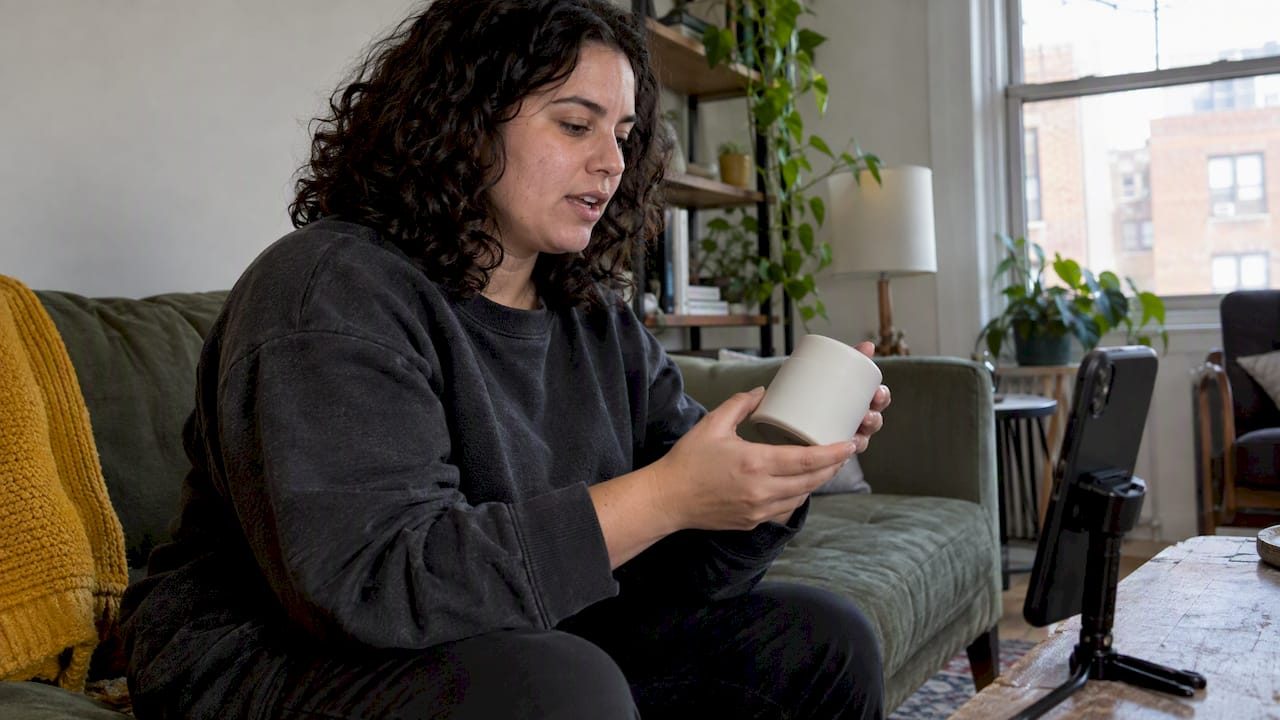
Many ecommerce sites still skip this entirely. Baymard’s research found that many ecommerce sites lack social-media-style images or videos from past buyers on their product pages, even though shoppers consistently use this kind of content to validate a purchase decision. Stores that do surface buyer-shot visuals give shoppers the confirmation they’re already looking for, right where they’re deciding.
Video also compresses the research phase. A ten-second clip of someone using the product answers questions that would otherwise take three paragraphs of text, or a trip to a review aggregator the shopper may never return from.
When to ask: timing and triggers that get the best responses
The best window to ask for a video is shortly after delivery, once the customer has unboxed the product but before the initial excitement fades. For items with a learning curve (software, skincare, fitness gear) wait until the customer has had a real chance to use it, since an unboxing video will not capture the benefit that actually sells the product.
Good trigger moments include:
- A high score on a post-purchase NPS or CSAT survey.
- A support ticket that ends in a resolved, positive outcome.
- A subscription renewal or a second purchase from the same customer.
- A spontaneous positive comment left in a review, email, or social post.
Avoid asking during checkout, when the customer has no experience with the product yet, or while a support issue is still open. Both moments produce thin, generic responses or, worse, a frustrated one.
How to collect video testimonials: ranked methods with trade-offs
Start with the method that removes the most friction, then layer in others as capacity allows.
- One-click browser recording links. A link that opens straight into a recording screen, no app download and no account creation, consistently produces higher submission rates than multi-step flows, because it captures the customer while their enthusiasm is still fresh.
- Review apps with video support. Many Shopify review apps now accept video uploads alongside star ratings. These integrate cleanly with your existing review flow, but moderation becomes more work since you’re reviewing footage, not just text.
- Direct interview capture. For flagship products or case-study-style content, a short scheduled call with a remote recording tool gives you better framing and audio, at the cost of needing a human to coordinate and edit.
- Social listening and rights requests. When a customer posts organically on social media, reach out and ask for written permission to repost the clip on your site. This scales well for brands with an active community but needs a clear verification step to confirm the poster is a real customer.
Pro Tip: Send the recording link within 24 hours of delivery confirmation, while the unboxing moment is still top of mind.
The trade-off across all four methods is consistent: the lower the friction, the higher the volume but the rougher the footage; the more production you add, the better the polish but the fewer clips you’ll collect. Most stores get the best return by running the one-click link as the default and reserving interviews for a handful of hero products.
What to ask customers to say
A testimonial only works if the customer knows what to talk about. Open-ended requests like “tell us what you think” tend to produce rambling, unusable footage. Give them a prompt instead.
- “What problem were you trying to solve when you bought this?”
- “What’s the one thing you’d tell a friend who’s on the fence?”
- “Show us how you actually use it day to day.”
- “What almost stopped you from buying, and what changed your mind?”
Keep the ask to one question at a time. For product-page placements, 15 to 30 seconds is plenty; for email or ad use, you can go up to 45 seconds if the content earns it. Coach customers toward natural light, a close shot on the product, and a quick demonstration if the product is visual or tactile. None of this needs to look professional. A slightly shaky, phone-shot clip often reads as more trustworthy than a polished one, precisely because it looks unscripted.
Incentives, permissions, and legal compliance
Before you publish a single clip, get the legal basics right. The FTC’s final rule on consumer reviews and testimonials (16 CFR Part 465) prohibits buying or knowingly publishing fake reviews and requires clear disclosure whenever there’s a material connection, like a discount or free product, between you and the person giving the testimonial.
Build a short release process around every video you collect:
- A plain-language consent checkbox the customer checks before recording.
- A timestamped record of that consent, stored alongside the video file.
- An on-screen, visible disclosure (not just in the caption) whenever an incentive was involved.
- A clear statement of how and where the video may be used.
If you offer an incentive for a video, a small discount or loyalty points is fine as long as it’s disclosed and not conditioned on a positive review. Never edit a testimonial to remove a disclosure or alter what the customer actually said.
Where to use testimonial videos for maximum effect
Placement matters as much as collection. The product page is the highest-leverage spot: embedding a video testimonial near the buy button answers a shopper’s objections at the exact moment they’re deciding, instead of sending them off to search reviews elsewhere.
- Product page, near the buy button: the primary placement, where uncertainty is highest.
- Dedicated review gallery: good for browsing multiple testimonials at once.
- Email follow-ups: a short clip in a post-purchase or abandoned-cart email adds proof without extra copy.
- Paid social and ads: trim to the first 10 to 15 seconds, since most viewers decide in that window whether to keep watching.
Make sure every placement is mobile-first: vertical framing, captions for sound-off viewing, and a thumbnail that doesn’t require a click to understand the content. Sites that add buyer-shot visual content to product pages give shoppers the validation they’re already seeking, according to Baymard’s UX research on reviewer images, which found that shoppers rely heavily on this kind of content when deciding whether to trust a listing. Track play rate, add-to-cart lift on pages with video versus without, and the conversion delta between visitors who watched a clip and those who didn’t.
Practical Shopify workflow and templates
Here’s a two-week starter workflow you can run without extra headcount.
- Week 1, days 1 to 2: pick two or three SKUs with strong repeat-purchase or high-traffic numbers.
- Days 3 to 5: pull a list of recent customers who gave a positive support or survey response.
- Days 5 to 7: send a short pre-ask email letting them know a request is coming.
- Week 2, days 1 to 3: send the one-click recording link with a single prompt question.
- Days 4 to 5: send one reminder to non-responders, then moderate submissions for audio quality and compliance with your consent checklist.
- Days 6 to 7: publish approved clips on the relevant product pages.
A short invite might read: “We’d love a 20-second video on how [product] is working for you. No app needed, just tap and record.” Keep the reminder even shorter.
Pro Tip: Batch moderation into one sitting per week so disclosure checks and editing don’t become a daily distraction.
A quick perspective on where to start
If you only run one test, run it on your single highest-traffic product page. Add the one-click recording link to your post-delivery flow, embed whatever comes back near the buy button, and watch add-to-cart rate on that page for four to six weeks before judging the result.
The trade-off you’ll keep running into is quality versus scale: low-friction recording gets you volume and authenticity, structured interviews get you polish. My rule of thumb is to default to low-friction for every product and save interviews for the handful that carry your highest margin or highest return rate.
— Leo
Put this workflow on autopilot with Peers
Everything described above, the one-click recording link, the consent capture, the product-page embed, is exactly what a Shopify-native video review widget built to automate can help you implement efficiently. Some Shopify-native apps let you collect post-purchase video reviews and shopper Q&A directly on your product pages, with moderation tools and customizable design, so you avoid stitching together multiple tools manually.
| Plan | Price | Best for |
|---|---|---|
| Free | Not published | Testing the workflow on a few SKUs |
| Peers Growth | $15 per month | Running video collection across your full catalog |
If you want to see how it fits into an existing Shopify store, visit the Peers listing on the Shopify App Store and check plan details on our pricing page.
FAQ
How can I collect video testimonials from my customers?
Send a one-click recording link shortly after delivery, paired with a single specific prompt rather than an open-ended request. Capture consent at the same time, and follow up once if the customer doesn’t respond within a few days.
Are fake testimonials illegal?
Yes, buying or knowingly publishing fake reviews is prohibited under the FTC’s final rule on consumer reviews and testimonials (16 CFR Part 465), which also requires disclosure of any material connection like a discount or free product. Editing a real testimonial to remove a required disclosure falls under the same rule.
What are the best ways to collect customer testimonials?
The lowest-friction method is a one-click browser recording link sent after delivery, since it avoids app downloads and captures customers while their experience is fresh. Review apps with video support, scheduled interviews, and social listening with rights requests round out the toolkit depending on how much production quality you need.
Can you give me some examples of video testimonials?
Common formats include a 20-second clip answering “what problem did this solve for you,” a quick demonstration of the product in daily use, and a before-and-after style response to an objection like price or sizing. The most effective ones stay short, phone-shot, and focused on one clear point rather than a general review.