Shopify Video Privacy: 4 Checks Before Customer Videos Go Live

Require explicit, recorded consent before you publish any customer video that shows a face, voice, or name, confirm that your Settings > Customer privacy controls are active, and make sure your pixels and video players check the Customer Privacy API before loading. Store consent metadata with every video so you can prove compliance later.
TL;DR:
- Shopify enables automated privacy settings by default for new stores, but review regional banner behavior, policy wording, and the live data sharing opt out page.
- Shopify’s Customer Privacy API tracks analytics, marketing, preferences, and sale of data consent as true, false, or undefined; treat undefined as undecided.
- Get separate affirmative consent to record and publish, specifying channels, editing rights, duration, and withdrawal steps; store the agreed text, timestamp, and video ID.
- Load tracking pixels and video players only after relevant consent is allowed; subscribe to visitorConsentCollected, and test true, false, and undefined states before launch.
- Store consent records in a secure database or app table, not Shopify’s public files; YouTube videos must be Public or Unlisted, while Vimeo must allow embedding.
Table of Contents
- How Shopify’s customer privacy settings actually work
- The Customer Privacy API: consent categories and states developers need
- Collecting video testimonials with consent that actually holds up
- Storing videos and consent records without creating a liability
- Pixels, players, and a pre-launch privacy checklist
- Why privacy-first video programs earn more trust than they cost
- Peers: a privacy-aware way to collect video reviews on Shopify
- FAQ
- Sources
How Shopify’s customer privacy settings actually work
Your admin controls live under Settings > Customer privacy, and three elements do most of the work: privacy policy automation, the cookie banner, and the data sharing opt-out page. These automated settings are turned on by default for new stores, and they localize banner behavior based on where a visitor is browsing from.
A shopper in the EEA or UK sees a cookie banner with granular choices, while a visitor elsewhere might see a simpler notice or none at all, depending on how you’ve configured regional behavior. When non-essential tracking is blocked by a visitor’s choice, that decision also affects what Shopify’s own network and marketing tools can collect from that session, so your analytics numbers will vary by region in ways that reflect real consent choices rather than traffic quality.
Before you publish anything that touches customer data, including embedded video reviews, walk through this checklist:
- Confirm automated settings are enabled if you have not customized them.
- Review the localized banner text for your top markets and adjust the wording if it doesn’t match your actual data practices.
- Create custom privacy policy copy only when your data collection goes beyond what the automated template describes.
- Verify the data sharing opt-out page is live and linked from your footer.
Skipping this step doesn’t just risk a compliance gap. It also means your pixel and tag data will be inconsistent until the settings actually match what your store collects.
The Customer Privacy API: consent categories and states developers need
If you or your developer are building anything that touches tracking, pixels, or embedded video players, the Customer Privacy API is the layer that decides whether that code is allowed to run. Shopify’s developer documentation lays out four consent categories: analytics, marketing, preferences, and sale of data. Each one can hold a value of true, false, or undefined, where undefined means the visitor hasn’t made a choice yet.
A practical implementation checks consent in this order:
- Call the appropriate method (such as
init.customerPrivacy) to read the visitor’s current consent state. - Check
analyticsProcessingAllowedormarketingAllowedbefore firing any analytics call or loading a tracking pixel. - Subscribe to the
visitorConsentCollectedevent so your code reacts the moment a visitor makes a choice, instead of polling. - Use
shouldShowBannerto confirm whether your store still needs to display a consent prompt for that visitor.
The same documentation explains that app pixels can declare their required consent categories directly in configuration, so Shopify’s pixel manager blocks them automatically when a visitor has denied that category. According to Uniconsent’s technical breakdown of the API, this same true, false, or undefined structure applies across all four categories, which means a script checking only for “true” and treating everything else as “false” will misread an undecided visitor as a denial, or worse, the reverse.
Pro Tip: Test all three consent states (true, false, and undefined) in a private browser window before launch, and confirm with your browser’s network tab that zero tracking calls fire when a category is set to false.
Collecting video testimonials with consent that actually holds up
A video testimonial captures a face, a voice, and often a full name, which makes it personal data under most privacy frameworks. Guidance on video recording and GDPR is clear that relying on “legitimate interest” to publish an identifiable testimonial is generally not sufficient. Explicit, informed consent is the safer standard, and it’s the one that holds up if a customer later asks why their face is on your product page.
A consent form built for video testimonials should capture:
- The customer’s full name and a way to verify identity.
- The intended uses: website, paid ads, social media, or all three.
- Whether you can edit, trim, or caption the video.
- How long you’ll use the footage and how the customer can request its removal.
- An affirmative checkbox (never a pre-checked box) with a link to your privacy policy.
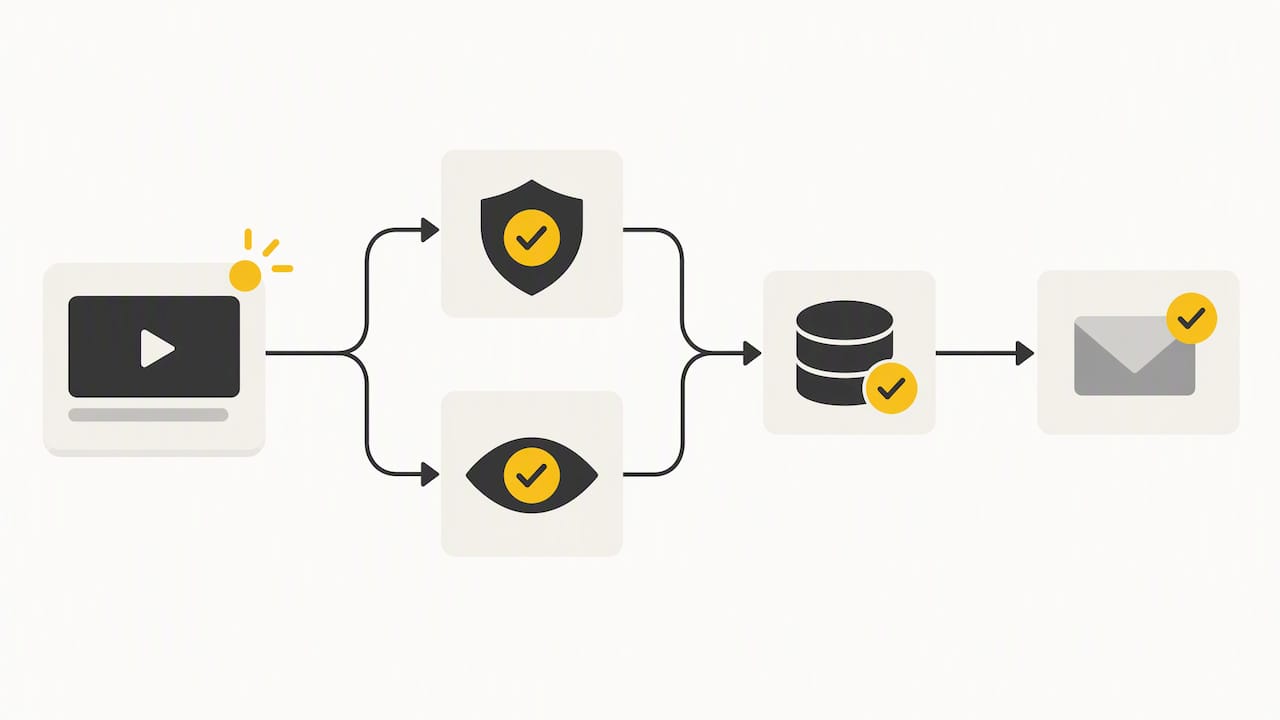
The strongest consent record is the one you never have to defend from memory. Pairing each submission with a timestamp, the exact text the customer agreed to, the form version, a geolocation or IP marker, and a unique video ID turns a verbal “yes” into audit-ready documentation that holds up months later.
A workflow that works well in practice: trigger a post-purchase modal asking for a video testimonial, separate the “record a video” consent from the “publish this video” consent as two distinct checkboxes, and send a confirmation email that links back to the stored consent record. Our video testimonial consent checklist walks through a field-by-field version of this flow, and our guide to FTC-compliant one-click testimonials covers the disclosure language that pairs with it.
Storing videos and consent records without creating a liability
Where you host the video and where you store the consent record are two different decisions, and merchants often conflate them. Shopify’s product media rules require that YouTube videos be set to Public or Unlisted and Vimeo videos allow embedding when you add them via “Add from URL.” Private or restricted videos simply won’t load.
That’s fine for the video file itself, which is meant to be publicly viewable once consent is granted. It’s a different story for the consent record behind it, which should never live in a public-facing asset.
- Treat Content > Files as a space for public assets only, never for anything that contains unredacted personal data.
- Store proof-of-consent metadata (the fields described above) in a merchant database or a secure app table, keyed to the published embed URL so each video traces back to its consent record.
- Tie the video’s retention period to the duration the customer agreed to, and set a calendar reminder or automated job to review expiring consents.
- Build an internal takedown workflow so a withdrawal request results in the video coming down and the consent record being flagged, not deleted outright, since you may need to show you honored the request.
Our walkthrough on publishing video reviews within Shopify’s 1 GB and 10-minute limits covers the practical upload mechanics that pair with this storage pattern, and if you want the videos to surface in search results, our guide to nesting VideoObject schema server-side explains how to do that without exposing consent data in your markup.
Pixels, players, and a pre-launch privacy checklist
Even a fully consented video can leak data if the player or an attached pixel fires before the visitor’s choice is recorded. The fix is to delay loading, not to skip the check. A simple pattern works for most stores: show a placeholder thumbnail and load the actual player only on click, or only after analyticsProcessingAllowed and marketingAllowed return true.
When you’re choosing a video player with privacy features, look for a few specific privacy features:
- A privacy mode that anonymizes IP addresses by default, which Wistia documents as a toggle that can stay off until a visitor consents.
- The ability to disable session-level tracking so the player doesn’t log individual viewing behavior before consent is granted.
- Domain restrictions on embeds, so your videos can’t be lifted and played on unrelated sites.
For your own app pixels, declare the required consent categories in configuration so Shopify’s pixel manager enforces the block automatically rather than relying on your own code to catch every case.
Pro Tip: Open your browser’s devtools network tab, clear cookies, deny all consent categories, and reload the page. If you see any analytics or marketing requests firing, your gating logic has a gap.
Testing this in a cookie-less or incognito session before every major theme update catches the cases where a theme change accidentally moves a pixel ahead of your consent check.
Why privacy-first video programs earn more trust than they cost
The common assumption is that consent requirements slow down a review program and shrink the pool of customers willing to participate. In practice, a clear, specific consent request (this video, these uses, this duration) tends to read as more trustworthy to the customer than a vague blanket agreement buried in terms of service, and it protects you from the much larger cost of pulling down videos after a complaint.
Shopify’s platform defaults handle the baseline, but they do not decide your consent language, your retention periods, or how granular your recordkeeping needs to be. That responsibility stays with the merchant. Treating consent documentation as a routine part of publishing, not an afterthought bolted on after a video goes live, is what actually separates a defensible program from a risky one.
— Leo
Peers: a privacy-aware way to collect video reviews on Shopify
We built Peers specifically for Shopify stores that want authentic post-purchase video reviews and shopper Q&A on their product pages without building a consent system from scratch. Because we work exclusively within Shopify, every embed we support follows the same consent-first logic this guide describes.
- We pair each submitted video with consent metadata so you have a record, not just a file.
- Our moderation tools let you review and approve a video before it goes live, which gives you a natural checkpoint to confirm consent is in place.
- Capture is mobile-first, which matches how most customers actually record a testimonial after a purchase.
If you want to see how embedded video reviews and Q&A look on an actual product page, visit our Peers app page on the Shopify App Store to start a free trial, or check Peers Growth at $15 per month for the full feature set.
This article is general information, not a substitute for advice from a qualified lawyer. Consult a qualified legal professional about your own circumstances before acting on anything here.
FAQ
What consent do I need before publishing a customer video?
You need explicit, documented consent that covers the specific uses you plan for the video (website, ads, social media) along with how long you’ll use it and how the customer can withdraw. A simple affirmative checkbox tied to clear consent text, stored with a timestamp, is the safest standard.
How does the Customer Privacy API affect my video embeds?
The API tells your store whether a visitor has allowed analytics or marketing processing, and any pixel or tracking code attached to your video player should check that status before firing. Shopify’s developer docs describe methods like analyticsProcessingAllowed that let you gate this automatically rather than loading everything by default.
Can I use private YouTube or Vimeo videos on my product pages?
No. Shopify’s “Add from URL” feature requires YouTube videos to be set to Public or Unlisted and Vimeo videos to allow embedding; private or restricted videos will not load through this method.
Where should I store consent records for customer videos?
Consent metadata belongs in a secure merchant database or app table, never in Shopify’s public Content > Files section, which is meant for public-facing assets. Pairing a unique video ID with the consent record lets you trace any published video back to its proof of consent.
Does Peers handle consent collection for me?
Peers records consent metadata alongside each video submission and lets you moderate and approve videos before they publish, which gives you a built-in checkpoint. The exact consent language and legal review remain the merchant’s responsibility, since requirements vary by market.
Sources
- Configuring customer privacy settings — Shopify Help Center
- Pixel privacy — Shopify developer docs
- How Shopify Customer Privacy API works — Uniconsent
- GDPR compliance for video calling and recording — VINP