Review Analytics for Shopify: What to Track and Why

Review analytics on Shopify means turning the reviews, videos and questions your customers leave into numbers you can act on: rating distribution, sentiment over time, themes by product, and which review content actually moves shoppers to buy. A star average alone tells you almost nothing. The useful part is what sits underneath it.
This guide covers what Shopify gives you natively, what to add, which metrics deserve a place on your weekly dashboard, and how video reviews and shopper Q&A change the data you can collect.
TL;DR
- Star ratings are the starting point. The real value is in themes, sentiment trends and attribute-level feedback such as fit, quality and comfort.
- Shopify’s native Shop channel reports collected reviews, average rating and review conversion rate, but only for reviews gathered through Shop and eligible apps.
- Video reviews and Q&A produce richer signals than text: what shoppers ask before buying, and what verified customers say in their own words.
- Track a short list of metrics weekly, tie each to a product page change, and never hide negative reviews to protect your average.
- Peers, our Shopify app, embeds post-purchase video reviews and shopper Q&A on product pages and includes analytics for engagement tracking.
Table of Contents
- What review analytics actually covers
- Why star ratings are no longer enough
- What Shopify gives you natively
- The metrics worth a place on your dashboard
- How video reviews change your analytics
- Shopper Q&A: the analytics most stores ignore
- Our perspective: analytics should end in a page change
- Keep your data honest
- Getting data out of your review tool
- A simple 30-day plan
- Try Peers on your store
- FAQ
- Sources
What review analytics actually covers
Most store owners start with one number: the average rating. Shopify’s own guide describes review analytics as much broader: review mining, sentiment analysis, theme detection to spot trends, and voice of the customer analysis that combines reviews with scores like NPS and CSAT.
In practice, a good setup lets you see:
- Rating distribution. How many 5-star, 4-star and 1-star reviews you have, not just the mean. A 4.6 made of mostly 5s and a few 1s is a different product from a 4.6 made of steady 4s and 5s.
- Sentiment over time. Whether feelings are improving or sliding, for example quarter over quarter.
- Performance by source. Which channel (email, SMS, social) brings in reviews, and how good those reviews are.
- Themes. Recurring topics: sizing, shipping damage, scent, battery life.
The same Shopify guide notes that modern dashboards track these dimensions so merchants can follow rating distribution, sentiment shifts and source performance. If your current review tool shows only an average and a list of comments, you have a display widget, not an analytics tool.
Why star ratings are no longer enough
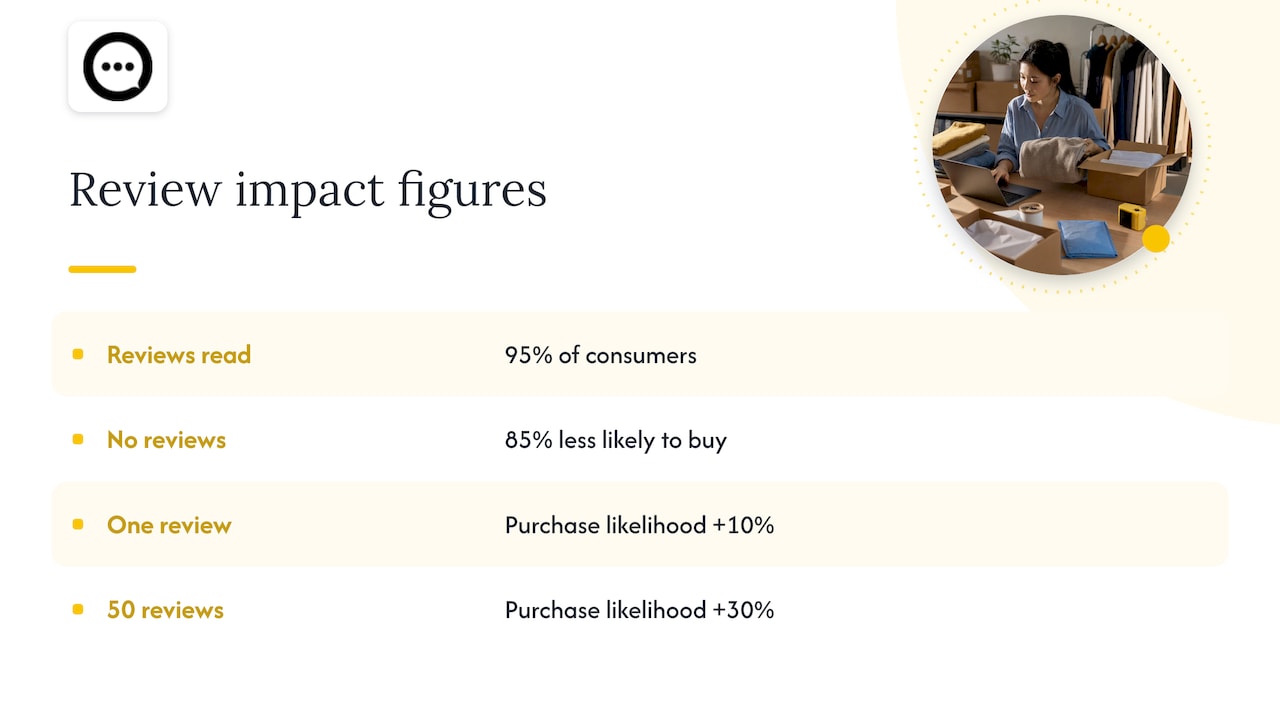
Shoppers read reviews almost universally. A June 2025 PowerReviews survey cited by Shopify found that 95% of consumers read product reviews as part of their shopping journey, and 85% say they are less likely to buy a product that has no reviews at all. The same page cites Bazaarvoice data showing that a single review can lift purchase likelihood by 10%, climbing to 30% at 50 reviews.
That tells you reviews matter. It does not tell you which reviews matter, or why. Once every competitor has stars, stars stop differentiating. What shoppers want now is context: does this jacket run small, does this serum work on sensitive skin, how does the lid actually close. Static photos and descriptions cannot answer those questions, but a customer talking on camera, or a verified buyer replying to a question, can.
This is also why attribute-level data is gaining ground. Instead of one rating per review, stores capture fit, quality and comfort separately, together with photos and video, so a product team can see exactly what is working and what is not.
What Shopify gives you natively
Shopify has built-in review reporting through the Shop channel. After a customer buys through the Shop app or your online store, they can leave a review in the Shop app. Your admin then shows Collected reviews, Average rating and Conversion rate for reviews triggered via Shop.
Two limits are worth knowing:
- The native metrics cover reviews collected through Shop and eligible partner apps that meet Shop’s verification and moderation standards. Reviews gathered elsewhere will not appear in those numbers.
- The native view is about collection and rating. It does not tell you what shoppers are asking, which clips they watch, or which themes keep recurring.
That is fine for a young store. Once you pass a few dozen reviews per product, you will want a layer that shows engagement and themes.
The metrics worth a place on your dashboard
Resist the urge to track everything. These are the ones that tie directly to decisions.
| Metric | What it tells you | Action it should trigger |
|---|---|---|
| Review collection rate | Share of orders that produce a review | Change the request timing, channel or incentive-free prompt |
| Rating distribution | Spread of scores per product | Investigate any product with a cluster of 1 to 2 star reviews |
| Recurring themes | Topics repeated across reviews | Fix the product, size chart or description |
| Review media share | Percentage of reviews with photo or video | Prompt buyers for richer content |
| Engagement with review content | Plays, views, expands on the product page | Move or redesign the widget if nobody sees it |
| Q&A volume and topics | What shoppers ask before buying | Answer on the page, update copy, add images |
| Conversion on pages with reviews | Whether review content correlates with purchase | Prioritize pages where content is thin |
A useful habit: review this table monthly, pick the one metric that looks worst, and change one thing on one product page. Small, specific experiments beat a quarterly redesign.
Review collection rate
If only a small slice of buyers ever leaves a review, your data is thin and skews toward the very happy or the very annoyed. Shopify lists several ways to raise it, including automated post-purchase emails, SMS requests and making it easy to leave a review. Friction is the main enemy. Every extra login or form field loses people.
For video, friction matters even more. That is why we built collection around a scan-and-record flow: our guide on capturing short verified video reviews with QR codes walks through it, and the three-step path from QR code to product page shows the whole loop.
Themes and attribute-level feedback
This is where analytics pays for itself. Shopify’s guide gives a clear example: if a product category keeps scoring low on fit, you can improve sizing charts or descriptions right away, which can cut returns and raise conversion. The point is that reviews are a free, continuous research panel, but only if you read them as data, not decoration.
A simple routine: once a month, export or scan the lowest-rated reviews for your five best-selling products. Tag each with a theme. If one theme appears more than a few times, it is a product or page problem, not a customer problem.
Engagement with review content
A video review nobody watches is not social proof. Track whether shoppers play clips, how far they scroll to reach them, and whether pages with video convert differently from pages without. If engagement is low, the issue is often placement, not content. We cover this in why clips hidden below the fold underperform.
How video reviews change your analytics
Text reviews give you words. Video reviews give you words plus tone, product use, scale, texture and fit on a real body or in a real room. That is richer evidence for the shopper, and it produces different data for you.
With video you can see things a text field never captures: how a customer unboxes the item, which feature they demonstrate first, what they struggle with. Reviewers also tend to mention the exact concern another shopper has. Industry commentary summarized in the research behind this article suggests star ratings are now table stakes, while post-purchase video reviews and direct Q&A are what answer the specific questions that photos and descriptions cannot.
For analytics, that means you should look at:
- Video share of total reviews. A rising share means your collection flow is working.
- Plays per product page view. The simplest measure of whether shoppers want this content.
- Moderation outcomes. How many submissions you approve, edit or reject, and why. A high rejection rate on one product can point to confusing instructions or a quality issue.
- Length and completeness. Short, focused clips (15 to 20 seconds) usually beat long ones for completion.
If you are weighing formats, our comparison of video testimonials versus reviews lays out where each works best.
Shopper Q&A: the analytics most stores ignore
Questions are the most honest data you can collect, because they show hesitation in the moment. Every question on a product page is a reason someone has not bought yet.
Track three things:
- Top question topics per product. If five shoppers ask whether a bag fits a 16-inch laptop, your page should say so, with a photo.
- Time to answer. Slow answers lose the sale. Answers from verified customers feel more credible than a brand reply.
- Questions that repeat across products. These point to store-wide gaps: shipping times, return policy, materials.
Q&A also feeds returns reduction. When shoppers get answers before they buy, fewer discover a mismatch after delivery. We detail the approach in how to reduce returns with Q&A, and if you have not added Q&A yet, there are four ways to add product Q&A without theme edits.
There is a search benefit too. Shopify points out that review-based content is a form of fresh page copy; its guide on user-generated content notes that surfacing customer content can help a store rank for customer-intent terms that standard product descriptions miss. For a wider look at why this kind of content builds confidence, this overview of user-generated content and brand trust is a good companion.
Our perspective: analytics should end in a page change
We built Peers for one platform, Shopify, and for one job: put real post-purchase video reviews and shopper Q&A on the product page, where the buying decision happens. Here is how we think about analytics from that vantage point.
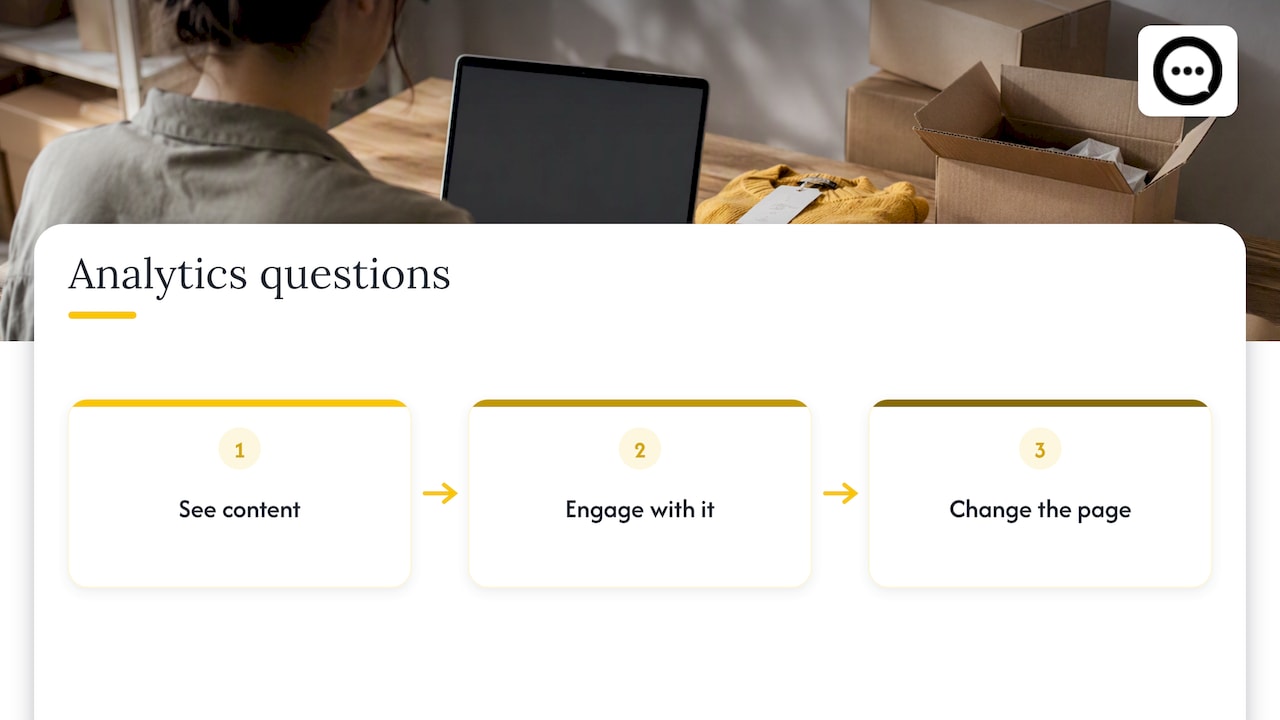
Most review dashboards are built to report. We think they should be built to decide. A chart that cannot lead to a change on a product page is trivia. So we look at analytics through three questions: Did shoppers see the content? Did they engage with it? Did the page change what it said or showed as a result?
We also think authenticity is the analytic that cannot be faked. Video from a verified buyer is hard to counterfeit and easy for a shopper to judge. That is why we pair collection with moderation tools, so you control what goes live without reshaping the truth. A store that approves only glowing clips gets a prettier dashboard and a weaker brand.
Finally, we would rather you start small. Pick your top three products, collect a handful of videos and answered questions for each, and watch engagement for a few weeks. The patterns will tell you what to do next far better than a big rollout will.
— Leo
Keep your data honest
Analytics only helps if the inputs are real. In the US, the FTC’s Consumer Reviews and Testimonials Rule is aimed at deceptive review practices, and Shopify’s guidance highlights that merchants should collect reviews from real customers and be transparent, including about constructive criticism. Hiding negative reviews to protect a star average is both risky and counterproductive: shoppers trust a mix of ratings more than a spotless one.
Practical rules:
- Moderate for spam, abuse and off-topic content, not for criticism.
- Label anything incentivized or gifted. Our guide to FTC endorsement rules and copy-ready disclosures gives wording you can adapt. It is general information, so talk to a lawyer about your specific setup.
- Reply publicly to negative reviews. The reply is part of the content.
Getting data out of your review tool
Many stores pick a review app on display and price, then discover analytics are an afterthought. If you run your own reporting, check whether your tool exposes data through an API or webhooks. Analysts note that merchants who feed review data into their own reporting systems can compare sentiment across channels instead of living inside a single app dashboard.
A realistic checklist when you evaluate any review tool:
- Can I see engagement, not just totals?
- Can I filter by product, rating and media type?
- Can I moderate before anything goes live?
- Does it work well on mobile, where most browsing happens?
- Can I export or pull the data elsewhere?
- Does it install without theme code work? Our walkthrough on embedding video reviews without theme code shows what that looks like.
A simple 30-day plan
Week 1: baseline. Note your average rating, review count and review collection rate for your top five products. Check the Shop metrics in your Shopify admin if you use that channel.
Week 2: collect richer content. Add a video and Q&A prompt to your post-purchase flow. Aim for the top three products only.
Week 3: read the signals. Tag themes in low-rated reviews and new questions. Check how many shoppers play videos.
Week 4: change one thing per product. Update a size chart, add an FAQ line, move the review block higher, or reshoot a main image. Write down what you changed so you can compare next month.
If you want the mechanics of the first publish, publishing video reviews within 1 GB and 10 minutes covers upload limits and timing.
Try Peers on your store
Peers is built only for Shopify. It embeds post-purchase video reviews and live shopper Q&A on your product pages, with full moderation, customizable design, mobile compatibility and analytics to track engagement. There is a Free plan, and the Peers Growth plan costs 15 USD per month. You can install it from the Peers page in the Shopify App Store and see your first clips and questions on a product page the same day you set it up.
FAQ
How do I check reviews on Shopify?
If you collect reviews through the Shop channel, open the product reviews metrics in your Shopify admin to see collected reviews, average rating and conversion rate. For anything beyond that, such as engagement or themes, use the dashboard of your review app.
What is the best review analytics setup for a small store?
Start with the native Shop metrics plus an app that shows engagement with review content and Q&A topics. Track five numbers: collection rate, rating distribution, recurring themes, media share and plays per page view. You can add more once you have enough reviews for patterns to show.
Do video reviews give better analytics than text reviews?
They give you different data. You can measure plays and completion, and you see how customers actually use the product. Text reviews are easier to scan for themes in bulk, so most stores benefit from both.
Should I remove negative reviews to keep my rating high?
No. Moderate spam and abuse, but keep honest criticism. US regulators target deceptive review practices, and shoppers tend to distrust a perfect score. Use negative reviews as a list of fixes for your product pages.
Sources
- Review Analytics: Use Cases + Tips for Ecommerce Stores, Shopify
- How To Get Product Reviews To Boost Brand Trust, Shopify
- Shop product reviews ratings and metrics, Shopify Help Center
- 10 Customer Engagement Metrics To Track, Shopify
- User Generated Content: What It Is and Examples, Shopify
- Best Review Software, Expert Picks
- User-generated content and brand trust