Email Review Requests on Shopify: Timing, Copy, Templates

The best Shopify review request email goes out after the order is delivered, not when it is placed. It names the product, carries one clear button to the review form, and asks for an honest opinion from every buyer, not only the happy ones. Shopify will not send it for you, so the work is picking a tool, setting the trigger and writing a short message a real person would answer.
This guide covers the setup, the timing, subject lines, three templates you can paste into your own flow, the FTC rules that apply to US stores, and how to measure what works.
TL;DR
- Shopify has no built-in review collection, so a third-party app or email tool sends the request.
- Trigger the email from the delivery date, not the order date, and wait long enough for the customer to actually use the product.
- Use a conversational subject line, one button, the product name and image, and a reply address that reaches a human.
- Ask everyone. Filtering who gets the request by expected satisfaction (review gating) can violate FTC rules, and incentives must never depend on a positive rating.
- Test send timing, and consider offering a video option in the email so reviews carry more proof.
Table of Contents
- Does Shopify send review request emails by itself?
- Why the request matters at all
- When to send the request
- Subject lines that get opened
- What the email body should contain
- Three templates to adapt
- Staying honest and inside the rules
- Where email falls short, and how video helps
- Our perspective: reviews are a conversation, not a form
- Try Peers on your Shopify store
- Measure, test and improve
- Frequently asked questions
- Sources
Does Shopify send review request emails by itself?
No. Shopify retired its own Product Reviews app and did not replace it with native review collection, so a store with no extra apps has no workflow that requests and stores reviews. The request email, its timing and the place the rating lands all come from whatever you install and configure.
That leaves you three realistic routes:
- A review app with built-in requests. You install it, pick a delay, edit the template. This is the least work and the route most stores take. Many apps also add photo and video reviews and SMS requests, as one setup guide notes.
- An email platform you already use. You trigger a flow from the order or fulfillment event, and send the customer to a review form. More control over design, more setup.
- A webhook-based flow. Developers can use Shopify’s delivery events to fire the email at the right moment. Worth it only if your apps cannot trigger from delivery.
Whichever you pick, check three things before you commit: can it trigger from delivery, can it send to every customer (not a filtered group), and where do the reviews appear on your product page.
Why the request matters at all
Reviews are the thing a hesitant shopper looks for before paying. One widely repeated figure, quoted in a comment filed with the FTC, says online shoppers are 270 percent more likely to buy a product with five-star reviews than with none. Treat it as a sign of the pressure, not a promise for your store. That pressure is exactly why stores rush to collect reviews and why some cut corners, which the compliance section below covers.
If you want the wider picture of how reviews and other proof change buying behavior, these social proof strategies are a good companion read. For the practical question of where proof belongs on a Shopify page, see our walkthrough of five Shopify spots for social proof.
When to send the request
This is where most stores lose reviews. If the email fires when the order is placed or marked fulfilled, it reaches the inbox before the package reaches the door. The customer cannot review something they have not held, so they archive it. One timing analysis puts it plainly: delivery date, not order date, is the right trigger.
A workable approach:
- Count from delivery. If your app can only count from fulfillment, add the typical transit time to your delay.
- Match the delay to the product. A candle or a snack can be judged in a day or two. A mattress, a skincare serum or a pair of boots needs weeks. Ask yourself how long a normal customer needs to form an opinion, then send just after that.
- Send one reminder, at most two. A single follow-up a few days later to people who have not responded is reasonable. Beyond that you are training customers to ignore you.
- Skip customers with open problems. Anyone with an unresolved return or support ticket should get help first. This is not review gating, as long as your rule is about an open issue and not about predicted sentiment. Keep the rule narrow and write it down.
Quick timing guide by product type
| Product type | Start counting from | Reasonable first send |
|---|---|---|
| Consumables (food, beverage, candles) | Delivery | 2 to 4 days after |
| Apparel and accessories | Delivery | 5 to 10 days after |
| Home goods and small electronics | Delivery | 7 to 14 days after |
| Skincare, supplements, anything that works over time | Delivery | 3 to 4 weeks after |
| Furniture, mattresses, bulky items | Delivery | 3 to 6 weeks after |
These are starting points drawn from common practice, not benchmarks. Your own data should overrule them. Most tools let you A/B test different send times and days, so run your first test on the product category that sells the most.
Subject lines that get opened
The pattern that holds up across guides is a conversational subject line rather than a corporate one. A typical example is “How is [Product Name] working out?”, which reads like a note from a person, not a survey.
Some variations to test, adjusted to your brand voice:
- How is your [Product Name] working out?
- Quick question about your [Product Name]
- Did your [Product Name] live up to the hype?
- [First name], what did you think?
- Your [Product Name] has had a few days. Thoughts?
- Help the next shopper decide (30 seconds)
A few rules keep these honest and effective:
- Name the product. It tells the reader exactly what you are asking about.
- Do not promise a prize in the subject line. It can read as pressure, and if the reward depends on rating, it creates legal risk.
- Avoid emotional steering. “Tell us how much you loved it” assumes a positive answer. One compliance firm flags phrasing like this as implying a good review is expected.
- Keep it short. Many inboxes cut off long subject lines on mobile.
What the email body should contain
The strongest review request emails do less, not more. A useful checklist:
- The product name and image, so the customer knows which item you mean in an order with several.
- One clear button, labeled something like “Write a review”. Guides agree on a single call to action.
- A direct link to that product’s review form, not your home page or a general review page.
- A footer with a reply address that reaches a human. If someone had a bad experience, they should be able to tell you privately as well as publicly.
- No cross-sell links above the ask. Recommendations before the button dilute the one thing you want the customer to do.
Two sentences of context are enough: why their opinion matters and how long it takes. Anything past a short paragraph tends to bury the button.
Three templates to adapt
Edit these to your voice and your product. Replace the brackets with your app’s merge tags.
Template 1: The simple ask
Subject: How is your [Product Name] working out?
Hi [First name],
Your [Product Name] should have arrived a few days ago. We would love to know how it is going.
Your honest opinion, good or bad, helps other shoppers decide and helps us improve what we make. It takes about a minute.
[Product image]
[Write a review]
If something is not right, just reply to this email and a real person on our team will help.
Thanks, [Name], [Store name]
Template 2: The long-use product
Subject: A few weeks in: how is your [Product Name]?
Hi [First name],
Some products need a little time before you can judge them. You have had your [Product Name] for a few weeks now, so we would like to hear how it has held up.
What is the one thing you would tell someone thinking about buying it?
[Write a review]
Reply to this email if you have questions about using it. We read every message.
[Name], [Store name]
Template 3: The gentle reminder
Subject: Still thinking about your [Product Name]?
Hi [First name],
We sent a note last week about your [Product Name]. If you have a minute, a quick review makes a real difference to shoppers weighing the same decision.
[Write a review]
No pressure at all. If you would rather not, you will not hear from us about this again.
[Name], [Store name]
Note that none of these mention a reward, and none ask for a specific rating. If you want to add an incentive, read the next section first.
Staying honest and inside the rules
This is the part that can cost real money, so it is worth getting right. These rules apply to US stores. If you sell elsewhere, check the local rules for each market.
Do not gate your reviews
Review gating means asking only the customers you expect to be satisfied, or routing unhappy customers to private feedback while sending happy ones to the public form. The FTC says soliciting reviews only from customers expected to be satisfied could violate the FTC Act. The simple fix: send the same request to every buyer, with the same wording.
The FTC also finalized a rule on fake and false reviews. It bars businesses from creating or selling fake reviews and from buying them or procuring them from company insiders, and it lets the agency seek civil penalties against knowing violators. Writing your own reviews, or asking friends and staff who never used the product to post them, falls squarely on the wrong side.
Handle incentives carefully
Offering a discount or a free product for a review is where many stores slip. The safe principles:
- Never tie the reward to a positive review. Pay for the act of reviewing, not the rating.
- Disclose it. Under the updated guides, free or discounted products given to an endorser may count as a material connection that needs disclosure, and incentivized reviews should say they were incentivized.
- Know the limits of disclosure. Consumer advocates argue that even disclosed incentivized reviews may not be unbiased. If your reviews are the heart of your credibility, keep rewards modest or skip them.
- Watch your vendors. The updated guides say intermediaries such as reputation management companies can be held liable for creating or spreading deceptive endorsements, so check how your review app and any agency handle requests.
We have written two practical pieces on this: FTC endorsement rules with copy-ready disclosures for Shopify and how to reward customers for reviews compliantly. For anything specific to your store, such as a particular promotion, ask an attorney who handles advertising law.
Where email falls short, and how video helps
A text review request has a built-in ceiling. The customer has to open the email, click through, log in to a form, and type. Many who would happily say two sentences about your product will not write a paragraph. And when they do, the review often reads like every other one: “Great product, fast shipping.”
That is why many stores now offer a quick video option alongside the text form. A short clip shows the product in a real home, on a real person, and answers questions text cannot. Our comparison of video testimonials versus written reviews goes through the trade-offs, and if you are curious how the capture step works, see how a QR code takes a customer from package to product page.
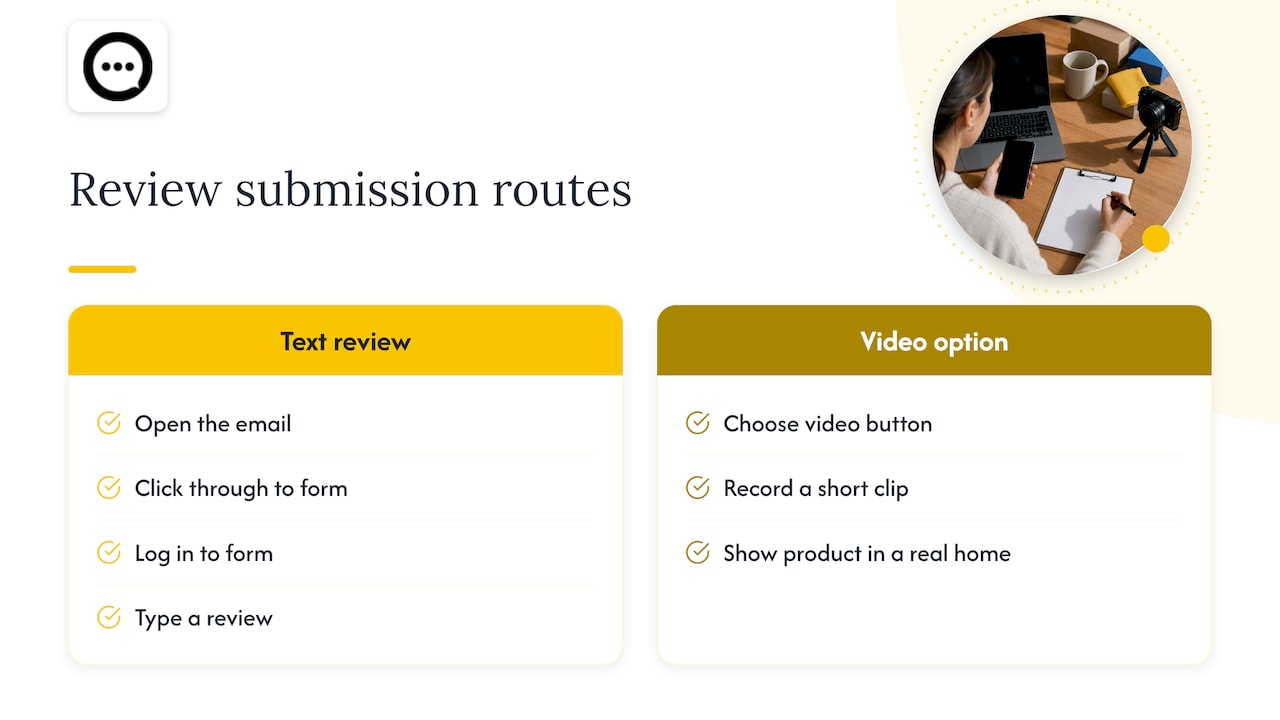
In email terms, this changes one line of your template: “Prefer to show us? Record a short clip instead.” One button for text, one for video is the only exception to the single-call-to-action rule, and it earns its place because it lowers the effort for customers who dislike typing.
Our perspective: reviews are a conversation, not a form
We built Peers for Shopify stores only, so we spend our days looking at what happens between a customer’s purchase and the next shopper’s decision. Here is what we have come to believe.
The review request email is the first moment a brand speaks to a customer after the sale, and most stores waste it on a generic survey tone. The stores that earn the best reviews treat the email as a real question from a real person, sent when the customer has something to say.

We also think the written star rating is only half of what a shopper wants. Visitors hesitate because of specific doubts: does it fit, does it look like the photo, is it loud, how does it hold up? A rating does not answer those. A short video from a verified buyer, and a place where shoppers can ask questions and hear from people who own the product, does. That is why Peers puts post-purchase video reviews and shopper Q&A directly on the product page, with moderation tools so you stay in control of what appears.
Our advice, whichever tool you use: ask everyone, ask at the right time, make it easy, and never shape the answer. Authentic feedback, including the occasional critical review, is what makes the good ones believable.
— Leo
Try Peers on your Shopify store
If you want the email to lead to richer proof, Peers is available on the Shopify App Store. There is a free plan, and the Peers Growth plan costs $15 per month. It lets customers leave video reviews after purchase, adds shopper Q&A to the product page, and includes moderation, customizable design, mobile support and engagement analytics. You can read how the install works in our guide to embedding video reviews without theme code.
Measure, test and improve
Once the flow is live, treat it as an experiment. Track a few numbers monthly:
- Request-to-review rate: reviews received divided by requests sent, by product category.
- Open and click rates for each subject line and template.
- Review quality: share of reviews with photos or video, and average length.
- Time to review: how many days after the send the reviews arrive, which tells you whether your delay is right.
Change one variable at a time. Test the delay first, then the subject line, then the button text, then the reminder. Give each test enough orders to mean something, and keep what wins.
Also review where the reviews show up. A great collection flow does not help if the reviews sit in a tab buyers never open. Our piece on stopping video reviews from hiding below the fold covers placement.
Frequently asked questions
Can I email customers for reviews after purchase?
Yes. Sending a review request to someone who bought from you is standard practice, and most Shopify review apps include settings for automatic post-purchase requests. Just send it to all customers, keep the wording neutral, and include your unsubscribe or preference link as your email tool requires.
Does Shopify charge to send these emails?
The review request itself depends on the tool you use. Shopify has no native review collection, so the app or email platform you pick sets the pricing and sending limits. Check the plan details of that tool before you build the flow.
How many reminders should I send?
One follow-up is a sensible default, two at most. Space them a few days apart, and stop for anyone who has already reviewed. If a customer does not respond after that, leave them alone.
Can I offer a discount in exchange for a review?
You can, but be careful. The reward must not depend on a positive rating, and the review should disclose that it was incentivized. Some critics argue disclosed incentives still bias results, so keep the offer small or skip it.
Sources
- How to automatically request product reviews on Shopify
- Shopify Review Request Emails: Setup and Timing
- How to Ask for Reviews by Email (Step by Step)
- The Best Time to Send a Shopify Review Request
- FTC final rule banning fake reviews and testimonials
- 14 Years Later: FTC Updates The Endorsement Guides
- TINA.org comment on the FTC Endorsement Guides
- Is Review Gating Illegal? What the FTC Rule Means