Capture Usable Video Testimonial Scripts in 2 Weeks for Marketers

Use a compact hook→context→problem→solution→result→CTA script to get authentic, high-converting video testimonials. Aim for 90 to 120 seconds on landing pages, 30 to 45 seconds for social, with a fill-in template you can send customers today. Disclose any incentive on camera, and let a short production checklist carry you from recording to publishing in about two weeks.
TL;DR:
- Specific numbers, timeframes, and visible product use significantly boost trust and engagement in video testimonials compared to polished scripts.
- Short social videos should focus on one strong hook, a clear result, and a simple CTA within 15 to 45 seconds for maximum effectiveness.
- Longer videos for landing pages or sales pitches need detailed problem, decision, and quantifiable outcome sections, with runtime depending on the channel.
- Authenticity is best achieved through natural conversation, good audio, comfortable setting, and transparent disclosure of incentives on camera.
- Using unscripted customer recordings or post-purchase review platforms delivers ongoing social proof and reduces production complexity.
Table of Contents
- What Should a Video Testimonial Script Include?
- Three Video Testimonial Script Examples You Can Copy
- How Long Should Your Testimonial Video Be by Channel?
- What Interview Questions Get Specific, Usable Answers?
- What Filming Setup Keeps Testimonials Looking Authentic?
- How Do You Turn Raw Footage Into a Published, Repurposed Asset?
- Why Specifics Beat Polish in Video Testimonials
- Want More Video Testimonials Without Scripting Every One?
- Sources
- FAQ
What Should a Video Testimonial Script Include?
A testimonial script isn’t a word-for-word speech. It’s a scaffold that keeps a real customer’s story on track without making them sound like they’re reading a hostage note. The strongest scripts follow six beats: hook, who they are, the problem, the decision moment, the experience, and the result, closed out with a call to action. Miss any one of these and the video either drags or leaves viewers wondering what actually changed.
The hook comes first because attention spans on video are brutal, especially on social. One strong line, ideally a specific result or a relatable frustration, decides whether someone keeps watching. Who they are grounds the viewer in a real person or company, not an anonymous voice. The problem section should feel specific, not generic (“we were losing deals because follow-up took too long,” not “we needed better tools”). The decision moment explains why they picked your product over alternatives or over doing nothing. The experience section covers onboarding and day-to-day use. The result is where you push hard for numbers. And the CTA either points viewers to your product page or simply lets the story speak for itself, depending on where the clip runs.
Here’s a 90 to 120 second template you can adapt:
- Hook (0:00 to 0:10): “Before [product], we were [specific pain point] — now [specific result].”
- Introduction (0:10 to 0:20): “I’m [name], [title] at [company], and we [what the company does].”
- Problem (0:20 to 0:40): “The issue was [specific problem], which cost us [time/money/customers].”
- Decision (0:40 to 0:55): “We looked at a few options, but chose [product] because [specific reason].”
- Experience (0:55 to 1:30): “Getting started took [timeframe]. The part that surprised me was [detail].”
- Result (1:30 to 1:50): “Since then, we’ve seen [specific metric] over [timeframe].”
- CTA (1:50 to 2:00): “If you’re dealing with [problem], I’d tell you to try it.”
For a 30 to 45 second social cut, compress to hook, one problem line, one result line, and a micro CTA. Skip the company background entirely. That means the metric line does double duty as both hook and payoff, which is why it needs to be nailed during the interview, not patched together in editing.
Getting a customer to say a real number on camera is the hardest part of any interview. Instead of asking “did it help?” ask “what were you dealing with before, and what changed by [specific date or milestone]?” Anchoring the question to a timeframe forces a comparison instead of a vague compliment. If a customer is uncomfortable naming an exact figure, ask for a range and label it as an estimate in the edit rather than dropping the number entirely.
Three Video Testimonial Script Examples You Can Copy
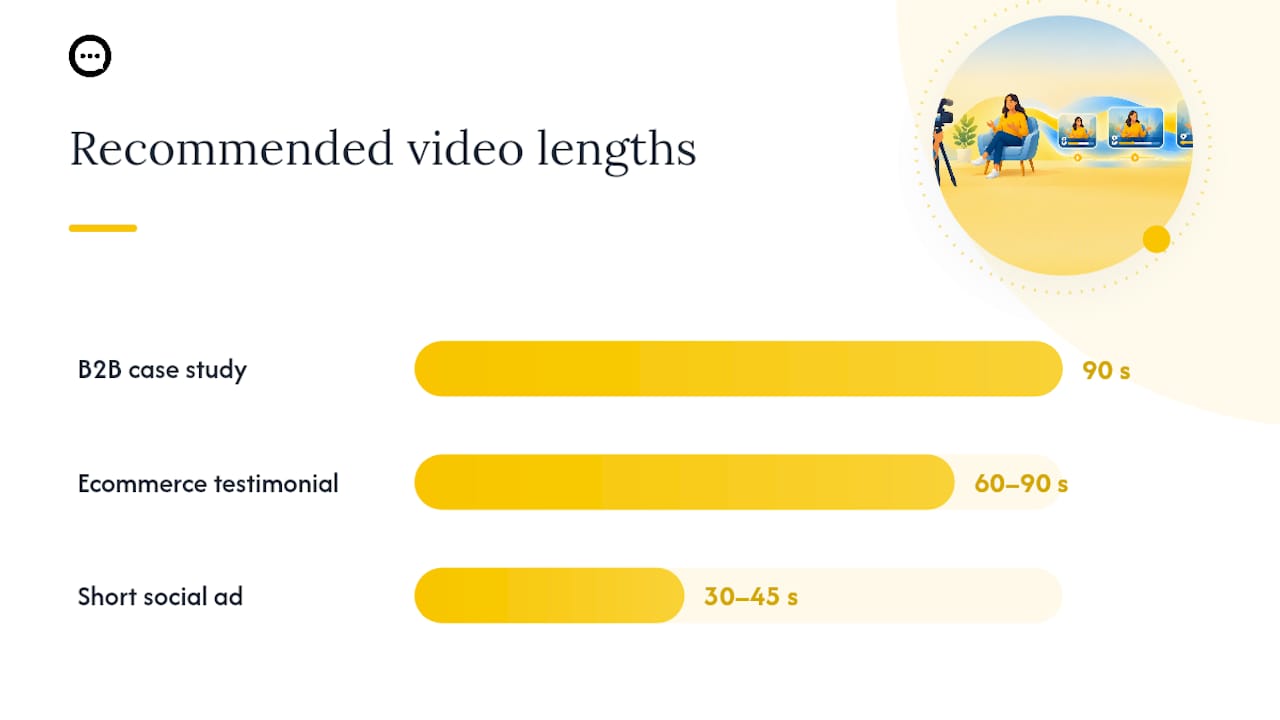
Different channels call for different pacing. These three scripts map directly to the template above, adjusted for a B2B case study, an ecommerce review, and a short social ad.
This one won because setup took a single afternoon and it plugged straight into our existing workflow. Experience: “The first week felt strange asking customers to record video, but response quality jumped immediately.” Result: “Within six weeks, our feedback volume tripled and we caught two product bugs we’d have otherwise missed for months.” CTA: “If you’re still relying on text surveys, you’re leaving information on the table.” For the 90 second cut, keep the hook, decision, and result; drop the setup detail.
-
Ecommerce product testimonial (60 to 90 seconds). Hook: “I almost returned this the first week, and now I use it every day.” Intro: “I’m Josh, I run a home gym and I’ve tried a lot of recovery gear.” Problem: “My shoulder pain was bad enough that I was skipping workouts twice a week.” Decision: “I bought this because the return policy made it a low-risk try.” Experience: “It took about three sessions before I noticed a real difference, not overnight, but steady.” Result: “Two months in, I’m back to a full training schedule with no flare-ups.” CTA: “Watch the demo on the product page, that’s what convinced me to keep it.” This format leans on product visualization. Show the item in use on camera rather than just talking about it, since product visuals and reviewer credibility measurably move purchase intent.
-
Short-form social ad (30 to 45 seconds). Hook, on-screen text overlay: “I switched software three times before this one stuck.” Spoken: “I’m Dana, I run a small design studio, and client approvals used to take a week of back-and-forth emails.” Result: “Now it’s under 24 hours, every time.” CTA overlay: “Try it free” or “See how it works,” depending on the ad objective. Keep spoken words under 80 total. The overlay text should repeat the spoken hook almost verbatim, since a large share of social video plays without sound.
How Long Should Your Testimonial Video Be by Channel?
Runtime isn’t a stylistic choice. It’s dictated by where the video runs and how much convincing the viewer needs before they’ll believe a stranger on camera.
- Social ads: 15 to 45 seconds. One hook, one result, one CTA. Anything longer loses viewers before the payoff.
- Landing pages: 60 to 120 seconds. Enough room for problem, decision, and a quantified result, since channel-specific runtime data supports shorter social cuts and longer landing-page context.
- Sales decks and enterprise pitches: 2 to 3 minutes. Buyers here want detail on the decision process, not just the outcome.
Format matters as much as length. A problem–solution–success arc works well for consumer and hedonic products, where emotional resonance drives the decision. A structured interview Q&A format suits analytical B2B buyers who want to see reasoning, not just enthusiasm. A product demo plus testimonial hybrid fits complex software, where viewers need to see the interface before they’ll trust a claim about ease of use.
Buyer involvement changes how much detail you need. A low-cost impulse purchase needs almost none, just a hook and a result. A high-consideration B2B purchase with multiple stakeholders needs the full arc, including the decision moment, because that’s the part other buyers relate to most when they’re comparing vendors themselves.
What Interview Questions Get Specific, Usable Answers?
The script only works if the raw interview gives you real material to cut from. A loose, conversational interview built around seven core questions consistently produces better footage than handing someone a script to read.
- What problem were you trying to solve before you found us?
- What had you tried before, and why didn’t it work?
- What made you decide to move forward with us specifically?
- What did the first few weeks look like?
- What result have you seen, and over what timeframe?
- What would you tell someone considering this right now?
- Is there anything that surprised you, good or bad?
Questions 1, 3, and 5 map to the problem, decision, and result beats. For B2B customers, frame follow-ups using S.T.A.R. logic: situation, task, action, result, since this structured framework produces more authentic testimonials than a memorized script. For consumer products, stick closer to problem–solution–success, since it carries more emotional weight than a task breakdown.
When an answer stays vague (“it’s been great”), follow up immediately: “Can you put a number on that?” or “What was that like a month ago compared to now?” Most customers will sharpen their answer the second time without needing a script.
Pro Tip: Ask the metric question twice, five minutes apart, in different words. People often deliver a cleaner, more quotable version the second time once they’ve relaxed into the conversation.
Keep the tone conversational and avoid rehearsal. A customer who’s memorized lines sounds stiff on camera, and viewers pick up on that instantly. Two or three natural takes beat one scripted, letter-perfect read every time.
What Filming Setup Keeps Testimonials Looking Authentic?
Good testimonials don’t need a production crew. They need clean audio, decent light, and a subject who feels comfortable enough to talk like a person instead of a spokesperson.
- Audio matters more than video quality. A $50 lavalier mic or a shotgun mic on a phone will outperform a $2,000 camera with built-in audio.
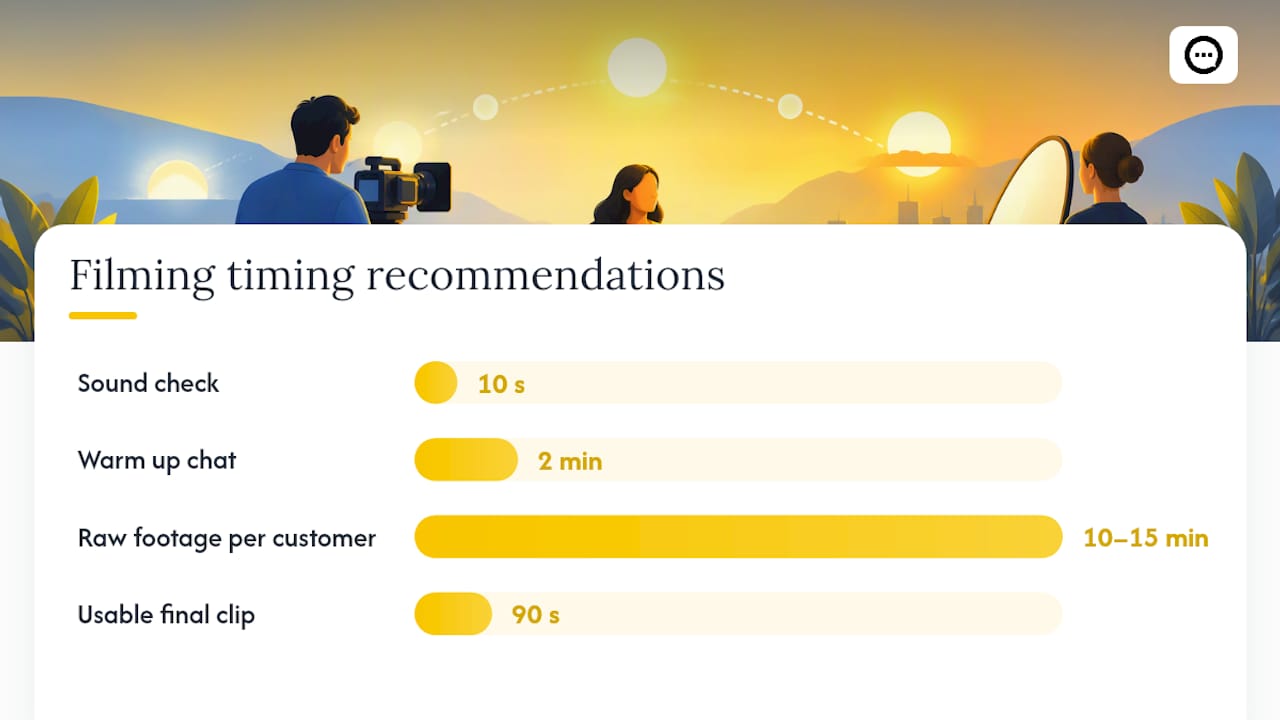
- Do a 10-second sound check before recording. Listen for hums, echo, or background noise you can’t fix in post.
- Natural window light, facing the subject, beats most artificial setups and avoids harsh shadows.
- Frame the subject slightly off-center with headroom, and pick a background that isn’t distracting but still looks like a real workspace or home.
- Warm subjects up with two minutes of casual, unrecorded conversation before rolling. Nerves show up on camera and flatten delivery.
- Get written consent for usage rights before recording, and confirm on camera if the customer received any incentive, so the disclosure is baked into the footage itself.
Facial expression and tone create what researchers call parasocial cues, the subtle signals that make a video review feel more honest and relatable than a written one. A slightly imperfect, warm delivery will usually outperform a polished but flat one.
Pro Tip: Record 10 to 15 minutes of raw footage per customer, even if you only need 90 seconds. Ask the result question at least twice. Extra footage is what saves an edit when the best quote comes out slightly garbled the first time.
If a customer received a discount, free product, or payment for their time, say so on screen, not just in a caption buried at the end. The FTC’s guidance on testimonials requires disclosures to be clear and conspicuous, which for video means visible and audible, not hidden in fine print.
How Do You Turn Raw Footage Into a Published, Repurposed Asset?
Editing order matters as much as the interview itself. Cutting in the wrong sequence buries the moment that actually convinces viewers.
- Open on the hook. Pull the sharpest line from the result section and move it to the front, even though it happened last in the interview.
- Add brief context. Two sentences on who the customer is and what they do, no more.
- Cut in the conflict. Keep the problem section tight, one or two sentences that make the stakes clear.
- Land the resolution. This is where the quantified result goes, stated plainly, ideally with an on-screen text overlay reinforcing the number.
- Close on the CTA. End card or spoken line, whichever fits the channel.
- Build the short cuts. Pull a 15 to 30 second version for social straight from the same footage, reusing the hook and result lines.
- Add captions and overlays. Burn in captions for sound-off viewing, and overlay the key metric as text at the moment it’s spoken.
- Tag links with UTM parameters so you can track which cut, channel, and CTA variant actually drives clicks.
A practical two-week cycle keeps this moving: record within three to five days of a customer win while the story is fresh, edit within another three to five days, then publish and repurpose across channels by day fourteen. Review performance after the first week live, then adjust the CTA or cut length based on what’s actually converting rather than guessing.
Why Specifics Beat Polish in Video Testimonials
The instinct to over-produce testimonials works against you. Research on video word-of-mouth shows that product visualization and publisher credibility are strong, statistically significant predictors of purchase intent, while polish and emotional intensity alone are not. Viewers trust specifics: a number, a timeframe, a visible product in use. A slightly rough clip with a real customer stating “we cut response time from four days to six hours” will outperform a glossy ad with vague enthusiasm every time.
Match the messenger to the product. For B2B software, expertise from the customer carries more weight than relatability. For consumer goods, similarity to the viewer matters more. And any incentive needs disclosure, on camera, not buried in a caption, or you risk trading short-term polish for long-term credibility.
— Leo
Want More Video Testimonials Without Scripting Every One?
Scripted testimonials are worth the production effort for landing pages and sales decks, but they don’t scale on their own. The platform gives Shopify store owners a way to collect post-purchase video reviews and shopper Q&A directly on product pages, without booking a single interview.
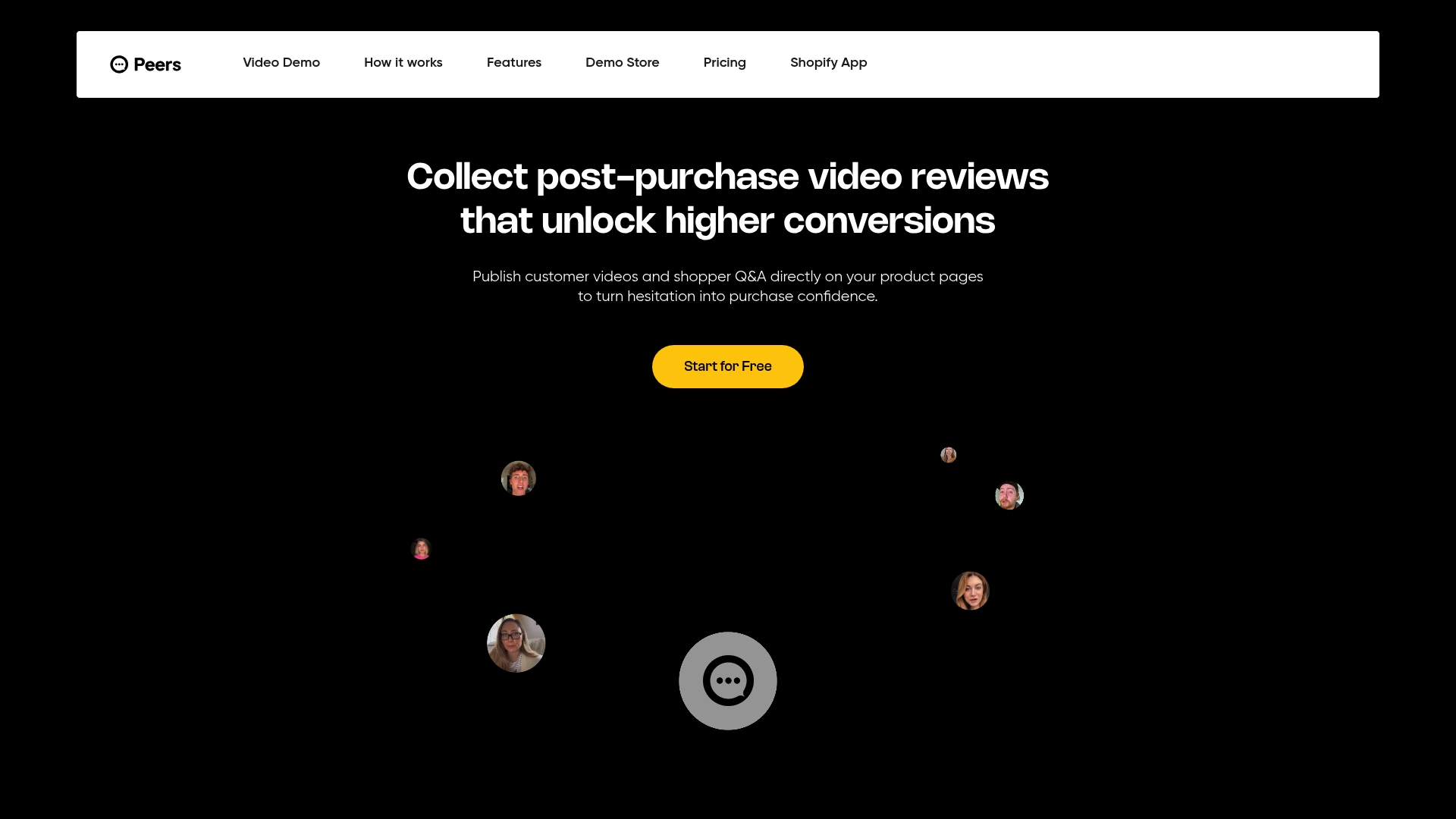
The workflow is simple: customers record a short video review after they buy, and it gets moderated and embedded next to the product they’re reviewing, alongside real shopper questions answered by verified customers. That’s a different kind of proof than a produced testimonial. It’s ongoing, unscripted, and it shows up exactly where a shopper is deciding whether to click “buy.” Instead of a handful of polished case studies, you get a steady stream of organic video social proof feeding the same trust signals the research points to: real product use, real customers, visible on the page that matters most.
The platform offers a Free plan to start, with a Growth plan available for stores that want more volume and analytics. If your product pages are missing customer video entirely, check out Peers and see what a week of embedded reviews does for your conversion rate.
Sources
For deeper reading on the research and standards behind this script framework, start with the FTC’s testimonial disclosure guidance, the study on video e-word-of-mouth and purchase intent, and the practical testimonial script framework this article’s templates draw from. For structuring the narrative itself, see this guide on storytelling techniques for brand engagement.
- FTC: Consumer Reviews & Testimonials Rule — Questions & Answers
- Investigating the Effects of Video-Based E-Word-of-Mouth on Consumers’ Purchase Intention: The Moderating Role of Involvement
- Journal of Business Research article on source characteristics and purchase intention (2023)
- Video Testimonial Script: Templates and Examples That Get Real Results
FAQ
What should you say in a testimonial video?
Say what problem you had, why you chose the product, what the experience was like, and what specifically changed, ideally with a number and timeframe attached. Skip generic praise like “it’s great” in favor of concrete details a viewer can actually picture.
Can you give an example of a video testimonial script?
A workable script runs: hook with a before/after result, a quick introduction, the specific problem, why you chose the product, what the experience was like, and the measurable outcome, closed with a short call to action. The B2B, ecommerce, and social examples above show this structure filled in for three different channels.
What makes a good customer testimonial?
A good testimonial is specific, not polished. It names a real problem, states a quantified result, and shows the product in actual use, since product visualization and credible customers are what move purchase intent according to video e-word-of-mouth research. A slightly imperfect but honest delivery beats an over-rehearsed one.
How do you make a video testimonial?
Interview the customer with open questions instead of a script, record 10 to 15 minutes of raw footage focused on the problem and result, then edit it into the hook→context→problem→solution→result→CTA order. Tools like Trypeers can also collect unscripted post-purchase video reviews automatically if you want ongoing footage without running interviews.
What does a Peers subscription cost?
Peers offers a Free plan to start, and Peers Growth at $15 per month for stores that want expanded video review collection and analytics on Shopify. Full plan details are available on the Peers site.