Seven Video Testimonial Questions for Honest Customer Stories

Use this seven-question kit to get authentic, edit-ready video testimonials: who they are, what problem they had, why they picked you over alternatives, what changed after using it, one measurable result, and whether they’d recommend it. These questions work because they pull specific stories and verifiable details out of customers instead of coached praise. Send the list to participants before you record, let them re-record answers, and get written permission before you publish anything.
TL;DR:
- Using focused questions that prompt specific stories and verifiable results increases testimonial authenticity and reduces editing time.
- Pre-sending questions helps participants give natural answers but must be balanced to preserve spontaneity and credibility.
- Recording must ensure proper lighting, stable camera position, quiet environment, and clear permission compliance to maintain professional quality.
- Short interviews of seven to eight questions typically yield 10 to 15 minutes of usable footage, emphasizing problem, decision, and results.
- For Shopify stores, automated post-purchase video reviews simplify collection, allowing real customer footage to enhance product pages without manual scheduling.
Table of Contents
- Video Testimonial Questions That Work On Camera
- A Categorized Question Bank For Every Testimonial Goal
- How To Structure The Interview For Usable Answers
- Setting Up A Remote Testimonial Recording
- Getting Permission And Staying On The Right Side Of FTC Rules
- Recruiting Customers And Scripts You Can Copy
- Turning Raw Footage Into Clips That Still Sound Honest
- An Eight-Step Workflow For Teams With Limited Time
- Making Verified Video Reviews Part Of Your Product Pages
- Where To Verify The Rules And Dig Deeper
- Sources
- FAQ
Video Testimonial Questions That Work On Camera
You don’t need thirty questions to get a usable testimonial. You need seven or eight that force specificity, and a format that keeps each answer short enough to edit. Here’s the kit marketing teams reach for when there’s no time to overthink it.
Each question below targets one thing an editor needs: a hook, a stake, a decision point, proof, or a close.
- “Can you introduce yourself and your role at [company]?” Gets a clean, usable opener with name and title. Aim for 15 to 20 seconds.
- “What problem were you trying to solve before you found us?” This is the stake. Without it, viewers don’t know why the result matters. Target 30 to 40 seconds.
- “What almost stopped you from buying, or what other options did you consider?” Selection reasoning is more persuasive to B2B buyers than generic praise, since it mirrors their own evaluation process.
- “Walk me through what changed after you started using it.” This is the transformation moment. Let them ramble a bit here, then trim in editing.
- “Is there a number or result you can point to, like time saved, errors reduced, or revenue impact?” Ask for a real figure, but don’t feed them one. If they hedge with “about” or “roughly,” that’s fine. Coached precision reads as fake.
- “What would you tell someone on the fence about trying this?” This is your close and your most reusable soundbite.
- “Would you recommend us, and why?” A direct yes plus a reason gives you a clean pull quote for landing pages.
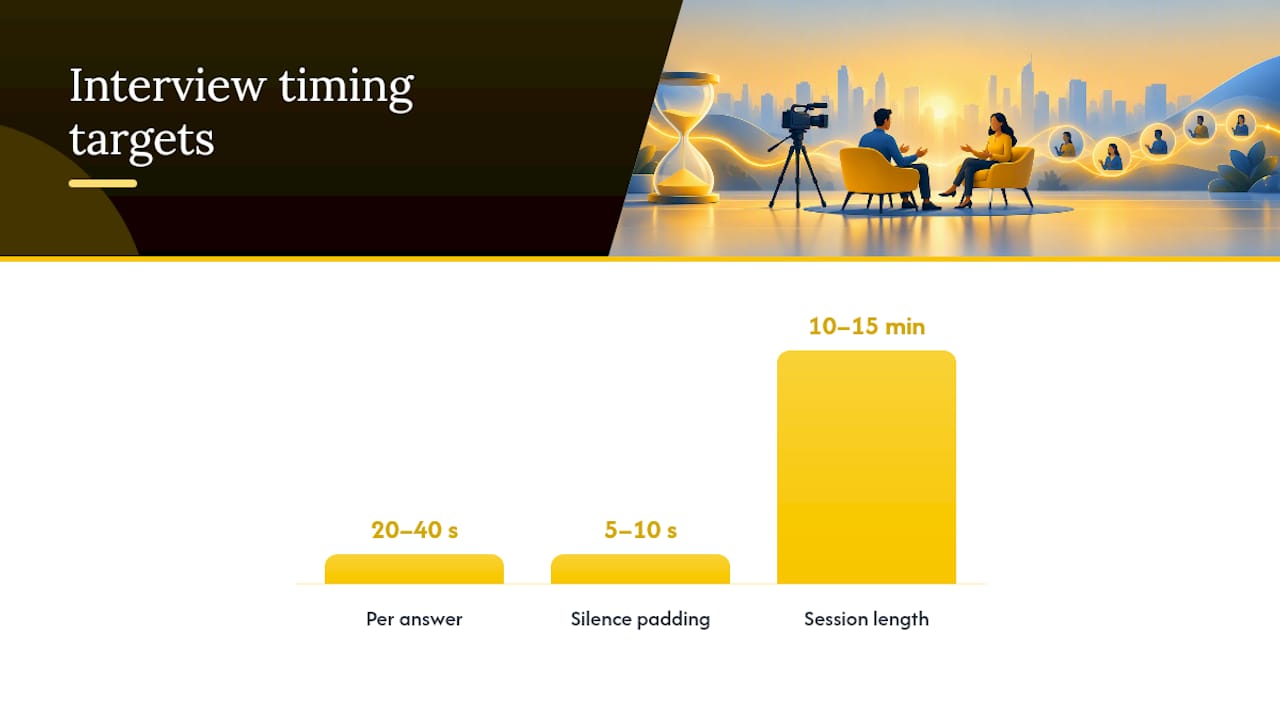
Keep each answer between 20 and 40 seconds and cap the session at seven or eight questions. That typically results in a recording lasting about 10 to 15 minutes once you factor in re-takes and small talk.
Statistic Callout: Sending questions to participants before filming reduces on-camera anxiety and produces more natural answers, according to Wyzowl’s testimonial question guidance. The tradeoff is real: pre-sent prompts help people think, but a written script kills authenticity. Send the question, not the answer.
Pro Tip: If a customer gives you a flat “yes, I’d recommend it” with no elaboration, don’t move on. Ask “what would you tell a friend who was skeptical?” instead. Same intent, but it forces a story instead of a one-word verdict.
If you’re a Shopify merchant collecting post-purchase reviews instead of a formal case study, swap in one line: “What made you trust this product enough to buy it without seeing it in person?” That single question surfaces the exact hesitation new shoppers feel on your product page.
A Categorized Question Bank For Every Testimonial Goal
A short kit works for quick social clips. It doesn’t cover every use case. When you’re building a longer case study, a sales enablement video, or a category-specific ask, you need more range. Thrive’s list of client testimonial questions runs to three dozen options, but pulling from a big bank only works if you’re deliberate about which questions serve which goal. Don’t ask all of them. Pick by outcome.
Intro and credibility
- “What’s your name, title, and company?” (short clips, always)
- “How long have you been in your role, and what does a typical day look like?” (long-form only, builds relatability)
- “What industry or market are you in?” (useful when the buyer persona needs context)
Problem or need
- “What was going wrong before you found a solution?” (core question for every format)
- “How long had this problem been costing you time or money?” (long-form, adds stakes)
- “What triggered you to finally look for a fix?” (good for urgency-driven landing pages)
Alternatives and decision factors
- “What other options did you look at?” (long-form, builds credibility with skeptical buyers)
- “What almost made you choose a competitor?” (powerful but only works with a candid participant)
- “What tipped the decision in our favor?” (short clips, strong pull-quote material)
Onboarding and use
- “How long did it take to get set up and start seeing value?” (long-form)
- “What did your team need to learn or change?” (case study only)
- “What surprised you about actually using it day to day?” (short clips, often produces the most natural soundbite)
Measurable results
- “What’s changed in your numbers since you started?” (all formats, ask for a range or estimate, not a demanded figure)
- “How has this affected your team’s time or workload?” (long-form)
- “If you had to put a dollar value on the impact, what would it be?” (only ask if the relationship supports it. Some customers won’t have this, and that’s fine)
Unexpected benefits or challenges
- “Was there anything that surprised you, good or bad?” (long-form, this is where credibility gets built)
- “What would you tell us to improve?” (rarely used but valuable for internal review, sometimes cut from public versions)
Recommendation and close
- “Who else would benefit from this?” (short clips, helps with targeting future ads)
- “What would you say to someone who’s hesitant to try it?” (all formats, your strongest close)
- “On a scale of one to ten, how likely are you to recommend us, and why?” (long-form, gives you both a number and a quote)
Short social clips and product-page snippets pull from intro, problem, decision factors, and recommendation. Long-form case studies use all seven categories, especially onboarding and unexpected challenges, since those sections build the trust a 90-second video can’t.
How To Structure The Interview For Usable Answers
Question order isn’t cosmetic. It shapes how coherent the final story feels once you’re in the edit.
- Start with credibility. Name, role, company. This warms up the speaker and gives you a clean opening clip regardless of how the rest goes.
- Move to the problem. Ask what wasn’t working before. This has to come before the solution or the story has no stakes.
- Ask about the decision. What almost stopped them, what else they considered. This section builds trust with skeptical viewers.
- Get the experience. What changed, what surprised them, how it felt to actually use the product.
- Ask for a result. A number, a timeframe, an observable change. Don’t suggest a figure. Let them qualify it themselves.
- Close with the recommendation. Who should try this, and why.
Ask one question at a time and let the silence sit after they answer. If the response is vague, follow up with something neutral like “can you give me an example of that?” rather than feeding them language. Coached wording is the fastest way to make a testimonial sound fake, and Wyzowl’s guidance on testimonial prompts makes the same point: send the prompt in advance, never the script.
Target 20 to 40 seconds per answer, six to eight questions total, and no more than one or two follow-ups per question. A session built this way runs 10 to 15 minutes and produces far more usable footage than a freeform 30-minute conversation.
Pro Tip: Record 5 to 10 extra seconds of silence before and after each answer. It gives your editor room to cut cleanly without clipping the first or last word.
Setting Up A Remote Testimonial Recording
Most testimonials today get recorded remotely, not in a studio, which means the technical bar is lower but the setup checklist still matters.
- Position the camera or laptop at eye level. A downward angle from a propped-up laptop is the single most common amateur mistake.
- Face a window or a lamp. Backlighting from a window behind the speaker turns them into a silhouette.
- Record in a quiet room with soft surfaces (carpet, curtains, furniture) to cut echo.
- Use a wired headset mic or earbuds with a mic if a dedicated microphone isn’t available. Built-in laptop mics pick up room noise badly.
- Confirm a stable internet connection before recording if you’re using a video call platform, or ask them to record locally and upload the file afterward for better quality.
Let respondents re-record an answer if they stumble. A single clean take beats a longer one with a mid-sentence correction that has to be cut around. Constraining each answer to a focused single point, rather than a long rambling response, keeps files smaller and dramatically reduces the editing time needed to pull a usable clip.
Pro Tip: Ask participants to pause for two seconds and restart the sentence if they misspeak, instead of saying “let me try that again.” That habit alone saves editors real time, since the clean restart is easy to find and cut to.
Getting Permission And Staying On The Right Side Of FTC Rules
Before you publish anything, you need explicit permission covering more than just “can we use this.”
Ask for consent that covers:
- Full name, role, and company (or explicit permission to use first name only)
- Likeness and voice, meaning the actual video and audio recording
- Editing rights, so you can trim and caption without renegotiating
- Which channels the video can appear on (website, paid ads, social, sales decks)
- How long you can use it (one year, indefinitely, until revoked)
The FTC’s Consumer Reviews and Testimonials Rule, which took effect in October 2024, requires that any material connection, meaning a discount, payment, free product, or other incentive given in exchange for a testimonial, be disclosed clearly and conspicuously. Burying a disclosure in a video description or a tiny caption doesn’t meet the bar. The FTC’s guidance on endorsement disclosures specifically notes that disclosures are far more likely to be noticed when they appear visually and audibly inside the video itself, not just in surrounding text.
Statistic Callout: If a participant received anything of value for recording (a discount code, a gift card, a free month), that connection has to be disclosed on screen, not just mentioned in a footer or a link. Say it out loud in the video, or overlay it as on-screen text that stays up long enough to read.
Recruiting Customers And Scripts You Can Copy
Getting someone to say yes is often harder than getting a good answer once they’re on camera. A short, specific ask converts better than a vague one.
- Subject line: “Quick 10-minute video chat about your experience with [product]?”
- Email body: Explain what you’re asking (a short video interview), how long it takes (10 to 15 minutes), whether there’s an incentive (a gift card, discount, or nothing at all), and how the footage will be used (website, ads, social). If there’s an incentive, say so plainly, since you’ll need to disclose it anyway.
- Pre-send checklist for the participant: A quiet, well-lit room. A stable device propped at eye level. A quick think-through of one specific result or moment they can describe, not a written script.
- On-camera interviewer script: Open with a warm, informal question (“tell me a bit about yourself and your role”), then move through problem, decision, experience, result, and recommendation, one question at a time, pausing after each answer.
For written or async formats, send the same five questions as a form and ask for a single video reply per question rather than one long recording. It’s easier for the customer and easier for you to edit.
Turning Raw Footage Into Clips That Still Sound Honest
A 45-second answer rarely survives intact. The job is trimming it without changing what the person actually said.
Before cutting anything, check three things: does the trimmed version still represent their real meaning, does it need a disclosure overlay, and does it need captions for silent autoplay on social feeds.
A typical edit path: take a 45-second answer about a measurable result, cut the throat-clearing at the start, keep the specific number or observation, and end on their strongest sentence. That becomes a 15-second social clip. For a product page, keep a bit more context (the problem plus the result) for a 60-second version, and add a text overlay of the key stat as it’s spoken.
- Never change the meaning of a sentence through cutting, even if the raw phrasing is a little messy.
- Keep a mild negative or a caveat if the customer offered one; it reads as more credible than a testimonial with zero friction.
- Add captions by default. Most social video plays muted.
- Add a visible disclosure overlay if any incentive was involved, timed to stay on screen long enough to read.
An Eight-Step Workflow For Teams With Limited Time
If you’re running a lean testimonial program, here’s the order I’d prioritize: identify candidates from support tickets or NPS responses, reach out with a short specific ask, send the seven-question kit in advance, schedule a 15-minute remote session, record with re-takes allowed, get written permission covering channels and duration, edit for one hero clip plus two or three shorter cuts, then publish and track where each clip performs.
With limited time, skip the 30-question bank. Run the short kit, and prioritize the problem, decision, and result questions over the softer ones like unexpected challenges. Those three produce the highest percentage of usable, specific footage per minute spent recording. Aim for three to five solid testimonials before optimizing anything further. A single outstanding clip that names a real number beats five generic ones that all say “it’s been great.”
If you have internal data on which testimonial placements convert best on your own product pages, that’s worth testing before scaling up production further.
— Leo
Making Verified Video Reviews Part Of Your Product Pages
Everything above assumes you’re chasing down testimonials one interview at a time, scheduling calls, wrangling permissions, editing footage by hand. For Shopify merchants, there’s a faster path: collect video reviews and shopper Q&A automatically after every purchase, right on the product page where new buyers are actually deciding.
There are platforms built specifically for Shopify stores that enable authentic post-purchase video reviews and live shopper Q&A embedded directly where hesitant buyers are reading. Instead of manually recruiting testimonial subjects, you capture real customer video after checkout, moderate it before it goes live, and display it in a mobile-friendly widget with analytics showing how it performs. The same principles from this article apply: ask for permission, keep questions focused, and let real answers speak for themselves rather than scripting them.
If you’re running a Shopify store, try Trypeers on the Free plan or move straight to Peers Growth at US$6 per 30-day billing cycle for the first 12 cycles, then US$15 per cycle, with a 14-day trial to start embedding verified video reviews on your product pages today.
Where To Verify The Rules And Dig Deeper
A few sources are worth bookmarking if you’re building a testimonial program with any regularity.
- The FTC’s Consumer Reviews and Testimonials Rule Q&A is the authoritative source on disclosure requirements and permissions, and it’s the one to check whenever rules seem to shift.
- Wyzowl’s guide to testimonial questions is a solid reference for the “send prompts, don’t script answers” principle that shapes most of the guidance above.
- Thrive’s longer question bank is useful when you need more variety than a short kit provides.
- The FTC’s endorsement guide FAQ breaks down disclosure placement in plain language.
Sources
- 10 ESSENTIAL Testimonial Questions to Ask | Wyzowl
- The Consumer Reviews and Testimonials Rule: Questions and Answers | Federal Trade Commission
- 36 Best Questions to Ask for Client Video Testimonials + Examples | Thrive
- FTC’s Endorsement Guides: What People Are Asking | Consumer Advice
FAQ
What are good testimonial questions?
The strongest questions ask about a specific problem, why the customer chose you over alternatives, what changed after they started using the product, and whether they’d recommend it. Avoid yes-or-no questions since they produce short, unusable clips.
Can you give me some examples of video testimonials?
A strong example combines a credibility opener, a specific problem statement, a measurable result, and a direct recommendation, all inside 60 to 90 seconds. Shopify product pages often use even shorter 15 to 20 second clips built from a single strong answer about why the shopper trusted the purchase.
What are 5 good questions to ask?
Ask what problem they were solving, what almost stopped them from buying, what changed after they started using it, what measurable result they can point to, and whether they’d recommend it. Those five cover the stake, the decision, the transformation, and the proof.
What are some effective testimonial examples?
The most effective examples name a specific number or observable change rather than vague praise, and they include the customer’s actual decision process, since that mirrors how a new buyer is evaluating the same choice. Testimonials that keep a small candid caveat also tend to read as more credible than uniformly glowing ones.
How many questions should a video testimonial interview include?
Keep it to seven or eight questions for a 10 to 15 minute session. That’s enough to cover credibility, problem, decision, experience, result, and recommendation without exhausting the participant or producing unusable, rambling answers.
Do I need permission before publishing a customer’s video testimonial?
Yes. You need explicit consent covering name and likeness, editing rights, which channels the video will run on, and how long you can use it, and you must disclose any incentive given in exchange for the testimonial under the FTC’s Consumer Reviews and Testimonials Rule.