Get Video Rich Results on Shopify By Nesting VideoObject Server Side

Add a VideoObject JSON-LD block, nested inside your Product schema using the subjectOf property, with at minimum a name, thumbnailUrl, uploadDate, and contentUrl or embedUrl. That combination is what makes a Shopify product video eligible for Google’s video rich results. The next concrete step is rendering that block server-side in your product template, pulling the values straight from product.media rather than hard-coding them.
TL;DR:
- Properly nested VideoObject schema enhances both traditional and AI-driven search visibility by linking videos directly to specific product SKUs.
- Required properties include name, thumbnailUrl, uploadDate, and contentUrl or embedUrl, with optional fields like duration and description boosting indexing.
- Mapping Shopify’s product media to schema requires filtering for videos, converting duration to ISO 8601, and avoiding duplicate JSON-LD blocks on the page.
- Validating schema markup involves running tests on Google’s Rich Results Tool and Schema Validator to identify missing fields or syntax issues.
- Collecting verified customer videos and metadata with platforms like Peers can improve schema accuracy and support rich search results for user-generated content.
Table of Contents
- Why nesting VideoObject under Product matters for discoverability
- Required and recommended VideoObject properties, with a minimal example
- Mapping Shopify’s product.media to VideoObject with Liquid
- Validating the markup and fixing the errors that actually show up
- Shopify-specific pitfalls that quietly break video schema
- Keeping verified video review metadata schema-healthy
- How Peers helps Shopify merchants put schema-ready video on product pages
- Where to start and what to check on a schedule
- FAQ
- Sources
Why nesting VideoObject under Product matters for discoverability
VideoObject is the schema.org type that tells Google a page contains a video worth featuring, not just embedding. When implemented correctly, it can unlock video rich results, key moment timestamps, and live badges for streamed content. None of that happens automatically just because a video plays on the page.
The subjectOf property is what connects the video to a specific product rather than leaving it as a floating, unrelated entity. Without that link, Google and AI crawlers have no clean way to know the video demonstrates that exact SKU rather than some unrelated clip on the same domain.
This matters for two audiences at once:
- Traditional search, where a correctly nested VideoObject can surface thumbnails and timestamps directly in results.
- AI-driven search agents, which increasingly rely on structured metadata rather than rendered pages to understand what a product page actually contains.
Get the nesting wrong and both audiences see a product page with a video and no usable context around it.
Required and recommended VideoObject properties, with a minimal example
Before writing any Liquid, know exactly which fields are non-negotiable and which ones add polish.
Required by Google’s video structured data documentation:
- name: a clear, descriptive video title, not a generic placeholder.
- thumbnailUrl: a direct URL to a thumbnail image matching the video’s aspect ratio.
- uploadDate: an ISO 8601 formatted date showing when the video was published.
- contentUrl or embedUrl: the direct file location or the embeddable player URL.
Recommended additions that improve how the video gets indexed and cited:
- description: a dense summary, ideally 100 to 200 characters, that gives text-based agents something to read.
- duration: ISO 8601 format (for example, PT1M30S for one minute thirty seconds).
- hasPart: nested Clip objects for key moments, each needing its own name, startOffset, and url.
- potentialAction: a SeekToAction definition so Google can link directly to a timestamp.
A minimal, annotated example nested correctly inside Product looks like this:
{
  "@context": "https://schema.org",
  "@type": "Product",
  "name": "Example Product",
  "subjectOf": {
    "@type": "VideoObject",
    "name": "How Example Product Works",
    "description": "A 45-second demo showing setup and first use.",
    "thumbnailUrl": "https://cdn.example.com/thumb.jpg",
    "uploadDate": "2026-01-10",
    "contentUrl": "https://cdn.example.com/video.mp4"
  }
}
That single block, with real values swapped in, is enough to satisfy the minimum bar for eligibility. Everything past this point is about automating the value extraction and avoiding the mistakes that break validation.
Mapping Shopify’s product.media to VideoObject with Liquid
Shopify stores video data on product.media, and each media item carries a media_type of either video or external_video. Filtering for those types is the first step before any schema gets written. Shopify’s own video_tag filter renders a playable video tag for shoppers, but it was built for front-end display, not for emitting JSON-LD, so theme code still has to do the schema work separately.
A typical loop checks the media type, then pulls preview_image, sources, duration, id, and created_at off each matching item. A few conversions matter here:
- Duration comes back in milliseconds and needs converting to ISO 8601 (for example, 90000 ms becomes PT1M30S).
uploadDateshould usecreated_atformatted as a plain ISO date string, not Shopify’s default timestamp format.- Any text field going into JSON, like a video name pulled from alt text, needs to run through a JSON escape filter so stray quotation marks don’t break the output.
On placement, the safest pattern is to build one consolidated snippet, something like snippets/video-schema.liquid, and include it once in the product template. Many themes already output a Product block through {{ product | structured_data }}, and dropping a second, separate Product block next to it creates duplicate nodes that validators and search engines both reject. The cleaner fix is either disabling the theme’s default structured data output for that section or merging your VideoObject data directly into the same JSON-LD object the theme already generates, so the page emits exactly one Product node. Shopify’s media support documentation lays out the full field list available on product.media, which is worth keeping open while writing the mapping logic.
Validating the markup and fixing the errors that actually show up
Once the snippet is live, check it before assuming it works — our detailed video SEO guide: boost visibility and organic reach covers key practices for validating video schema and improving search performance.
- Run the page through Google’s Rich Results Test and confirm the VideoObject is detected, not just the Product type.
- Paste the raw JSON-LD into the Schema Markup Validator to catch syntax issues the Rich Results Test sometimes misses.
- View page source and confirm there’s a single top-level Product node, not two competing blocks fighting for the same entity.
- Check for the most common failures: a missing required property, a duration written in the wrong format, an unescaped quote that silently breaks the JSON, a contentUrl pointing to an HTML page instead of the actual media file, or schema emitted before Shopify finishes processing the video so the URL field comes back empty.
- For AI discoverability, run a few targeted queries through conversational tools and check whether your product page or its video content gets cited at all.
Most of these failures are invisible on the front end since the video still plays fine. They only show up when something actually tries to parse the metadata.
Shopify-specific pitfalls that quietly break video schema
A handful of habits separate schema that validates from schema that looks right but fails silently.
- Prefer a direct contentUrl pointing at the actual video file when one is available; if using YouTube or Vimeo, still populate embedUrl and fill in explicit name, thumbnail, and duration metadata rather than leaving the player to speak for itself.
- Upload and map a genuine high-quality thumbnail instead of relying on Shopify’s auto-generated poster frame, which captures a frame around the one-second mark and often looks like a mid-motion blur.
- Always format duration as ISO 8601 and write a name and summary dense enough that a text-only reader understands what the video shows.
- Render JSON-LD server-side through Liquid, and confirm the media file’s status is READY on Shopify’s side before emitting its URL, since pulling the URL too early returns a blank or broken link.
- Consolidate everything into one snippet so the page never emits two separate Product JSON-LD blocks.
Pro Tip: Treat the thumbnail as its own schema field to maintain, not a byproduct of the video upload, since a mismatched aspect ratio is one of the most common reasons a thumbnail gets rejected.
Keeping verified video review metadata schema-healthy
We built our platform around a specific gap: shoppers trust other shoppers more than polished product photography, but most stores have no structured way to collect or expose that trust. We capture post-purchase video reviews directly from verified buyers, and those videos carry real metadata worth exposing in schema, including an accurate uploadDate, a descriptive name pulled from the review context, and a clear thumbnail.
Our moderation workflow keeps review transcripts and descriptions usable as actual schema text rather than throwaway captions, which matters once that description field is feeding both search snippets and AI summaries. Every embed stays mobile-compatible, and analytics track how much engagement those videos generate once they’re live on the product page.
How Peers helps Shopify merchants put schema-ready video on product pages
Collecting video content from happy customers is one problem. Making sure each clip has the metadata a search engine or AI agent can actually read is another. Peers solves both at once: we embed verified post-purchase video reviews and shopper Q&A directly on product pages, with moderation tools that keep descriptions clean and metadata controls that make each video easier to expose in structured data.
For merchants who would rather not hand-build a video collection pipeline from scratch, our Shopify app offers a Free plan to start and a Peers Growth plan at $15 per month for stores ready to scale. Check it out on the Shopify App Store and see what a product page looks like with real customer video attached to it.
Where to start and what to check on a schedule
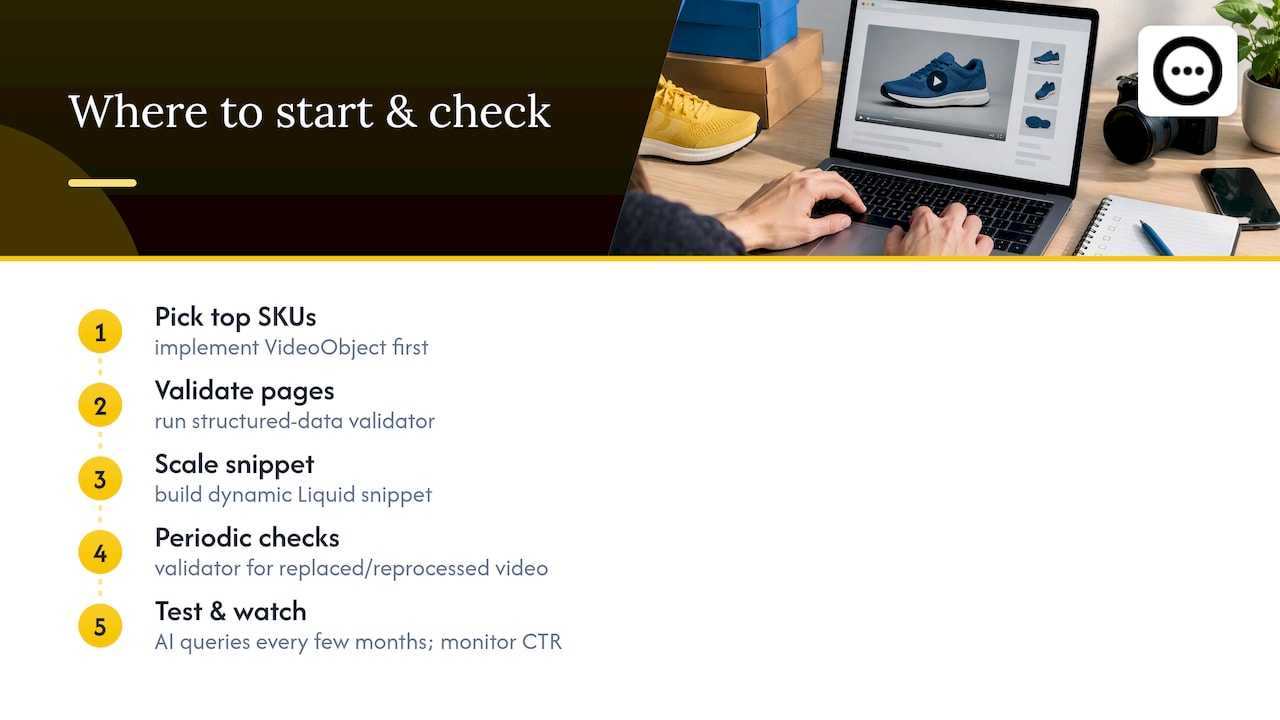
If there’s one lesson in all of this, it’s that structured data rewards sequencing. Start with your best-selling SKUs, not your full catalog: implement VideoObject there first, validate it, and only then build out the dynamic Liquid snippet that scales the pattern across every product with video.
After launch, don’t treat it as done. Shopify media status can change when a video gets replaced or reprocessed, so a periodic validator check catches breakage before it costs you visibility. I’d also recommend testing a handful of product queries against AI tools every few months, just to see whether your pages get cited, and watching whether rich result impressions move the needle on click-through rate over time. Schema work pays off slowly and silently until it suddenly doesn’t.
— Leo
FAQ
What is video schema and why does Shopify need it?
Video schema is structured data, typically VideoObject in JSON-LD, that tells search engines what a video on a page actually shows. Shopify doesn’t generate this automatically for uploaded product videos, so themes need custom code to expose it, which is what makes a product video eligible for Google’s video rich results.
Which VideoObject properties are required for rich results?
The required fields are name, thumbnailUrl, uploadDate, and either contentUrl or embedUrl, according to Google’s structured data documentation. Recommended extras like duration and description improve how the video gets summarized and cited but aren’t strictly required for eligibility.
Does Shopify automatically create video schema markup?
No. Shopify’s video_tag filter and product.media objects render video for shoppers to watch, but they don’t emit VideoObject JSON-LD on their own. Theme code has to map those media fields into schema manually.
How do I check if my video schema is working correctly?
Run the page through Google’s Rich Results Test and through the Schema Markup Validator to confirm the VideoObject is detected and free of syntax errors. Also check the rendered page source to confirm there’s only one Product node, since duplicate blocks commonly cause validation failures.
Can customer video reviews use video schema too?
Yes, a verified customer video review can carry the same VideoObject properties as any product demo video, provided it has an accurate name, thumbnail, and uploadDate. Platforms like Peers that collect post-purchase video reviews can expose that metadata directly on the product page where it supports the same schema structure.