Video Release Form Templates That Ensure FTC Disclosure Compliance

A video release form is a dated, signed permission that lets you lawfully use a person’s recorded image, voice, or performance for the specific uses you spell out. Whoever appears on camera signs it, usually before filming starts, and it protects you from later disputes over how that footage gets published or repurposed.
TL;DR:
- A signed release form must explicitly list all potential rights holders, including successors or distribution partners, to prevent future legal gaps.
- Consent for filming does not automatically cover endorsement disclosures, which require separate, clear, and conspicuous on-screen disclosures if incentives exist.
- Fillable templates should specify project details, rights granted, channels, territory, duration, and compensation, with signatures signed before or immediately after filming to ensure enforceability.
- When filming minors, a separate parental consent form with explicit authority language is necessary, and it should be stored apart from the main release.
- Proper storage and metadata tagging of signed releases and media files are essential to prevent disputes and ensure compliance throughout the content lifecycle.
Table of Contents
- What a Video Release Form Covers and When to Use One
- Core Clauses Every Video Release Form Must Have
- Template Preview and Quick-Fill Steps
- Parental Consent and Minors: Using a Dedicated Minor Release
- When to Get the Release Signed and a Simple Workflow
- Testimonials and Endorsements: FTC Disclosure Rules You Must Follow
- Authoritative Templates and Legal Guidance to Download and Review
- Turning a Release Form Into an Actual Workflow
- Publishing Testimonial Video the Right Way on Shopify
- Sources
- FAQ
What a Video Release Form Covers and When to Use One
Video release forms show up anywhere a camera points at a real person whose footage will leave the room: customer testimonials, corporate events, product demos, modeling shoots, employee appearances in training videos, and documentary interviews. If the footage will ever appear outside a private archive, you need a signed release before it does.
Three parties typically show up in the document: the producer or company creating the footage, the participant being filmed, and any assignees or successors who might use the footage later. That third category matters more than most people realize. If your agency changes hands, your brand gets acquired, or you hire a new distribution partner, a release naming only “the company” as it exists today can leave a gap. Naming assignees and successors explicitly closes that gap.
Consent for filming and consent for endorsement are not the same thing. A release grants permission to record and use someone’s likeness. It does not automatically satisfy disclosure requirements when that person is being paid, given free products, or otherwise compensated to say something positive on camera. That distinction becomes critical when the footage functions as a testimonial rather than a general appearance, a point worth flagging now because it resurfaces later in this guide.
Core Clauses Every Video Release Form Must Have
A usable release does more than say “yes, you can film me.” Official templates like the AHRQ talent release lay out the fields that make a release enforceable and specific enough to prevent arguments six months later.
At minimum, your video release template needs:
- Project title and a brief description of the footage being captured
- Full legal name and contact information of the participant
- Explicit rights granted: recording, editing, reproducing, publishing, and distributing
- Media and channels where the footage can appear (website, social media, broadcast, print)
- Territory (worldwide, or a named country or region)
- Duration: perpetual rights, or a specific term with an end date
- Compensation terms, or a clear statement that none was provided
- Language covering third-party use, in case the footage moves to partners or affiliates
- A waiver of the right to inspect or approve the final edited version
- Signature and date lines for both parties
Name every downstream rights holder you can anticipate, not just your own company. AHRQ’s guidance on talent release forms recommends listing assignees and successors directly in the document, since footage transferred to an ad agency or distribution partner later stays covered only if that transfer was anticipated in writing.
Pro Tip: Don’t default to “perpetual, worldwide, all media” just because it sounds thorough. A broad grant is not always the safer choice. If you only need the footage for one campaign cycle, say so. Deliberate scope protects both you and the person you’re filming.
If the person on camera is paid or represented by a talent agency, spell out the compensation and any agency arrangement in writing. Verbal agreements about payment tend to become disputes exactly when the footage becomes valuable.
Template Preview and Quick-Fill Steps
A well-built template reads less like a legal wall of text and more like a form you fill out in five minutes. The Smithsonian’s sample video release is a good model: it identifies the project, lists permitted uses (web, social, broadcast), and separates editing rights from usage rights so signers actually understand what they’re agreeing to.
Here’s how to fill one out before you press record:
- Project and date. Name the shoot and the date footage will be captured.
- Participant details. Full name, address, and a phone number or email for follow-up.
- Description of footage. One sentence on what’s being recorded and why.
- Rights granted. Check boxes or write out exactly what you can do: edit, reproduce, publish, distribute.
- Channels and territory. List where the footage will run and where geographically.
- Compensation. State the amount, or write “no compensation provided.”
- Signature and date. Both the participant and a company representative sign.
Most official templates come as fillable PDF or Word documents, which matters more than it sounds. A Word file lets you customize clauses per project; a PDF locks the layout for consistent recordkeeping. Keep both a blank master copy and every signed original, since a release with no stored copy is functionally the same as no release at all.
Parental Consent and Minors: Using a Dedicated Minor Release
If anyone in your footage is under 18, the participant cannot sign for themselves. A parent or legal guardian signs instead, and the form should include a warranty stating that the signer actually has the legal authority to consent on the child’s behalf.
State education templates, including the California Department of Education’s sample release, build in dedicated minor-consent language: the child’s name and age, the parent or guardian’s contact information, and clear waiver language scoped to the intended use. Keep the minor release as a separate signed document rather than folding it into the general form, and retain a record of the signer’s identity and authority alongside it.
When to Get the Release Signed and a Simple Workflow
Sign the release before you start filming whenever possible. If that’s not realistic, such as a spontaneous event capture, get it signed before the footage is published anywhere.
Electronic signatures through tools like DocuSign or Adobe Sign are widely accepted for this purpose. The University of Illinois’s photo and video release guidance confirms digital signatures work for institutional templates, which makes remote signing practical for distributed teams or events with dozens of participants.
A simple three-step workflow keeps this from becoming a mess:
- Prepare a tailored template with the correct project name, rights, and channels filled in ahead of time.
- Collect the signature, timestamped, before or immediately after filming.
- Archive the signed copy and tag the corresponding media file with consent metadata, so anyone pulling that footage later can confirm it’s cleared.
Testimonials and Endorsements: FTC Disclosure Rules You Must Follow
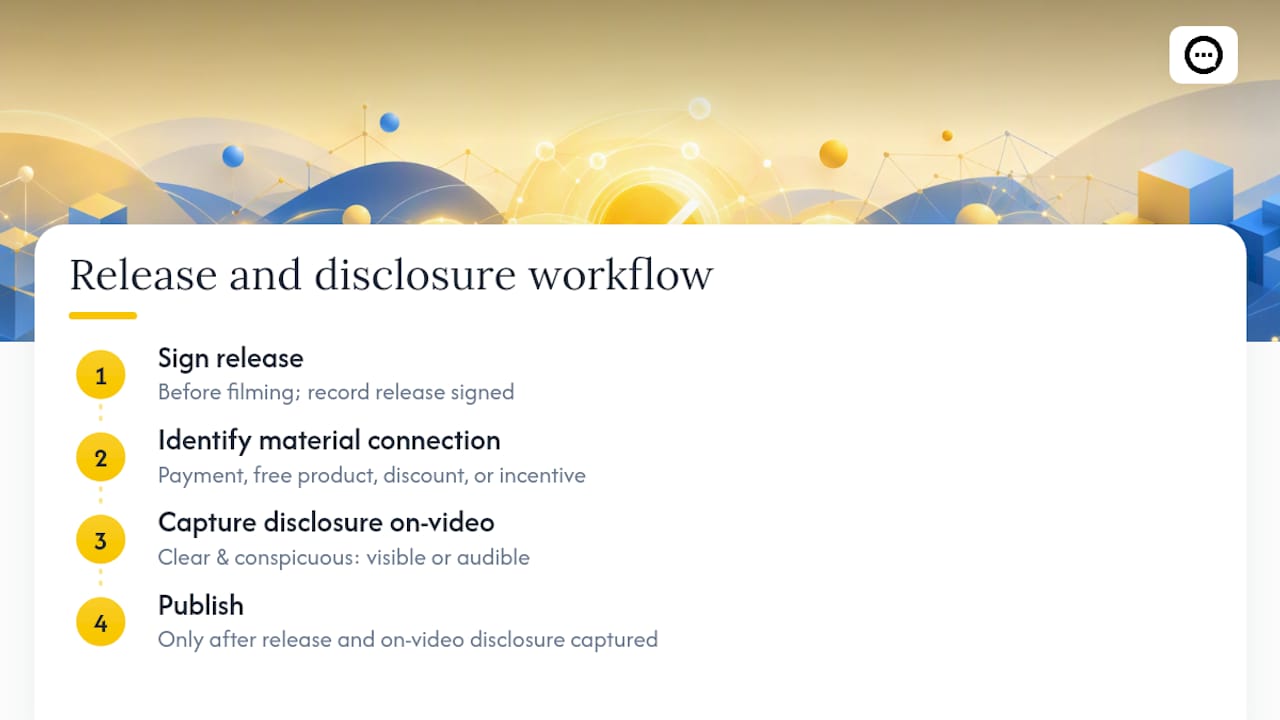
A signed release does not clear you of disclosure obligations. If there’s a material connection between your business and the person on camera — meaning payment, a free product, a discount, or any other incentive — you likely need a separate on-screen disclosure regardless of what the release says.
The FTC’s Consumer Reviews and Testimonials Rule, which took effect on October 21, 2024, requires that disclosures be clear and conspicuous in video, meaning visible or audible, not buried in a text description underneath the video.
FTC guidance on placement: disclosures at the end of a video, or only in the written description, are easy to miss. The FTC’s own guidance notes that placing the disclosure at the beginning, or repeating it, makes it far more likely a viewer actually sees it.
Build this into your workflow rather than treating it as an afterthought. When you collect a video release, note whether a material connection exists, and if it does, capture the on-video disclosure at the same time you capture the footage. Treat release and disclosure as one combined step, not two separate compliance boxes.
Authoritative Templates and Legal Guidance to Download and Review
Start with the AHRQ talent release for core clauses, the Smithsonian sample for plain-language usage terms, and the California Department of Education template for minor-consent language. Have local counsel review any template before wide use, since enforceability varies by jurisdiction.
Turning a Release Form Into an Actual Workflow
Most disputes over video footage don’t come from a bad clause. They come from nobody being able to find the signed release six months after the shoot. Storage matters as much as drafting.
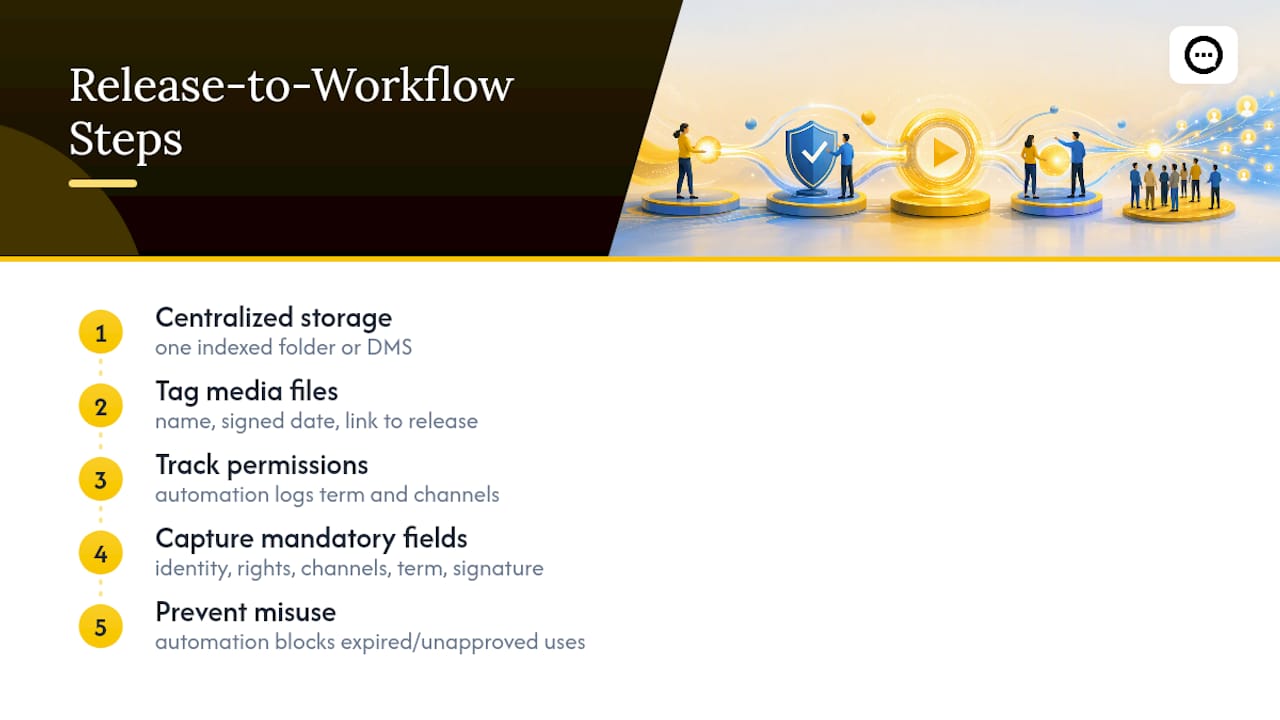
Keep signed releases in one indexed location, whether that’s a shared drive folder or a document management tool, and tag each media file with the participant’s name, the date signed, and a link to the release itself. If you’re repurposing testimonial clips across a marketing pipeline, a content automation workflow that tracks permissions alongside distribution can prevent a piece of cleared footage from accidentally running past its granted term or outside its approved channels.
The mandatory fields are shorter than people assume: identity, rights granted, channels, term, and signature. Everything else is refinement. Get those five right and you’ll avoid the vast majority of disputes that actually show up in practice.
— Leo
Publishing Testimonial Video the Right Way on Shopify
Once you’ve got a signed release in hand, the next question is where that footage actually lives. A folder of cleared video clips does nothing for conversion sitting unused on a hard drive.
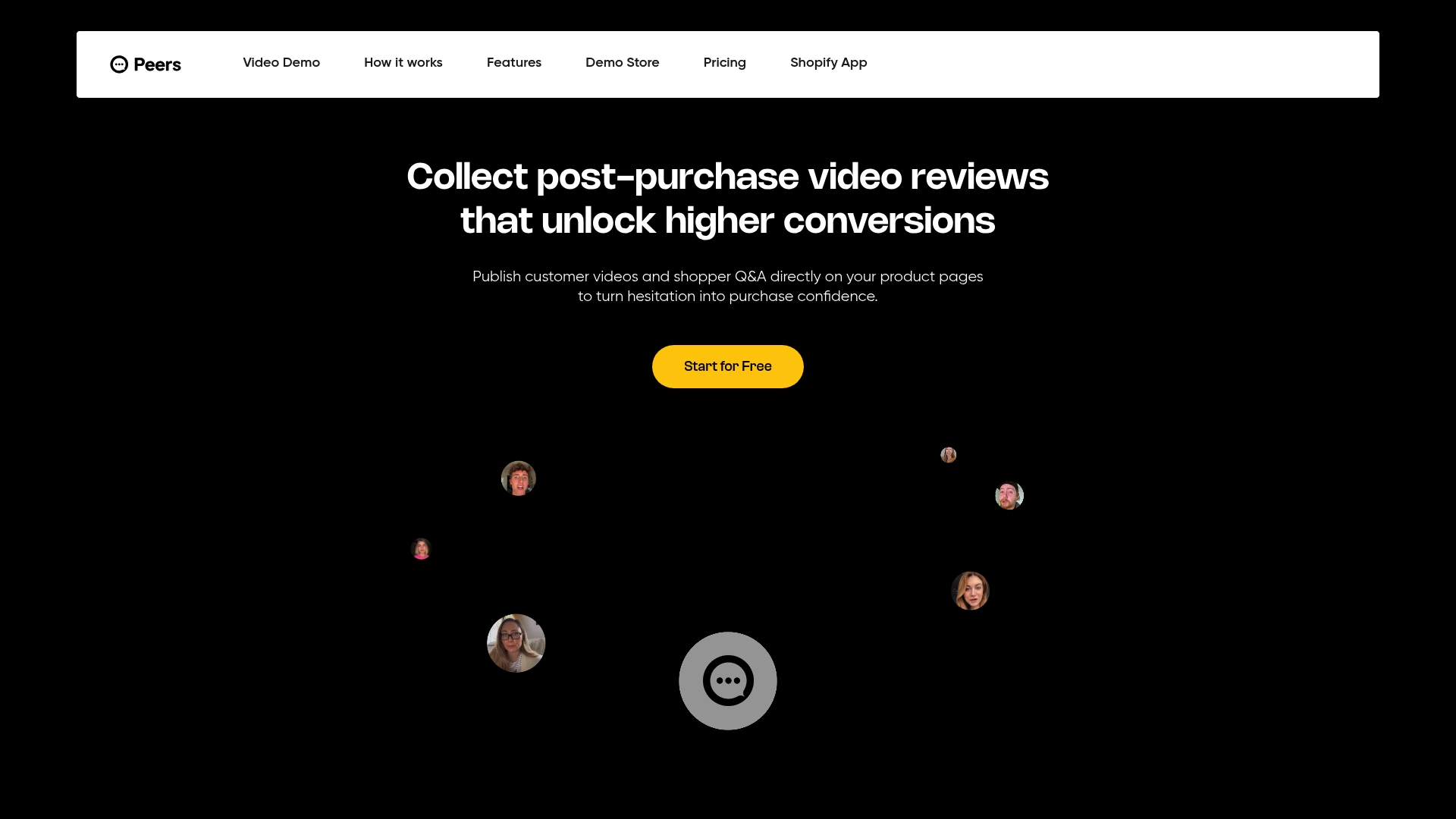
A video review and shopper Q&A platform gives Shopify brands a way to embed post-purchase content directly on product pages, with moderation tools built in so you control what goes live. It’s built specifically for stores that have already done the harder part, collecting real customer video with proper consent, and now need a place to show it off without hiring a developer or building a review pipeline from scratch. Every clip stays tied to moderation controls and engagement analytics, so you’re not just publishing testimonials, you’re tracking whether they actually move buyers toward checkout.
This platform offers a Free plan to start, with a Growth plan available at a monthly subscription fee for stores that want more. Check out the Peers listing on the Shopify App Store and see what a moderated video review section looks like on your own product pages.
Sources
- Talent Release form (AHRQ)
- The Consumer Reviews and Testimonials Rule: Questions and Answers | Federal Trade Commission
- Sample Video Release Form (Smithsonian)
- Sample Video Release Form (California Department of Education)
FAQ
What Is a Video Release Form?
A video release form is a signed document in which a filmed person grants permission for their image, voice, or performance to be recorded and used for specified purposes. It typically names the project, the rights granted, the channels and duration of use, and includes signature and date fields, as shown in the AHRQ talent release template.
How Do I Make a Video Release Form?
Start from an established template rather than writing one from scratch, since official examples already include the fields courts and platforms expect to see. Fill in the project name, participant details, exact rights granted, channels, territory, duration, and compensation terms, then have both parties sign and date it before or immediately after filming.
What Is the Standard Release Form for Filming?
There’s no single universal release form, but standard templates share the same core structure: identity of the participant, description of the footage, explicit permitted uses, compensation or a no-compensation statement, duration, and signatures. Government and institutional templates like those from AHRQ and the Smithsonian follow this same basic pattern, though exact wording should be checked against local law.
What Does a Media Release Form Look Like?
A media release form is typically a one to two page document listing the project title, a description of the recording, the specific media and channels where it can appear, the geographic territory, the term of use, and blank fields for compensation, signature, and date. Minors require an added section for parent or guardian consent, similar to the language used in the California Department of Education’s sample form.
Does a Video Release Cover Testimonial Disclosures Too?
No. A signed release grants permission to use someone’s image and voice, but it does not satisfy separate disclosure requirements when there’s a material connection like payment or free product. The FTC’s Consumer Reviews and Testimonials Rule requires a clear, conspicuous on-video disclosure in those cases, independent of the release itself.