Shopify Video Q&A: How to Add It and Run It Well

Video Q&A on Shopify means two things on one product page: shoppers ask public questions, and customers answer or review with short videos. You set it up inside Shopify Admin with a reviews or Q&A app, place it with a theme app block or an app embed, invite real customers to take part, and moderate everything before it goes live. This guide walks through each step, including the permission and privacy points that trip up most stores.
TL;DR
- Video Q&A combines public shopper questions with customer video content on the product page, so buyers can judge fit, size and real-life use before they purchase.
- With Peers, setup happens in Shopify Admin through theme app blocks or the app embed. There is no separate merchant login and no code snippet to paste.
- Keep three things separate: purchase verification, permission to publish, and browser tracking consent.
- Peers Free includes moderation, widgets and up to 10 published video reviews per product. Growth removes that limit and the branding.
- Preview mobile playback and measure page performance. No app can promise zero impact, and none can promise ranking or conversion results.
Table of Contents
- What video Q&A means on a Shopify store
- How to add video Q&A to a Shopify product page
- Collecting videos and questions from real customers
- Moderation: what goes live and what doesn’t
- Verified purchase, permission and tracking consent are three different things
- Showing approved content on every theme and on mobile
- Can Q&A help search visibility?
- Our perspective
- Peers pricing and how to start
- FAQ
- Sources
What video Q&A means on a Shopify store
Shopify’s own guide to user-generated content counts customer videos and product-page Q&A as UGC. Online, shoppers cannot touch, try on or test a product. A customer video shows how it looks in a real home or on a real person, and a question-and-answer thread shows what other buyers wanted to know.
The two formats do different jobs:
- Questions expose the exact doubt that stops someone today. A review tells the next shopper only what a past buyer chose to mention. A question, as House of Marka explains, arrives in the shopper’s own words at the moment of deciding.
- Videos answer the “what will this actually look like” question that photos and copy can’t.
Together they let a shopper assess a product through real customer experience instead of brand copy alone.
What the numbers say, and what they don’t
The figures below come from PowerReviews research as reported in Shopify’s UGC guide. A June 2025 survey of more than 21,000 US consumers found that 91% are more likely to buy when reviews include photos and videos, and 84% want visual content on product pages. The same guide reports that nearly 74% of online shoppers regularly read Q&A, and 92% look for answers from verified buyers.

Treat these as survey results about shopper attitudes. They describe what people say they do, not what your store will earn. Your own analytics are the only honest measure for your catalog, and we never promise a conversion lift.
How to add video Q&A to a Shopify product page
Shopify themes don’t usually ship with a questions feature of their own, so the usual route is an app. House of Marka’s guide describes placing it from the theme editor as a block on the product template, near the reviews and below the description.
Here is the Peers flow, all inside Shopify:
- Install Peers from the Peers listing on the Shopify App Store. You manage it from the embedded app in Shopify Admin.
- Open the theme editor for your product template.
- Add the Peers theme app block where shoppers decide, usually under the product description or beside existing reviews. Alternatively, turn on the app embed.
- Preview on desktop and a phone before you publish the theme.
- Moderate and publish selected videos and questions from the app.
There is no standalone Peers merchant login to remember, and no generic copy-paste snippet. Everything runs through Shopify Admin with theme app blocks or app embeds. If you want a deeper look at placement without touching theme files, see our walkthrough of adding product Q&A without theme edits.
Where to place it
Put the content where the doubt appears. A fit question belongs near the size selector or description. A “does it work with…” question belongs close to the add-to-cart button. Clips buried far below the fold rarely get seen, which we cover in our video review rollout post.
Collecting videos and questions from real customers
A shopper will not record a video unless the ask is easy. Third-party guides on collecting customer video agree on a few habits. 82dash reports that a clear brief covering what to film, how long, one line of practical guidance and any reward can lift submissions, and that the best path is a single link opening a mobile-friendly form that needs no account.
Peers supports both routes that fit this pattern:
- Peers invitations, sent to a specific customer after a purchase.
- Browser recording, so customers can record straight from a phone or computer without installing anything.
Customer uploads through Peers have a 150 MB control limit. That is separate from Shopify’s own product-media limits, which apply to media you add to your product listings.
Ask for honest feedback, not happy feedback
Choose who to invite using neutral criteria, such as “delivered at least 14 days ago” or “bought this product”. Do not select people you predict will be satisfied. Filtering for likely praise produces a skewed page and invites regulatory trouble.
The same applies to rewards. Peers Rewards are available on the Free plan too. Whatever you offer, never condition it on positive or negative sentiment. Disclose that an incentive was offered, and check the rules of any platform where you republish the content. No setup can promise legal compliance, so if you run large incentive programs, talk to your own counsel.
What about a QR code on packaging?
A QR code is a popular way to ask for videos. Two rules matter:
- A generic QR on a box or insert needs a separate public landing page and its own purchase-verification flow. Nothing in a packaging QR proves the person scanning bought the item.
- Never share a private customer invitation link or a merchant recording-session link as a public QR. Those links are meant for one person or one internal purpose.
For a step-by-step on the invitation route, read from QR code to product page.
Moderation: what goes live and what doesn’t
Moderation is where Q&A earns trust. House of Marka suggests a clear policy:
- Publish every genuine product question, including the awkward ones.
- Redirect order and shipping queries to private support.
- Remove personal details such as order numbers, phone numbers, addresses and emails.
- Reject spam and abuse.
- Never write questions yourself and present them as coming from shoppers.
Peers gives you moderation tools for submitted videos and questions on every plan, including Free. You review, approve and publish selected content, and nothing appears on the page until you choose it.
Answer quickly and specifically. Reply to what was asked, sign with a first name and role, and write for the next reader, not just the asker. Once a month, read the new questions, group them, and move repeated answers into your description, size guide or photos. Our Q&A strategy post and the one on shopper questions and conversion go further, and public video replies show how a merchant can answer on camera.
Verified purchase, permission and tracking consent are three different things
This is the most common point of confusion, so keep the three apart.
| Question | What it answers | How Peers relates |
|---|---|---|
| Is this a verified purchase? | Did the person buy the product? | Customer-specific post-purchase invitations can link a review to an order. |
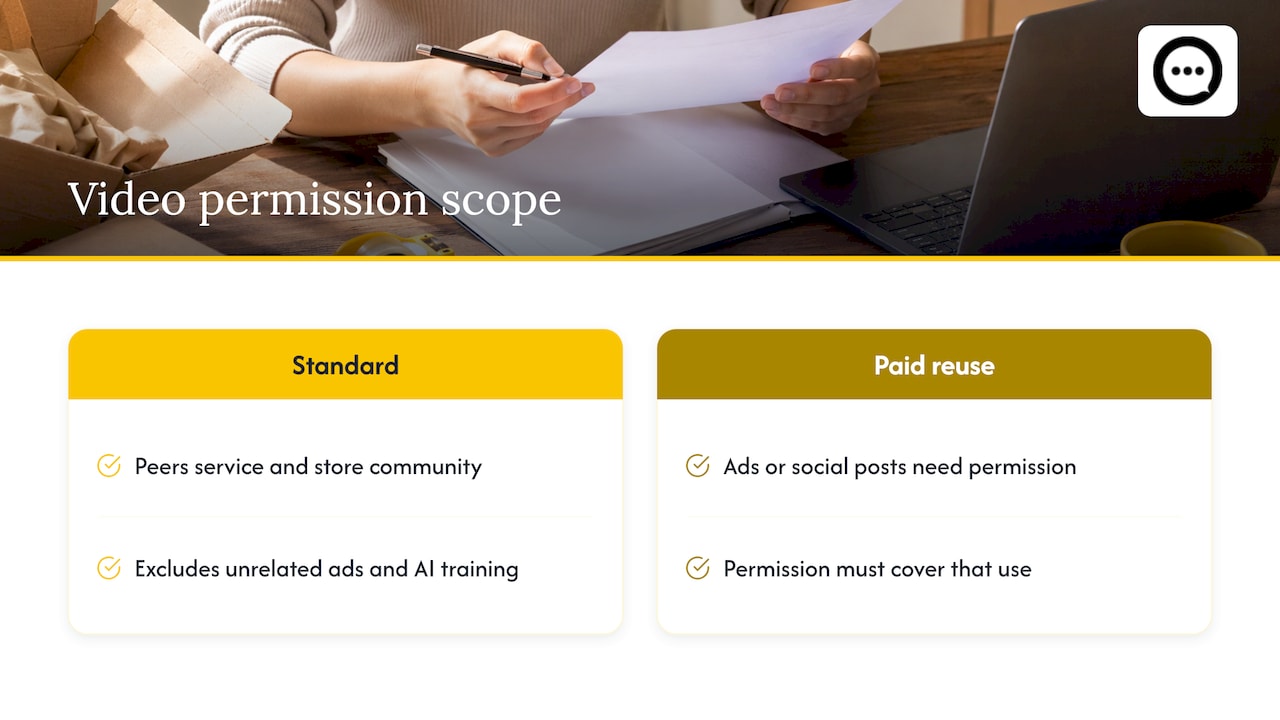
| Do we have permission to publish? | May we show this video, and where? | Peers’ standard video permission covers its service and store community. |
| Did the visitor consent to tracking? | Cookies and browser tracking on your storefront | Handled by your store’s consent setup, not by the review itself. |
Purchase verification
Reviews submitted through a customer-specific post-purchase invitation can be matched to an order. Public Q&A, public replies and merchant recordings are not automatically verified purchases. Don’t label them as such.
Permission to publish
Peers’ standard video permission covers the Peers service and your store community. It does not cover unrelated advertising or AI model training. If you want to reuse a customer’s clip in paid ads or social posts, you need permission that covers that use.
What counts as sufficient permission depends on context. A signed release is not a universal GDPR rule, and requirements differ by country and use. Commercial sources agree on the principle: consent to collect and process a video is legally distinct from a release to publish it, as Vidlo’s guide puts it. Video carries a face and a voice, so the risk is higher than with text. Our guides on UGC rights, a five-step consent checklist and video privacy checks cover the practical steps. For legal advice on your situation, consult a lawyer qualified in your market.
Browser tracking consent
This is about visitors, not contributors. Whether your store needs a cookie banner depends on where your shoppers are and which scripts you run. A customer agreeing to publish a video says nothing about it.
Showing approved content on every theme and on mobile
Because Peers uses Shopify’s theme app blocks and app embeds, placement happens in the theme editor, and it works with themes that support app blocks on the product page. Practical advice, which is merchant implementation advice and not a product feature:
- Preview mobile playback. Most shoppers browse on phones. Check that videos start smoothly, that captions or sound cues make sense, and that the block doesn’t push the add-to-cart button out of view.
- Keep it near the decision. One short row of clips above the fold of the reviews area beats a long gallery at the bottom.
- Measure performance. Any added media can affect load time. We don’t promise zero performance impact. Compare your page speed and engagement before and after, using the tools you already trust.
- Choose fewer, better items. Moderation lets you publish the clearest, most useful clips and questions instead of everything.
For a walkthrough of embedding post-purchase clips, see embedding post-purchase video reviews without theme code.
Can Q&A help search visibility?
It can help, with caveats. Real questions are written the way people search, so a page containing a question and a clear answer can match a query better. But as House of Marka notes, no on-page content guarantees a ranking, and text only counts if a search engine can read it. Content locked behind a click that loads later may not count.
Peers does not guarantee SEO results, and it does not automatically generate video markup. If you add structured data yourself, map it only to fields Shopify documents in Liquid, and remember that markup alone never guarantees indexing or rich results. A product page with supplementary video is still a product page, not a dedicated watch page.
If you want a broader search program for your store, an automated Shopify SEO platform can handle keyword research and content planning alongside the work you do on product pages.
Our perspective
Most stores treat questions as a support problem and videos as a marketing asset. We see them as the same thing: shoppers telling each other what the product is really like.
That is why Peers puts video reviews and moderated Q&A in one app inside Shopify. You collect, review and publish from the embedded app, then display it with theme app blocks or the app embed. You stay in control of what goes live, and your customers get a simple way to share honest feedback.
We built it for store owners who want real customer voices on the page, not scripted testimonials. We don’t claim it will change your sales overnight. We do think a shopper who sees a real person answer their exact question is better placed to decide.
Leo
Peers pricing and how to start
Peers has two plans on the Peers Shopify listing:
- Free, US$0 per month. Includes moderation, widgets and up to 10 published video reviews per product. Rewards are available here too.
- Peers Growth. Starts with a 14-day trial, then costs US$6 per 30-day billing cycle for the first 12 cycles, and US$15 per cycle after that. Growth removes the video-review limit and the branding.
We suggest starting on Free, collecting your first clips on your best-selling product, and moving to Growth when you hit the 10-video limit or want your own look without branding. Check the listing for the current terms and any published Founding offers.
Install Peers from the Shopify App Store and add your first block in the theme editor.
FAQ
Do I need to edit my theme code to add video Q&A?
No. With Peers you work in Shopify Admin and place the content with theme app blocks or the app embed. You don’t paste a generic snippet or sign in to a separate merchant dashboard.
Are video reviews automatically verified purchases?
Only reviews submitted through a customer-specific post-purchase invitation can be linked to an order. Public questions, replies and merchant recordings are not automatically verified purchases, so don’t label them that way.
Can I reuse customer videos in ads?
Peers’ standard permission covers its service and your store community, not unrelated advertising or model training. For ads you need permission that covers that use, and the requirements depend on context and country. Ask a qualified lawyer if you’re unsure.
Is there a file size limit for customer videos?
Customer uploads in Peers have a 150 MB control limit. It is separate from Shopify’s product-media limits, which apply to media you upload to product listings.
Will video Q&A improve my conversion rate or rankings?
Surveys show shoppers value visual content and Q&A, but no app can guarantee a lift or a ranking. Preview mobile playback, measure performance and conversion in your own analytics, and judge from your results.
Sources
- User Generated Content: What It Is and Examples (2026), Shopify
- Q&A Section on Shopify Product Pages: How to Add One, House of Marka
- How to Get Customer Videos for Your Shopify Store, 82dash
- Video Testimonial Release & Consent Forms, Vidlo