Shopify Review SEO: What Video Reviews and Schema Do

Reviews help a Shopify product page in search in three ways. They add fresh, specific wording from real buyers. They can feed structured data that makes the page eligible for star snippets. And they help shoppers decide, which is the part you can control. None of it is guaranteed by Google, so the practical plan is to collect honest reviews, show them where shoppers actually see them, and mark them up with fields Google documents. Peers is a Shopify app that collects customer video reviews and answers shopper questions on product pages, and you manage it inside Shopify Admin.
TL;DR
- Reviews and review markup make a page eligible for richer search appearances. Google does not promise them, and no review app can.
- Google’s review snippet rules require an author, the item reviewed and a rating on each review. Markup has to describe content shoppers can actually see.
- A product page with a video on it is not a video watch page. Treat product video as a buyer-help tool first and a possible search bonus second.
- Keep three things separate: purchase verification, permission to publish a video, and browser tracking consent.
- Peers has a Free plan with moderation, widgets and up to 10 published video reviews per product, and a Growth plan with a 14-day trial.
Table of Contents
- What reviews can and cannot do for search
- Review schema: what Google requires
- Why valid markup may still show no stars
- Video reviews and search
- Collecting reviews that are honest and usable
- Putting reviews on the page the Shopify way
- A practical review SEO checklist
- Our view
- Start with Peers
- FAQ
- Sources
What reviews can and cannot do for search
Search engines read the words on your page. A product page with only a manufacturer description says what the maker wants to say. A page with customer reviews and answered questions also carries the vocabulary shoppers use: how a jacket runs, whether a charger fits a certain phone, what a serum smells like. That language is hard to write yourself, and it answers the long, specific questions people type.
Reviews also change what shoppers do after they land. If someone reads or watches a stranger confirm the fit, they are more likely to stay on the page and less likely to go back to the results. Google does not publish a rule saying engagement raises rankings, so we do not promise it. What you can say with confidence is that a page that helps buyers decide is the page worth optimizing.
Three separate things are often lumped together as “review SEO”:
- Content on the page: the review text, video and Q&A that shoppers and crawlers can see.
- Structured data: code that labels the rating, the author and the product in a format Google reads.
- Rich results: the star ratings or video features Google may show in results. These are the output, and Google decides whether to show them.
You control the first two. Peers does not automatically promise or guarantee any search or sales result, and neither should anyone else.
Review schema: what Google requires
Review schema is structured data, usually JSON-LD, that tells Google a block of content is a review and gives its parts. Google’s review snippet documentation says Google may show a short excerpt of a review or rating as a rich snippet with stars, and lists the item types that can carry ratings, including Product.
For each review, the same page requires:
- author: a valid name, under 100 characters.
- itemReviewed: the product being reviewed (or the parent item’s name in nested reviews).
- reviewRating with a ratingValue: the default scale is 1 to 5 unless you provide bestRating and worstRating, and decimals use a dot, such as 4.4.
For a product page specifically, Google’s product snippet documentation requires a name plus at least one of review, aggregateRating or offers. It also says product rich results support pages focused on a single product or its variants. Pros and cons appearances are limited to editorial review pages, so do not try to mark up customer reviews that way.
If you want a plain-language walkthrough of which schema types to add first on a store, this guide on schema markup types for merchant listings is a good companion.
Shopify specifics
Most Shopify themes already output Product markup with offers. The common mistakes happen when a second source adds a competing block, for example a theme and an app both emitting a Product with different ratings. Before adding anything, view your page’s rendered markup and note what is already there.
If you add markup yourself, map it only to fields documented in Shopify’s Liquid reference, and keep rating values tied to reviews that are really displayed on that page. Writing a rating into markup that shoppers cannot see is the fastest way to a manual action. This is merchant implementation advice, not a feature of any review app: Peers does not automatically generate VideoObject markup, so do not assume it is doing that for you.
Why valid markup may still show no stars
Passing a validator means the syntax is readable. It does not mean Google will show a rich result. The usual reasons for no stars:
- The page is not indexed yet. Markup on a page Google has not crawled does nothing.
- The reviews are not visible. If the reviews load only after a click or sit in a hidden tab, Google may not treat them as page content.
- Duplicate or conflicting markup. Two Product blocks with different ratings confuse the result.
- Wrong page type. Collection pages and pages that list many products are not single-product pages.
- Google simply chose not to show it. Eligibility is not entitlement.
Troubleshoot in order: confirm the page is indexed in Search Console, confirm the reviews are visible on load, then inspect the rendered markup for one clean Product block. Re-test after each change, and allow time for Google to recrawl.
Video reviews and search
Video is where Shopify review SEO gets confused, so it is worth being exact.
Google’s ecommerce structured data documentation lists VideoObject as a supported type and says marking up prerecorded videos, such as those on a product page, can help Google present them appropriately in results. “Can help” is the operative phrase. VideoObject does not guarantee indexing or a rich result.
A second point: a product page that happens to contain a video is not a dedicated video watch page, and Google treats those differently. A page built around the video itself has a better shot at video features. A product page with a supplementary clip is still worth marking up, but expect modest results from the video alone. Our deeper walkthrough on nesting VideoObject server side covers the markup mechanics.
What holds up regardless of rich results:
- Put the video where shoppers see it. Clips pushed below the fold or hidden behind tabs are neither watched nor useful to crawlers. See why you should stop hiding clips below the fold.
- Preview mobile playback. Most shopping happens on phones, and video adds weight to a page. Peers does not promise zero performance impact, so measure your page speed before and after, and test on a real phone.
- Keep thumbnails and video files on stable, fetchable addresses if you add your own markup.
Video is persuasive because it is hard to fake. A shopper watching someone hold the product, show the stitching or try the size gets proof that a star rating does not give. That is the main reason to collect it.
Collecting reviews that are honest and usable
The quality of your review markup depends on the quality of the reviews. A few rules protect both shoppers and your store.
Ask for honest feedback, not good feedback
Invite customers using neutral eligibility criteria, such as “delivered at least a week ago”, never a guess at who will be happy. Selecting only customers you expect to praise you skews your rating and can break platform rules. If you offer a reward, do not make it depend on whether the review is positive or negative. Disclose the incentive wherever you display the review, and check the rules of any platform you syndicate to. This is general good practice and not a promise of legal compliance.
Separate three questions that get mixed up
| Question | What it decides | How it works in Peers |
|---|---|---|
| Was this a real purchase? | Purchase verification | Customer-specific post-purchase invitations can link a review to an order. Public Q&A, replies and merchant recordings are not automatically verified purchases. |
| May you publish this video? | Permission | Peers’ standard video permission covers its service and store community, not unrelated advertising or model training. Requirements depend on context, and a signed release is not a universal GDPR rule. |
| May you track the visitor? | Browser tracking consent | A separate matter from the first two, handled by your store’s own consent setup. |
Our four privacy checks before customer videos go live walks through this in more detail.
Invitations and recording
Peers invitations and browser recording are supported, so a customer can record from a phone or computer without installing anything. Customer uploads have a 150 MB control limit in Peers, which is separate from Shopify’s own product-media limits. If you want the details on sizes and formats, see Shopify video upload limits.
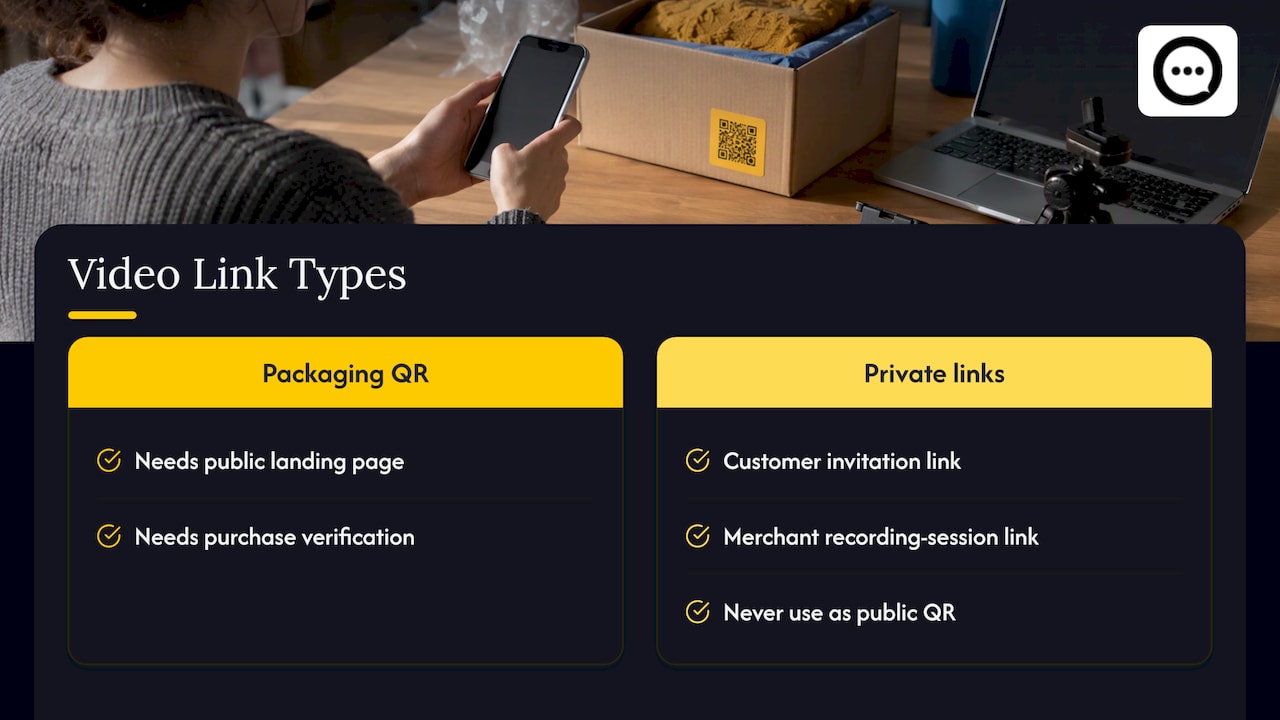
A word on QR codes. A generic QR code printed on packaging needs its own public landing page and a purchase-verification flow, because anyone can scan it. Never use a private customer invitation link or a merchant recording-session link as a public QR code. A step-by-step version lives in our guide from QR code to product page.
Putting reviews on the page the Shopify way
Setup happens inside Shopify Admin. You add Peers to your product page using theme app blocks or the app embed in the theme editor. There is no separate merchant login to use and no code snippet to paste into your theme files.
A sensible sequence:
- Install Peers from the Peers listing on the Shopify App Store.
- Invite customers after purchase, and moderate each submitted video and question before it goes live.
- Publish selected content with a theme app block or the app embed, placing it high enough on the product page that shoppers see it without hunting.
- Preview on mobile, then measure page speed.
- If you want your own markup, add it as a separate, deliberate step using documented Liquid fields, and test it.
The no-theme-code embed guide and the 10-minute publishing walkthrough cover the practical steps.
Questions and answers count too
Shoppers ask the things your description forgot. Peers lets you answer questions on the product page and moderate them. Public Q&A is not a verified purchase, so present it as questions and answers, not as reviews. Our guide to adding video Q&A and running it well explains how.
A practical review SEO checklist
- Make sure each product page has one clean Product markup block.
- Mark up only reviews shoppers can see on that page.
- Include author, itemReviewed and a rating in each Review.
- Display video where it loads on first view, not in a hidden tab.
- Preview mobile playback and compare page speed before and after.
- Disclose any incentive, and keep rewards independent of sentiment.
- Keep purchase verification, publishing permission and tracking consent as separate decisions.
- Check Search Console for indexing and enhancement reports after changes.
Our view
Merchants often ask us which review app will “do SEO” for them. We would rather give a straighter answer: the thing a review app does best is give you real customer evidence to put in front of shoppers, and that is worth having whether or not Google shows a star.
Video gives that evidence its force. A text review says “great fit”. A customer on camera shows the fit. That is why Peers is built around customer video reviews and moderated Q&A on the product page, managed inside Shopify and published through theme app blocks or the app embed.
Search benefits are a possible bonus and we do not guarantee them. What we do ask of every merchant is honesty: neutral invitations, no reward tied to sentiment, clear incentive disclosure and a clean separation of verification, permission and consent. Stores that do that build a review library worth keeping.
Leo
Start with Peers
Peers has two plans. Free includes moderation, widgets and up to 10 published video reviews per product, and Rewards are available on Free too. Growth removes the video-review limit and Peers branding. It comes with a 14-day trial and costs US$6 per 30-day billing cycle for the first 12 cycles, then US$15 per cycle.
You can try it from the Peers page on the Shopify App Store, and see both plans on the Peers site. Check the listing for the current pricing before you subscribe.
FAQ
Do reviews improve Shopify SEO?
They add unique, customer-written content to a product page and can support review markup that makes the page eligible for star snippets. Google does not say reviews or video raise rankings, so treat them as a way to help shoppers decide, with search visibility as a possible extra.
What is Shopify review schema?
It is structured data, usually JSON-LD, that labels reviews and ratings on a product page so Google can read them. Google requires an author, the item reviewed and a rating value for each review, and the product needs a name plus a review, an aggregate rating or an offer.
Why is my review markup valid but no stars appear?
Valid syntax only shows Google can read the code. The page must be indexed, the reviews must be visible, the markup must not conflict with your theme’s, and Google still decides whether to show a rich result. Fix indexing and duplicates first, then allow time for a recrawl.
Do video reviews help SEO on Shopify?
They can make a product page more persuasive, and VideoObject markup may help Google understand the video. A product page is not a dedicated watch page, and no markup guarantees indexing or rich results, so measure what happens instead of assuming.
Sources
- Google: Review snippet structured data
- Google: Product snippet structured data
- Google: Structured data for ecommerce sites