Shopify Metafields for Reviews: What They Store and What They Don't

Shopify review metafields are two small, standardized fields on each product: one holds the average star rating, the other holds the number of ratings. They are what lets a theme show “4.7 (212)” on a product card or in search results. They do not hold the review itself, a customer’s video, or an answer to a shopper’s question. For that you need content that shoppers can watch and read on the page, and that is where Peers fits: we help Shopify merchants collect customer video reviews and answer shopper questions on product pages, set up inside Shopify with theme app blocks or the app embed.
This guide explains what review metafields are, where to find them, how to display them, and how to decide what goes beside the numbers.
TL;DR
- Shopify defines two standard review metafields,
reviews.ratingandreviews.rating_count, for products and variants. They hold a summary, not the reviews. - They are not visible in Shopify Admin and are written by a review app, so a merchant cannot edit them by hand.
- Your theme reads them to show stars and counts. Hide the rating block when a product has no reviews.
- Stars summarize; shoppers still decide on evidence. Video reviews and answered questions give them that evidence on the page.
- Peers has a Free plan with moderation, widgets and up to 10 published video reviews per product, and a Growth plan after a 14-day trial.
Table of Contents
- What review metafields are
- Where to find review metafields
- How themes use the metafields
- Metafields and structured data
- What stars cannot tell a shopper
- Adding video reviews and Q&A beside the rating
- Measuring what is working
- Try Peers on your product pages
- FAQ
- Sources
What review metafields are
A metafield is a custom field attached to a Shopify resource, such as a product. It stores one value of a defined type: a number, a piece of text, a rating. Shopify also publishes a list of standard definitions so that apps and themes agree on names and types.
For reviews, Shopify’s standard definitions include two reserved fields:
| Metafield | Type | What it stores |
|---|---|---|
reviews.rating |
rating | The average rating for a product or variant |
reviews.rating_count |
integer | The total number of ratings |
Both apply to products and product variants. The first part of the name (reviews) is the namespace, and the second part (rating) is the key. Themes that follow the standard look for exactly that pair.
The rating type is more than a bare number. It carries a value and the scale it sits on, which is why a theme can render “4.5 out of 5” without guessing the maximum.
Metafields versus the review metaobject
Shopify also defines a standard product review metaobject. A metaobject is a structured record that can hold several fields at once. In this one, each individual review can carry a rating, title, body, submission and publish dates, source, author, linked order and product, a merchant reply, a language, a verification status (verified buyer, verified reviewer or unverified) and media URLs.
The split is simple:
- Metafields hold the aggregate: one average, one count.
- Review metaobjects hold individual reviews.
What your product page can display depends on which of these your review app writes to and which your theme reads. If you are choosing an app, check the released product’s documentation for what it writes, rather than assuming.
Where to find review metafields
This is the step that surprises most merchants. According to Shopify’s documentation, reviews.rating and reviews.rating_count are not visible in Shopify Admin and can only be accessed or validated through the GraphQL Admin API. That is intentional: merchants cannot edit them, because the review app is expected to update them whenever a review is created, updated, deleted or has its published status changed.
What that means in practice:
- Do not hunt for a field to type a rating into. If a number looks wrong, the fix is in the review app, not in the product editor.
- Some apps use their own namespace. If your theme shows no stars even though reviews exist, confirm which namespace and key your app writes under before editing theme code.
- A product with no reviews has no value. Nothing is stored for it, so your theme has to decide what to show.
If you are comfortable with developer tools, the GraphQL Admin API is the place to confirm the values. If you are not, ask your developer to check one product and compare it with what the app dashboard reports.
How themes use the metafields
In a Liquid theme, product metafields are read through the product object. A theme that supports the standard fields reads the rating and the count and prints them as stars plus a number. Many current themes ship a product rating block and a setting to show ratings on product grids, and those blocks only have something to display when a review app has written the two fields.
A reliable setup checklist:
- Install a review app and collect at least one approved review for a product.
- In the theme editor, add the rating block to the product template, or turn on the theme’s setting for ratings in product grids.
- Open a product with reviews and one without, on desktop and on a phone.
- Confirm the star count matches the count shown in the app.
Guard against empty ratings
A new product with zero reviews can render an empty row of stars or a “0” if the block is not conditioned on the count. A Shopify theme tutorial recommends wrapping the rating in a check on the review count so nothing shows until a review exists. Many themes include a setting for this; look for an option about showing ratings when there are no reviews.
When your theme does not read the standard fields
Older or custom themes may point to a different namespace. The fix is a small edit in the theme’s rating component so it reads the fields your app writes, and it is merchant implementation work, not something the review app changes for you. Make the edit in a duplicate theme, preview it, and only then publish.
Metafields and structured data
The rating metafields are also the natural source for review markup in structured data. Be careful with the expectations here.
Per a Shopify developer community discussion, the structured_data Liquid filter outputs product and article data but does not appear to include aggregateRating automatically. Merchants who want that markup need either a snippet that reads reviews.rating and reviews.rating_count, or a review app that emits it.
A few rules keep this safe:
- Map the markup only to documented Liquid fields and to values actually visible on the page.
- Keep one source of product markup. If your theme and an app both output a rating, the two can disagree.
- Test a product page with Google’s Rich Results Test after every theme change.
- Treat rich results as eligibility, not a promise. Markup does not guarantee a star display or any ranking change.
If you want to go deeper on search visibility for a store, SEO for Shopify stores is a useful place to look at how ratings, content and structured data fit into a wider plan.
For video, the logic is the same: markup describes what is on the page, and a product page with a supplementary video is still a product page. Our guide on nesting VideoObject on the server side covers that implementation as merchant work, separate from what Peers does inside the app.
What stars cannot tell a shopper
A metafield can tell a visitor that a product averages 4.6 across 180 ratings. It cannot say whether the shirt runs small, whether the grinder is loud, or how a bag looks next to a laptop. Those are the questions that stop a purchase, and a number does not answer them.
That is why the summary and the evidence work as a pair:
- The summary (the metafields) gets a shopper to look twice, on a collection page or in a search listing.
- The evidence (customer videos and answered questions) is what they use to decide on the product page.
If you want the evidence side of the case, we collected it in what the research says about reviews and conversions. Read the figures with their limits in mind, because results depend on the store, the product and the audience.
Adding video reviews and Q&A beside the rating
Peers is a Shopify app for collecting customer video reviews and answering shopper questions on product pages. You manage it inside Shopify, invite customers to share honest feedback, moderate the submitted videos and questions, and publish the ones you choose.
The setup is done in Shopify Admin. You display content with theme app blocks or the app embed, so there is no standalone merchant login to manage and no generic code snippet to paste into your theme. Peers invitations and browser recording are both supported, so a customer can respond from the invitation they received and record in the browser.
Where this meets your metafield work:
- Your theme’s rating block shows the summary from whichever review app writes the standard fields.
- Peers blocks add customer videos and a question-and-answer area on the product page, in the places you choose in the theme editor.
- You decide what is published. Moderation tools let you review each submitted video and question first.
For the walkthrough, see how to publish video reviews without theme code and how to add product Q&A without theme edits. If you want the blocks to match your brand, customizing a review widget shows the options.
Verification, permission and consent are three different things
When you mix star data with customer content, keep three questions apart:
- Was this a purchase? Reviews collected through a customer-specific post-purchase invitation can be linked to an order. Public questions, replies and merchant recordings are not automatically verified purchases.
- Do you have permission to publish it? Peers’ standard video permission covers its service and store community, not unrelated advertising or model training. What permission you need depends on your context, and a signed release is not a universal GDPR rule.
- Has the visitor consented to browser tracking? That is a separate matter from either of the above, and it belongs to how you set up analytics and cookies on your store.
If you want a packaging QR code, it needs a separate public landing page and a purchase-verification flow. Never share a private customer invitation link or a merchant recording-session link as a public QR code.
Asking for feedback fairly
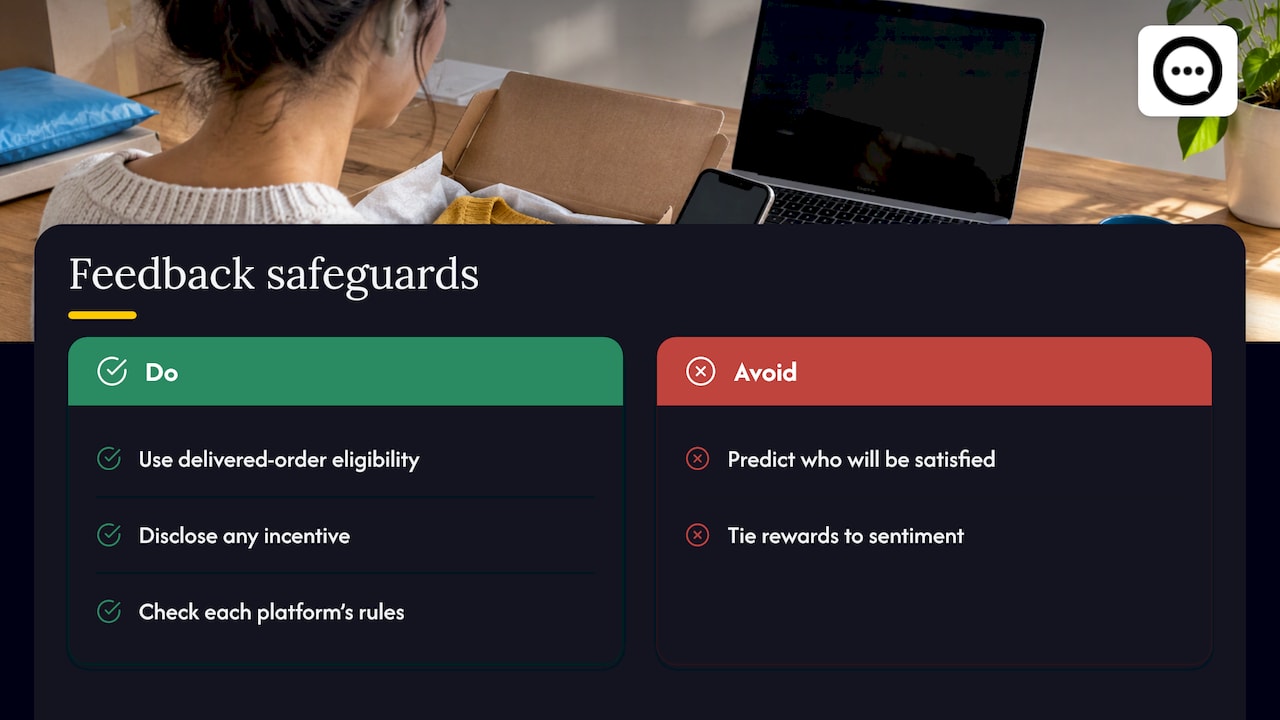
Request honest feedback using neutral eligibility criteria, such as “customers whose order was delivered”, never a prediction of who will be satisfied. If you offer a reward, do not make it depend on positive or negative sentiment, disclose the incentive, and check the rules of any platform where the content will appear. Peers does not promise legal compliance, and neither should your store copy.
Performance and file size
Video adds weight to a page. No setup has zero performance impact, so preview mobile playback and measure page speed before and after you publish. Customer uploads in Peers have a 150 MB control limit, which is separate from Shopify’s own product-media limits. Our guide on publishing video reviews within size and length limits explains the practical side, and choosing thumbnails helps the clips load as clear previews.
Measuring what is working
A metafield gives you a number to display. It does not tell you whether shoppers engaged with your content. Decide on a few measures before you launch: how many invitations lead to a submitted video, how many published clips sit in view on mobile, and whether product pages with video and answered questions behave differently from those without. What to track in review analytics lists the numbers worth watching. If the clips sit too low on the page to be seen, this rollout guide shows how to move them up.
Treat any before-and-after comparison with care. Peers does not guarantee sales or SEO results, and neither do metafields.
Our view on stars and stories
We think a rating metafield is a good summary and a poor argument. A shopper who sees 4.6 stars still wonders whether the product will work for them. A short video from a real customer, or a plain answer to a question, settles that.
That is why we built Peers around video reviews and shopper Q&A on the product page, managed inside Shopify and displayed through theme app blocks or the app embed. You moderate every video and question before it goes live, and you can link invitation-based reviews to purchases.
Use the standard metafields for the numbers your theme shows. Use Peers for the voices behind them.
Leo
Try Peers on your product pages
Peers has two plans. Free is $0 per month and includes moderation, widgets and up to 10 published video reviews per product. Rewards are available on the Free plan too. Growth has a 14-day trial, then costs US$6 per 30-day billing cycle for the first 12 cycles and US$15 per cycle after that. Growth removes the video-review limit and the Peers branding.
You can install Peers from the Peers listing on the Shopify App Store and add the blocks to a product page from the theme editor.
FAQ
What are Shopify metafields for?
They store extra structured data on products, collections, orders and other resources, such as a size guide, a material, or a rating. For reviews, Shopify defines reviews.rating and reviews.rating_count so that review apps and themes can share an average and a count.
Can I edit review metafields in Shopify Admin?
No. Shopify’s documentation says these fields are not visible in Admin and are accessible through the GraphQL Admin API, because merchants are not meant to edit them. The review app updates them as reviews change.
Why are my stars missing even though I have reviews?
The usual causes are that the app writes to a different namespace than your theme reads, the theme’s rating block or product-grid setting is off, or the product has no published review yet. Check one product with reviews and one without, then confirm the namespace and key your app uses.
Do review metafields improve SEO?
They do not do anything for search on their own. They can feed structured data that you add, but that markup must match what is on the page, and it does not guarantee rich results or rankings.
Sources
- List of standard metafield definitions, Shopify developer docs
- Standard product review metaobject definition, Shopify developer docs
- Structured_data should add support for rating, Shopify developer community
- How to show review stars on Shopify collection product cards, LearnShopify.dev