Review Widgets and Page Speed on Shopify: How to Measure It

A review widget can affect your page speed, but how much depends on how it loads, where it sits on the page and what it shows. The useful question is not whether to have reviews. It is which Core Web Vitals the widget touches on your product pages and how to check that against real shopper data. Peers is built for Shopify product pages. Merchants set it up in Shopify Admin with theme app blocks or the app embed, so you can preview mobile playback and measure the result before you publish.
This guide is for Shopify store owners and e-commerce managers who want customer video reviews and Q&A on product pages without guessing about speed.
TL;DR
- Third-party scripts and styles that block rendering delay First Contentful Paint and Largest Contentful Paint (LCP), according to Shopify’s performance documentation.
- Judge speed with real-user Core Web Vitals first: LCP within 2.5 seconds, INP under 200 milliseconds and CLS under 0.1 for at least 75% of page loads.
- PageSpeed Insights lab scores help you debug, but Google says good lab data does not guarantee good real-user experiences.
- Preview mobile playback and measure your own product pages before and after any change. No review widget should be promised to have zero performance impact.
- Peers Free includes moderation, widgets and up to 10 published video reviews per product. Growth has a 14-day trial.
Table of Contents
- How a review widget can slow a product page
- What a good speed score means for your store
- Lab data versus field data
- How to measure a widget’s effect on your product pages
- Video reviews: where the weight really comes from
- Placement and layout: the cheap fixes
- Speed is a means, not the goal
- Perspective
- Peers for stores that want video reviews and Q&A
- FAQ
- Sources
How a review widget can slow a product page
A review widget is code that comes from outside your theme. It asks the browser to download a script, sometimes extra CSS, and then to draw content: stars, text, thumbnails and, for video reviews, a player or preview images.
Shopify’s documentation on render-blocking apps explains the mechanism. Scripts and CSS that block rendering delay First Contentful Paint (when the first content appears) and LCP (when the largest visible element, often a product image, finishes loading). The same page lists common causes: script tags loaded synchronously without async or defer, oversized critical CSS, many separate HTTP requests and cascading dependencies, where one file loads another that loads another.
That tells you where to look. A widget rarely makes a page “slow” in one dimension. It usually shows up in three places:
- Loading (LCP). If the widget competes with your hero image for bandwidth, or blocks rendering, the main image arrives later.
- Responsiveness (INP). Interaction to Next Paint measures how quickly the page reacts when a shopper taps or clicks. Heavy scripts keep the browser busy and taps feel sluggish.
- Visual stability (CLS). Cumulative Layout Shift measures how much content jumps around. A widget that appears after load and pushes the buy button down causes shifts when the space was not reserved.
When reading any speed claim about review apps, check which of these three it measures. A page can load quickly and still feel unstable, or look stable and respond slowly.
What a good speed score means for your store
Before you decide a widget is a problem, know what you are aiming at. Shopify’s Help Center on how web performance works says a store performs well when at least 75% of page loads achieve LCP within 2.5 seconds, INP under 200 milliseconds and CLS under 0.1. It also says there is no perfect speed score, and that merchants should focus on their business needs.
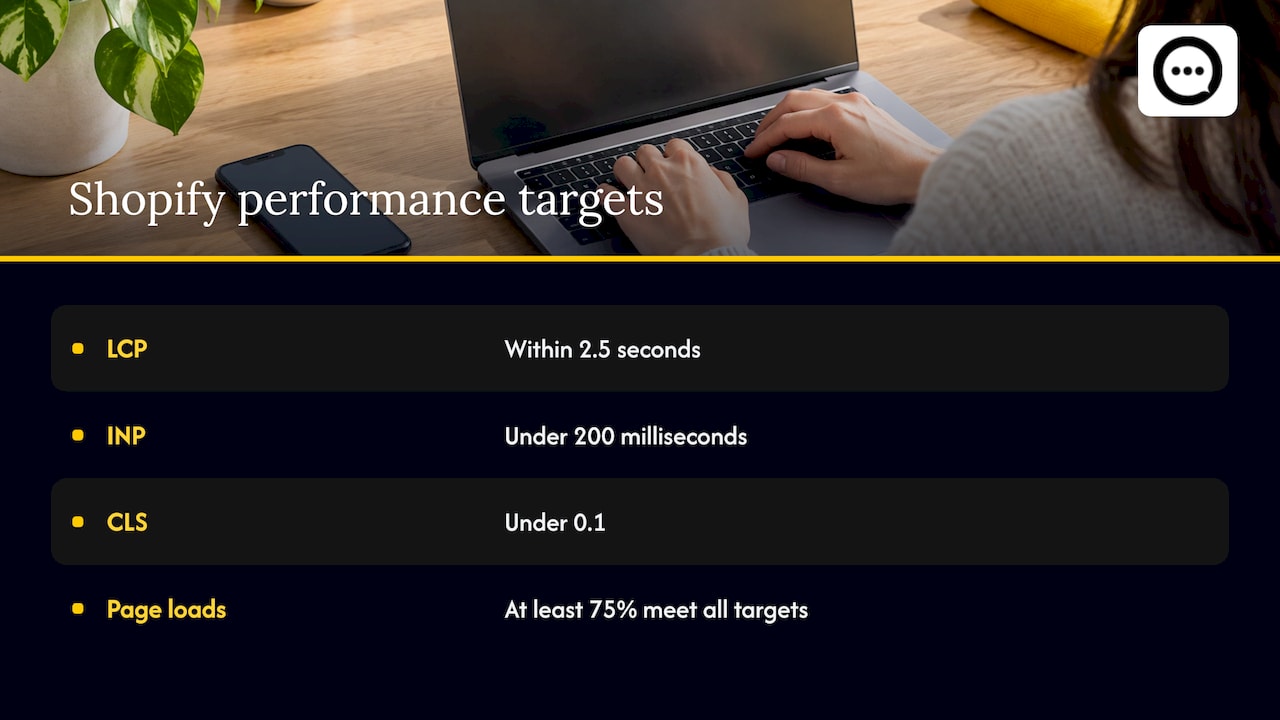
That last point matters. A single number from a testing tool is a snapshot of one simulated visit. The 75% threshold describes what your real visitors experience.
It also helps to know how typical Shopify stores do. Ska Digital’s October 2026 study of Chrome UX Report phone data covered 449,762 Shopify stores. Of the 442,190 with enough data to judge, 82% passed Core Web Vitals, with a median LCP of 1.4 seconds, INP of 100 ms and CLS of 0. The same study found that 51% of the 100,000 most-visited Shopify stores passed. This is one agency’s analysis of field data, so treat it as context rather than a guarantee for your theme and app mix. The takeaway is that passing is normal and achievable on Shopify, and that adding a review feature does not have to mean failing.
Lab data versus field data
Most merchants run a test, see a mediocre score and blame the last app they installed. That reaction skips a distinction Google spells out in its PageSpeed Insights documentation.
PageSpeed Insights (PSI) reports two kinds of data:
- Lab data comes from Lighthouse, a controlled, simulated page load on a mid-tier device. It is repeatable and good for debugging, but Google notes it may not capture real-world bottlenecks.
- Field data comes from the Chrome UX Report: real users over the previous 28 days, summarized at the 75th percentile. It reflects what shoppers actually experienced, though with a more limited set of metrics.
Google states that good lab data does not necessarily mean real-user experiences will also be good, and the two can disagree. Shopify made the same call for its own tools. In January 2024 its performance team explained that it moved from a single Lighthouse-based Speed Score to a web performance dashboard built on real-user Core Web Vitals, because lab scoring does not represent real-world user experiences well.
For a review widget, this has a practical meaning. A lab test loads every script on the page on a simulated slow phone, so a widget can look expensive there. Field data tells you whether shoppers on real phones and connections are actually affected. Use the lab to find what to fix and the field to decide whether it matters.
Field data only exists if your page gets enough traffic. If a product page has too little, look at your store-wide dashboard in Shopify and the origin-level field data in PSI.
How to measure a widget’s effect on your product pages
You do not need a developer to run a fair before-and-after comparison. You need discipline, because a single run is noisy.
- Pick the pages that matter. Shopify’s own app testing weights product detail pages most heavily: according to its storefront performance documentation, the weighted average uses Home at 17%, Product details at 40% and Collection at 43%. Your best-selling product page is the right place to start.
- Record a baseline before changing anything. Run PSI in mobile mode on the product URL and save the field metrics (LCP, INP, CLS) and the lab metrics (including Total Blocking Time).
- Run it several times. Shopify’s documentation tells developers to run PageSpeed Insights mobile tests multiple times and average the scores, because Lighthouse results vary between runs. Do the same: at least five runs, then take the average.
- Make one change. Add the widget, move it, or change what it shows. If you change three things you will not know which one mattered.
- Repeat the same runs. Compare averages, and look at the specific metric that moved. A change in CLS points to reserved space. A change in Total Blocking Time points to script weight.
- Check field data after a few weeks. Because field data covers a 28-day window, it responds slowly. Give it time before concluding anything.
- Test on a real phone. Open the product page on an actual mobile device on cellular data, scroll, and tap play on a video review.
This is merchant implementation advice, and it applies to any review tool. It is also why we recommend previewing mobile playback and measuring performance for your own store rather than relying on anyone’s promise, including ours.
Video reviews: where the weight really comes from
Video is heavier than text, so it is fair to ask whether video reviews cost more speed than star ratings and written reviews. In general the cost depends on what the page loads up front. A page that loads full video files on arrival asks the browser to do far more than one that shows a still preview and loads the clip when a shopper taps it. That is a general principle of how browsers work and the reason placement and loading behavior matter more than the word “video”.
Three things are in your control as a merchant:
- What you publish. Shorter, tighter clips are lighter. Our guide to compressing video reviews on Shopify covers keeping quality while cutting file size.
- How many clips you show at once. A strip of a handful of featured reviews is lighter than a wall of dozens. With moderation, you choose which submitted videos to publish, so the featured set stays curated.
- Where the widget sits. Putting it far below the buy button is not automatically right. Reviews exist to help a shopper decide, and hiding them costs you the trust they build. See how we think about placing video reviews so shoppers actually see them.
On uploads: customers who submit video through Peers are subject to a 150 MB control limit. This is separate from Shopify’s own product-media limits, which apply to media you upload to your product listings.
Placement and layout: the cheap fixes
Most speed problems from widgets are solved by layout choices, not by dropping the feature.
Reserve space to protect CLS. When a widget appears after the page renders, content below it jumps down. A theme section with a set minimum height gives the widget room, so the buy button stays put. Check the PSI layout-shift diagnostics before and after.
Keep the main image first. Your LCP element is usually the product photo. Anything that delays it, including a review script that blocks rendering, hurts your most important metric. Compare LCP with and without the widget on the same page.
Show fewer items up front. A summary rating near the title and a short video strip lower on the page serves most shoppers. Fuller review lists can sit in an expanded section.
Use native Shopify placement. Peers is set up inside Shopify Admin using theme app blocks or the app embed. You add the block to your product template in the theme editor, preview it on mobile, and publish. There is no separate merchant login and no snippet to paste into theme files. Keeping everything inside the theme editor also makes it easy to remove or move the block when you compare results. Our walkthrough of embedding post-purchase video reviews without theme code shows the flow, and the guide on customizing a review widget covers the design side.
Count your apps, not only this one. Shopify’s documentation points out that cascading dependencies and many requests add up across apps. If your product page loads scripts from several tools that do overlapping jobs, the combined cost is the real issue.
Speed is a means, not the goal
Speed work serves one outcome: a shopper who trusts the page enough to buy. A page that is a fraction of a second faster but gives no social proof is not necessarily the better page. Reviews and customer answers help a shopper judge a product they cannot hold, and the SEO and marketing value of online reviews for ecommerce is a reason to keep them in your plan.
We do not promise conversion or ranking results from any widget. Our own page on what the evidence says about reviews and conversions is careful about that. What you can do is make an informed trade: put the reviews where they help, then measure that the page still passes the thresholds that matter.
Some trust practices also belong next to the speed work, because they affect what you display:
- Verification is separate from permission and consent. A customer-specific post-purchase invitation can link a review to an order. Public Q&A, replies and merchant recordings are not automatically verified purchases. Permission to publish a video is a different matter again, and browser tracking consent is a third. Keep them distinct.
- Ask for honest feedback. Use neutral eligibility criteria for who you invite, not a guess about who will be satisfied.
- Disclose incentives. If you offer a reward, tell shoppers, never tie it to positive or negative sentiment, and check the rules of any platform where you republish the content.
Perspective
We built Peers around a simple idea: a shopper deciding on a product wants to see and hear from people who bought it, and to ask a question and get a real answer. Video reviews and moderated Q&A do that better than a star average alone.
That is exactly why we want merchants to treat speed as a measurement, not a worry. Set Peers up in Shopify Admin with a theme app block or the app embed, preview how it plays on a phone, and compare your Core Web Vitals before and after. Field data from real shoppers is the verdict that counts.
We do not claim zero performance impact, and we would not trust any tool that did. We do think a curated set of real customer videos, chosen through moderation, belongs on the product page where it can influence the decision, and that a store can keep that and still pass.
Leo
Peers for stores that want video reviews and Q&A
Peers is a Shopify app for collecting customer video reviews and answering shopper questions on product pages. You invite customers to share honest feedback, moderate submitted videos and questions, and publish the ones you choose through theme app blocks or the app embed. It supports Peers invitations and browser recording.
The Free plan includes moderation, widgets and up to 10 published video reviews per product, and Rewards are available on Free too. Growth removes the video-review limit and branding. It has a 14-day trial and costs US$6 per 30-day billing cycle for the first 12 cycles, then US$15 per cycle. You can find it on the Peers Shopify listing, or see the plans at Peers.
FAQ
Do review widgets slow down Shopify stores?
They can. Shopify’s documentation says render-blocking scripts and CSS from apps delay First Contentful Paint and LCP. The size of the effect depends on how the widget loads, where it sits and how many other apps share the page, so measure your own product pages.
What is a good page speed score for a Shopify store?
Shopify’s Help Center defines a good store as one where at least 75% of page loads reach LCP within 2.5 seconds, INP under 200 milliseconds and CLS under 0.1. It also says there is no perfect score, so focus on those real-user thresholds rather than one lab number.
Is PageSpeed Insights accurate for judging a widget?
It is useful for finding problems, but Google says good lab data does not necessarily mean real-user experiences are good. Run mobile tests several times, average them, and read the field data section alongside the lab results.
Do video reviews hurt speed more than text reviews?
Video is heavier, so what loads on arrival matters. Curate which clips you publish, keep files compact, limit how many show at once and preview mobile playback. Then compare Core Web Vitals before and after on your product page.
Sources
- Remove or optimize apps causing render-blocking issues (Shopify.dev)
- Storefront performance (Shopify.dev)
- How web performance works (Shopify Help Center)
- How fast are Shopify stores? Speed study, October 2026 (Ska Digital)
- About PageSpeed Insights (Google for Developers)
- Shopify’s new web performance dashboard (Shopify Performance blog)
- Online Reviews: Impact on Ecommerce SEO Success