Review Request Timing on Shopify: When to Ask and Remind

Time your first review request from confirmed delivery, not from the order date. Then match the delay to how long the product takes to show its value. Fast-use items can be asked within days. Products that need setup or weeks of use need longer. Send a reminder after a pause, not right away. This guide shows how to set those windows in your Shopify store and how to test them.
TL;DR
- Anchor the request to delivery. Shopify’s own guidance warns against asking before the package arrives, and against waiting until the experience has faded.
- Let the product set the delay: a few days for quick-use goods, a few weeks where results take time.
- Delay reminders. Field experiments found that immediate nudges can backfire, while delayed ones raised posting.
- Shopify’s Shop review notifications can be scheduled from 1 to 180 days after delivery.
- Treat every window as a starting point. Change one variable at a time and compare.
Table of Contents
- Why the timing of a review request matters
- Start from delivery, not from the order date
- Match the delay to the product
- Reminders: wait longer than feels natural
- Email, SMS or both
- Time of day and day of week
- Timing for video reviews and shopper Q&A
- Perspective: a request is a conversation, not a timer
- How to test and improve your timing
- Common mistakes to avoid
- Show the reviews where they matter
- Put timing into practice with Peers
- FAQ
- Sources
Why the timing of a review request matters
A review request has two jobs. It has to arrive when the customer can say something useful, and when they still feel like saying it. Those two moments rarely line up on the day of purchase.
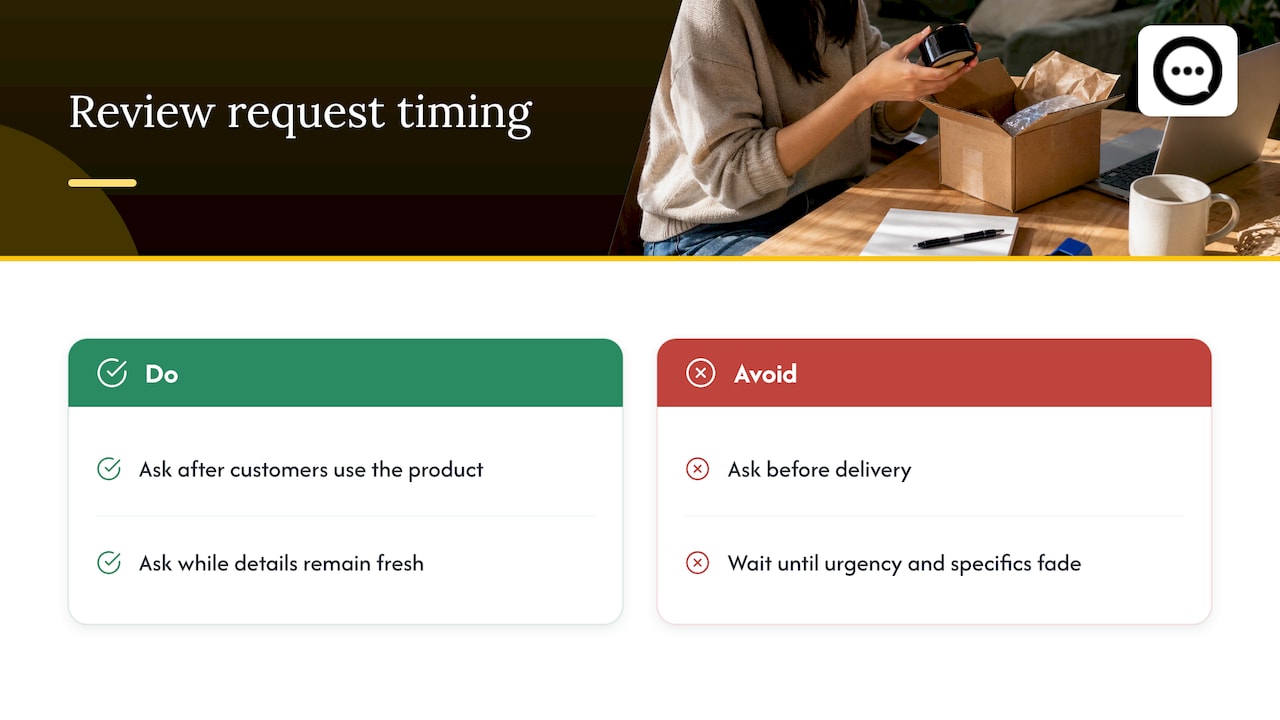
Ask too early and the customer has nothing to report. The box may still be in a truck. Ask too late and the excitement is gone, along with the details that make a review worth reading. Shopify’s guide to getting product reviews puts it this way: before delivery, the customer may forget the request, and long after, the urgency and the specifics fade.
There is also a trust angle. Shoppers read reviews to learn what ownership is actually like. A review written after real use, with specifics about fit, setup or results, helps the next visitor decide. A rushed “arrived fast, thanks” does not. If you want the bigger picture on why this matters for sales, our walkthrough of what the evidence says about reviews and conversions covers it.
Start from delivery, not from the order date
Many review tools default to a fixed number of days after the order or after fulfillment. That is convenient, and it is the main reason requests land at the wrong moment. Shipping times vary by carrier, region and season. A seven-day delay from the order date means one customer has had the product for five days and another is still waiting for it.
There is a second reason to be delivery-aware. A study of delivery performance and online ratings in the Journal of Business Research found that late delivery is associated with lower ratings. It also found that more time between a late delivery and the rating is associated with higher ratings. For a store owner, the practical reading is simple: when a parcel runs late, give the customer a little more room before you ask.
What to use as your trigger
In order of preference:
- Confirmed delivery. Use the carrier’s delivered status where your setup supports it.
- Fulfillment plus a buffer. If you cannot get delivery status, add the typical transit time for the customer’s region to the delay.
- Order date plus a long buffer. The weakest option. Use it only if nothing else is available, and lean toward a longer delay.
Shopify’s Help Center documents a delivery-based option for its Shop channel. Review notifications can be scheduled from 1 to 180 days after an order is delivered, and you set it in Shopify admin under Sales channels, then Shop, then Settings. If you use a third-party review app, look for the equivalent “after delivery” setting and a fallback delay in case the delivery notification never arrives.
Match the delay to the product
The right window is the time it takes a customer to form an opinion. Shopify’s guidance is to ask a few days after delivery for immediate-use products, and a few weeks later when results or familiarity take time.
The table below is our suggested starting point for your first test. It is a practical rule of thumb built on that principle, not a benchmark, and your own customers will tell you where to move it.
| Product type | Suggested first request after delivery | Why |
|---|---|---|
| Food, snacks, drinks | 3 to 5 days | Used up and judged quickly |
| Apparel and accessories | 7 to 10 days | Customers need to wear and wash it |
| Small electronics | 7 to 14 days | Setup plus a few days of daily use |
| Furniture, anything needing assembly | 14 to 21 days | Customers review after it is built and lived with |
| Skincare and results-based goods | 21 to 28 days | Results take weeks to show |
| Supplements | 4 to 8 weeks | The effect is slow and hard to judge early |
If you sell across categories, set the delay per product or per collection, not store-wide. A single global timer means the supplement buyer gets asked on day five and the coffee buyer gets asked on day thirty.
A quick way to pick your number
Ask yourself: “How many days until a typical customer can honestly say whether this was worth the money?” Start the request at that number, then adjust. For bundles, use the slowest item. For subscriptions, ask after the second delivery, once the customer has a pattern, rather than after the first box.
Reminders: wait longer than feels natural
The instinct is to chase fast. The research says to hold back.
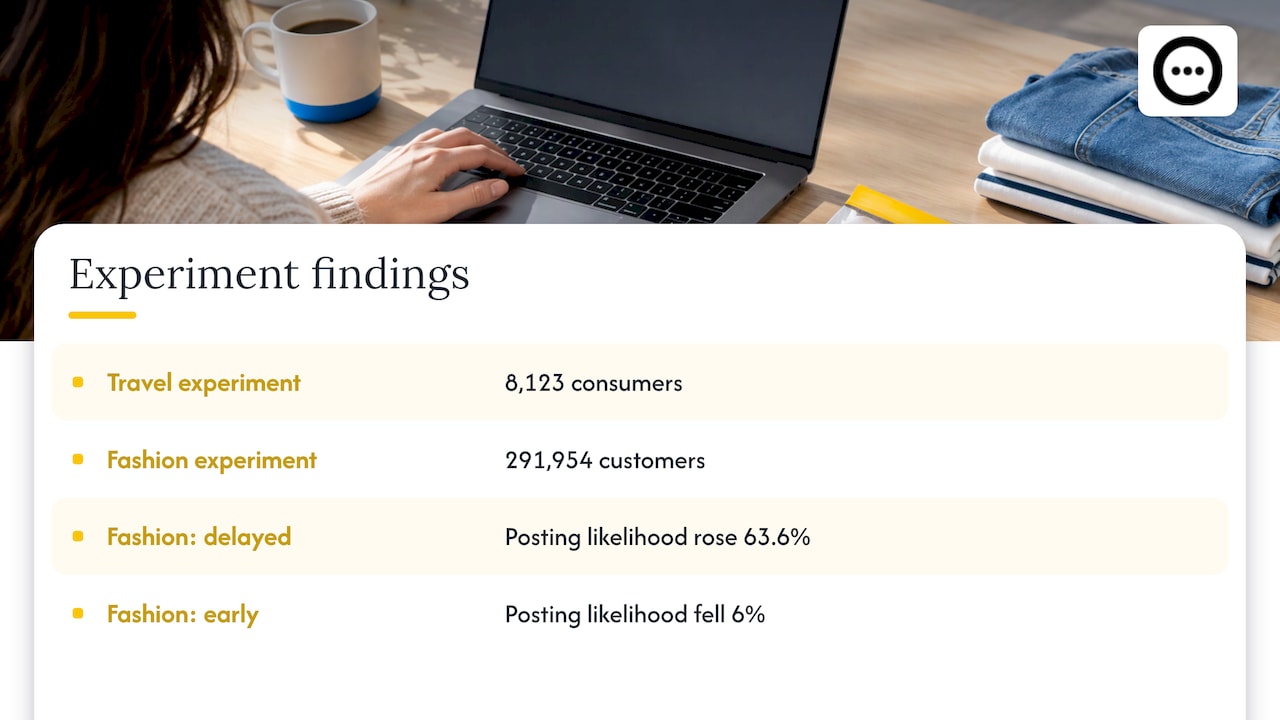
A Baylor Keller Center summary reports two randomized experiments, one with 8,123 travel consumers and one with 291,954 fashion customers. In the fashion experiment, delayed reminders produced a 63.6% increase in the likelihood of posting in the latest timing group, while early reminders reduced it by 6%. The American Marketing Association’s write-up of research involving more than 300,000 consumers reaches the same conclusion: immediate reminders can reduce posting, delayed ones increase it, and timing should reflect how long customers normally need to try and judge the product.
The authors of the underlying paper explain the logic. An instant reminder can feel pushy and trigger resistance. A delayed one can help the customer recall an experience they have now had time to form an opinion about.
A simple reminder cadence
- Request one: at the product’s evaluation window (see the table).
- Reminder: a clear gap after request one, long enough that the customer has moved on from the first email. For a 7-day product, a gap of one to two weeks is a reasonable test.
- Stop: after one reminder for most stores. A third nudge adds more annoyance than reviews.
If your review app has a long fallback delay for cases when the delivery notification does not fire, keep it generous. A very long interval protects you from asking before the parcel arrives.
Email, SMS or both
Channel changes the answer a little. Shopify’s article cites third-party figures of 42% response for text or in-app push versus 9% for email. That is a vendor-reported number, not a Shopify experiment, so treat it as a reason to test a text channel rather than a promise of results.
Three practical notes:
- Email gives you room for a product photo, a clear single button and a short explanation. It is the easiest place to start. Our guide to email review requests on Shopify covers the timing, copy and templates.
- Text messages are short and immediate, so the timing matters even more. A text that lands on a delivered-today notification reads as relevant. One that arrives with no context reads as noise.
- Whichever channel you use, make leaving the review take under a minute on a phone. Most of your customers will tap through from a mobile device.
Time of day and day of week
There is less certainty here. An analysis of 22.3 million review requests reported response-rate peaks around noon and early evening, and a general decline in response as the interval from purchase to request grew (summary on RePEc). That dataset comes from a European review platform, so your customers may behave differently.
A reasonable approach: schedule sends for midday or early evening in the customer’s time zone, then check whether your own data agrees. Do not spend weeks optimizing the hour before you have the delay right. The delay is the bigger lever.
Timing for video reviews and shopper Q&A
Video reviews follow the same rule with one extra twist: a customer is more willing to record a short clip while the product is in front of them and the experience is fresh. That favors the early part of your evaluation window, not the late part, for a video ask. For products with a slow payoff, a two-step approach works well: ask for a quick rating first, then invite a short video once results appear.
If you are building this out, these guides go deeper on the mechanics:
- Post-purchase video reviews on Shopify, a practical overview.
- Collecting video reviews from QR code to product page, in three steps.
- Capturing short verified clips with QR codes, useful when you want customers to respond from a package insert.
If you offer anything in return for reviews, read our piece on rewarding customers compliantly first. Incentives affect how and when you can ask.
For wider context on getting reviews without asking at the wrong moment, see this overview of leveraging online reviews for sales.
Perspective: a request is a conversation, not a timer
We built Peers around a simple observation: shoppers do not trust a star average as much as they trust another customer talking about the product they are about to buy.
That changes how we think about timing. A text review request fired on a schedule is a broadcast. A post-purchase video review or a question answered by a verified customer is a conversation, and conversations need the right moment. We would rather a store ask a customer after they have actually used the product, and let them say it in their own words, than collect a pile of early, thin ratings.
Peers is a Shopify-only app. Because we focus on one platform, we design for the product page where the decision happens: video reviews and shopper Q&A sit right there, with moderation tools so you control what is shown, customizable design so it matches your theme, and analytics so you can see what visitors engage with.
Our advice: get the delay right per product, collect fewer but richer reviews, and put them in front of the people who are hesitating.
Leo
How to test and improve your timing
The research agrees on one point: there is no universal best number. The AMA summary advises re-evaluating current practice and adjusting timing to specific customer groups rather than assuming faster is better. Here is a plain test plan.
Step 1: Pick one product group
Choose a collection with steady order volume. Testing across your whole catalog at once muddies the result.
Step 2: Change one thing
Split orders into two groups. Keep everything the same except the delay, for example 7 days versus 14 days after delivery for apparel. Do not change subject line, channel and delay together.
Step 3: Measure what matters
Track three numbers per group:
- Review rate: reviews divided by requests sent.
- Review quality: share of reviews with text, photos or video, and average length.
- Unsubscribe or complaint rate: a warning that you are asking too often or too soon.
Step 4: Give it enough time
A slow-payoff product needs several weeks before the results are meaningful. Run each test until you have a few dozen requests in each group, then decide.
Step 5: Lock in, then test the reminder
Once you have a winning delay, test the reminder gap the same way. Then move to the next product group.
Common mistakes to avoid
- One timer for the whole store. It will be wrong for most of your products.
- Counting from the order date. Shipping variance makes the request land before arrival for a share of customers.
- Instant reminders. The experiments above point the other way.
- Ignoring late deliveries. A customer whose order was late needs more breathing room before you ask.
- Asking and then hiding the results. If reviews are tucked below the fold, customers and shoppers never see the payoff. Our note on video review rollout shows how to give them space.
Show the reviews where they matter
Good timing gets you better reviews. Placement gets them in front of buyers. Two guides help here: embedding post-purchase video reviews without theme code and customizing a review widget so it fits your store’s look.
Put timing into practice with Peers
If you want the reviews you collect to be more than a star rating, Peers gives your Shopify product pages post-purchase video reviews and live shopper Q&A with verified customers. You can moderate what appears, customize the design, check how it looks on mobile, and track engagement in analytics. Peers has a free plan, and Peers Growth is $15 per month.
You can see the plans and install it from the Peers page on the Shopify App Store.
FAQ
When is the best time to ask for a review after a Shopify order?
Ask after delivery, once the customer has had time to use the product. A few days works for quick-use goods and a few weeks for products where results take time. Shopify’s guidance says to avoid both asking before arrival and waiting until the experience has faded.
Should I send the request from the order date or the delivery date?
Use delivery whenever you can. Shipping times vary, so an order-date timer reaches some customers before their parcel. Shopify’s Shop review notifications can be set to go out from 1 to 180 days after delivery.
How many reminders should I send?
For most stores, one reminder is enough, sent after a real gap rather than straight away. Field experiments found that immediate reminders can lower the chance of a review, while delayed ones raised it. Test the gap with your own customers.
Is SMS better than email for review requests?
Shopify cites a third-party figure of 42% response for text or in-app push against 9% for email. That is a reported figure, not a guarantee. Start with email, then test a text with the same delay and compare your own rates.
Does timing apply to video reviews too?
Yes, and the early part of your evaluation window often suits video best, while the product is fresh. For slow-result products, ask for a quick rating first and invite a short video once results show.
Sources
- How To Get Product Reviews To Boost Brand Trust, Shopify
- Manage your Shop product reviews, Shopify Help Center
- Impact of delivery performance on online review ratings, Journal of Business Research via PMC
- Wait Just a Minute: When to Ask for Online Reviews, Baylor Keller Center
- Asking for customer reviews at the right time, American Marketing Association
- Ask for Reviews at the Right Time: Evidence from Two Field Experiments, Journal of Marketing
- When to ask for a review: An empirical analysis of online reviews, RePEc
- Leveraging Online Reviews to Boost E-Commerce Sales