Q&A Examples for Shopify Product Pages That Build Trust

The best Q&A examples for a Shopify product page are short, specific answers to the questions shoppers ask just before they buy: fit, materials, what is included, care, shipping and returns. Each one opens with the answer, states the condition that could change it, and sits next to the choice it affects. Below are example questions and answers you can adapt, the formula behind them, and a way to keep them honest once real shoppers start asking. We built Peers for Shopify stores that want shoppers’ own questions, moderated and answered on the product page, so that is the setup this guide assumes.
TL;DR
- Good product Q&A answers start with the answer (yes, no, or a number), add one condition, and give a next step only when needed.
- Put answers that change a purchase choice beside that choice: size, variant, bundle or quantity. Link long policies instead of pasting them.
- Use real shopper questions from support tickets, chats and reviews rather than a list you invented.
- Verify every detail before publishing, and moderate for duplicates, errors and outdated answers.
- Peers adds customer Q&A and video reviews to Shopify product pages through theme app blocks or the app embed, with moderation built in. The Free plan covers moderation and widgets.
Table of Contents
- What a good product Q&A answer looks like
- Fit and size Q&A examples
- Materials, care and what’s included
- Compatibility and who it’s for
- Shipping, returns and warranty
- Where to find the questions worth answering
- Organizing answers on the page
- Publishing and moderating without losing trust
- Collecting shopper questions inside Shopify with Peers
- Perspective: why real questions beat a written FAQ
- Peers pricing for Shopify stores
- FAQ
- Sources
What a good product Q&A answer looks like
A product Q&A answer has one job: remove the doubt that is stopping a purchase. That is different from a general FAQ page, which collects store-wide topics. If you want the distinction in depth, we cover it in Q&A vs FAQ on Shopify.
A repeatable formula works across nearly every category:
- Answer first. Yes, no, or the number, in the first words.
- State the condition. The one thing that could change the answer: a size, a variant, a use case.
- Give proof or a fact. A measurement, a material name, a policy window.
- Add a next step only if it helps. A size chart, a policy page, a variant to pick.
This mirrors guidance from several Shopify content guides, which suggest keeping each answer decision-ready and starting with the response rather than a preamble. One guide, SourceVision’s product page article, shows the style with plain facts such as a stated shipping time and a stated return window. Shopify’s own Help Center points the same way: it says to make product claims factual and back up superlatives with proof, and to avoid vague lines like “excellent product quality.”
The examples below are illustrative templates. Replace every number, material and policy with your own verified product facts.
Fit and size Q&A examples
Fit is the most common reason a shopper hesitates on apparel, bags, cases and accessories. Answers work best when they sit near the size selector.
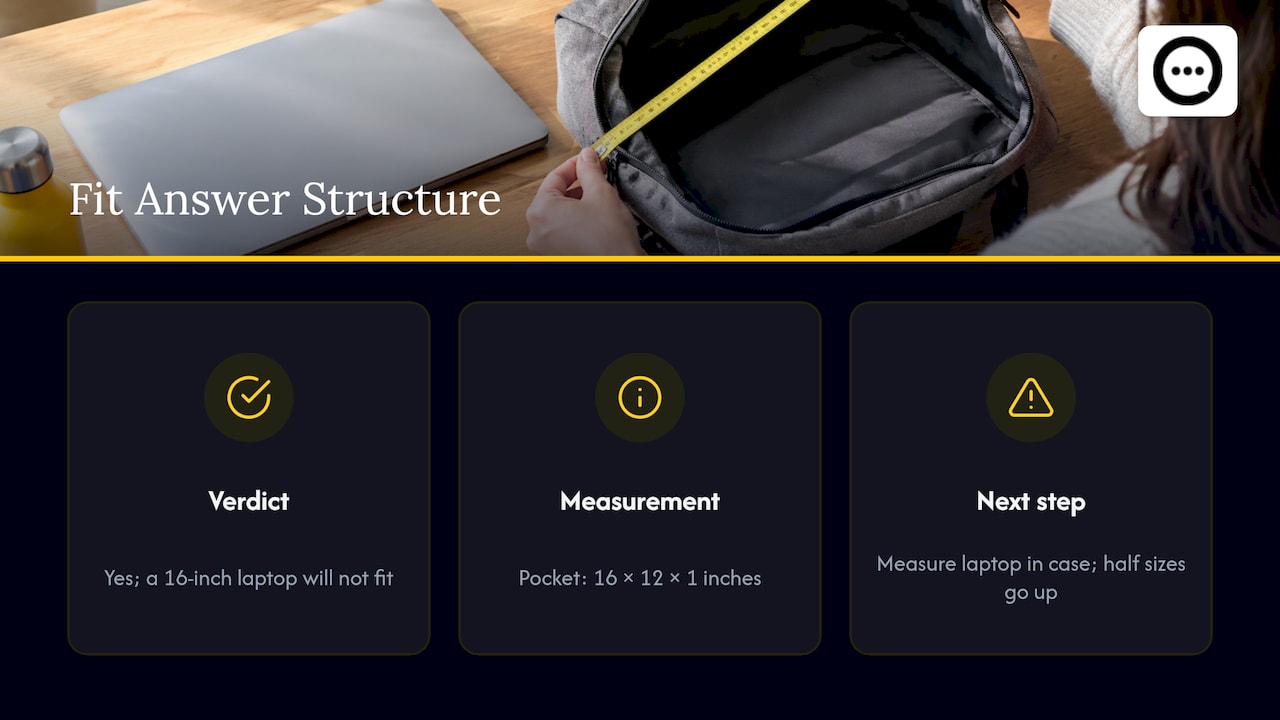
Q: Will this bag fit a 15-inch laptop? A: Yes. The inside pocket measures 16 x 12 x 1 inches, which fits laptops up to 15 inches. A 16-inch laptop will not fit. Measure your laptop in its case if you carry it in one.
Q: I’m between a medium and a large. Which should I order? A: Order the large if you plan to layer. The medium is cut close through the chest, and the large adds about 2 inches. See the size chart for exact measurements.
Q: Does this run small? A: It runs true to size for most customers. If you wear half sizes, go up to the next full size.
Why these work: each opens with the verdict, carries one concrete measurement and tells the shopper what to do if their situation differs. Thankik’s Shopify product page guide makes a similar point, recommending size guidance, dimensions and concise fit notes near the selector.
Materials, care and what’s included
These questions are cheap to answer and expensive to leave unanswered, because shoppers who cannot find them often leave the page.
Q: What is the strap made of? A: Cotton webbing, 1 inch wide. The body is 12 oz cotton canvas.
Q: Can I machine wash it? A: Spot clean only. Do not tumble dry. Washing in a machine can distort the shape.
Q: What comes in the box? A: One bag, one detachable shoulder strap and a dust bag. A laptop sleeve is sold separately.
Specificity is what makes the difference. Shopify’s trust guidance recommends exact measurements, weight, materials and warranty details, and a precise material name over a generic one. For bundles, subscriptions and multi-packs, put the “what’s included” answer beside the quantity or bundle selector so it reads as part of the choice.
Compatibility and who it’s for
The honest “no” is one of the most trust-building answers you can publish. Shoppers read it as a sign that the rest of the page is also straight.
Q: Is this waterproof? A: Water-resistant, not waterproof. It handles light rain. It is not meant for wet gym gear or heavy downpours.
Q: Does this work with the 2023 model? A: Yes, with the 2023 model and newer. Earlier models use a different connector and will not fit.
Q: Is it warm enough for winter? A: It is a lightweight layer, so it is less suitable if you need the warmest option for freezing temperatures. It works well as a mid layer under a coat.
That last example follows a framing suggested by SEO BOSS: describe a limit as a fit consideration, not a failure, and avoid phrases like “perfect for everyone.” Write the answer as guidance to the right buyer, and the wrong buyer self-selects out before a return.
Shipping, returns and warranty
These answers need a short reassurance on the product page and a link to the full policy. Do not paste the whole policy into every answer.
Q: How fast does it ship? A: Orders ship in 1 to 2 business days. Delivery usually takes 3 to 5 business days within the US.
Q: Can I return it if it doesn’t fit? A: Yes. Returns are accepted within 30 days of delivery if the item is unused. Final-sale items are marked on the product page. See our return policy for the full terms.
Q: Is there a warranty? A: Yes, a 1-year warranty covers manufacturing defects. It does not cover normal wear.
FunnelSpark’s FAQ guide shows the same pattern in a before and after example: lead with the number, then remove the risk. Shopify also lets merchants set return rules, including the return window, who pays return shipping and final-sale exclusions, and the policy appears in the checkout footer. Make sure your Q&A answers match those settings exactly.
Where to find the questions worth answering
The most useful Q&A is not the one you write from imagination. Pixel Union’s FAQ guide suggests reviewing support tickets and sales inquiries to decide what to cover, and WhatFlow recommends pulling from customer chats and reviews. Practical sources include:
- Support inbox and live chat transcripts, filtered by product.
- Pre-sale emails and social media direct messages.
- Product reviews that mention a surprise (“smaller than I expected”).
- Returns reasons.
- Questions shoppers type directly on the product page.
A shortlist of three to six questions per product is plenty to start, which matches WhatFlow’s suggested range for product FAQs. For a deeper look at what shoppers ask before buying, see Pre-Purchase Questions on Shopify.
Organizing answers on the page
Placement changes how an answer performs. A practical order:
| Answer type | Where it goes |
|---|---|
| Size, variant, bundle, subscription | Beside the relevant selector |
| Shipping, returns, warranty | Short reassurance near the buy button, linking to the full policy |
| Materials, care, specifications | Product details or the Q&A block |
| Secondary questions | The Q&A or FAQ block lower on the page |
This follows Thankik’s advice to put choice-changing answers beside the relevant choice and reserve the final FAQ for secondary questions. Landing page structure also matters for how those answers get found; an e-commerce landing page guide explains why a focused page tends to serve both shoppers and search.
For store-wide topics, group a separate FAQ page by theme: shipping and delivery, returns and refunds, product information and care, payments and billing, and order issues, as Pixel Union suggests. Product-specific questions stay on the product page.
Publishing and moderating without losing trust
A confident wrong answer does more damage than an empty space. WhatFlow’s guide advises checking uncertain details before publishing and leaving an answer unpublished until it is verified. Use this checklist before any answer goes live:
- Does it match the product description, size chart and variant names?
- Does it match the current return and shipping settings in Shopify?
- Is the claim factual, with proof for any “best” or “most” statement?
- Is the author clear (the store team, or a shopper)?
- Is it a duplicate of an answer already on the page?
Ecom Design Pro argues that trust in Q&A depends on ongoing moderation of errors, duplicates and outdated details. Set a rhythm: review new questions on a schedule, and re-check answers whenever a product changes. Our guide on on-page Q&A etiquette covers tone and how to handle awkward questions.
One point about honesty: shoppers can also see what you do not say. If a limit matters to the purchase, say it plainly in the answer, as in the waterproof example above.
Collecting shopper questions inside Shopify with Peers
Writing your own examples is the starting point. Real Q&A grows when shoppers ask on the page and you answer in public. Peers is a Shopify app for collecting customer video reviews and answering shopper questions on product pages. You manage it inside Shopify, moderate submitted videos and questions before anything is published, and display selected content through theme app blocks or the app embed. Setup happens in Shopify Admin, so there is no separate login and no code snippet to paste.
A few points about what Peers does and does not do, since they affect how you describe the content on your page:
- Purchase verification, permission to publish and browser tracking consent are three separate things. Customer-specific post-purchase invitations can link a review to an order. Public questions, replies and merchant recordings are not automatically verified purchases, so do not label them that way.
- Peers invitations and browser recording are supported. Customers can respond to an invitation and record in the browser.
- Uploads have a 150 MB control limit in Peers, which is separate from Shopify’s product-media limits.
- Peers’ standard video permission covers its service and your store community. It does not extend to unrelated advertising or model training.
- A generic packaging QR code needs its own public landing page and purchase-verification flow. Never share a private customer invitation or a merchant recording-session link as a public QR code.
If you want to see how the pieces fit, 4 Ways to Add Product Q&A on Shopify Without Theme Edits walks through placement options, and How to Answer Shopper Questions on Your Shopify Store covers the answering workflow. For video answers specifically, read Shopify Video Q&A.
A note on measurement: Peers does not promise sales or SEO results, and no widget has zero performance impact. Preview mobile playback on your own theme and measure page performance after you add it. A conversion rate optimization approach that tests changes first is a sound habit here too: change one thing, then compare.
Perspective: why real questions beat a written FAQ
A written FAQ shows what a merchant thinks shoppers wonder. A Q&A block shows what they actually wonder, in their words, at the moment they hesitate.
That is why we built Peers around shopper questions and customer video. A question typed on the product page tells you exactly which sentence is missing from your description. An answer from the store team, published after moderation, turns one shopper’s doubt into a reference for the next hundred visitors.
We also think the shopper’s own experience matters as much as your copy. Video reviews let people see the product in use, and invitation-linked reviews can be matched to a purchase. We keep that separate from public questions, which are not automatically verified purchases, because honest labeling is part of earning trust.
Start with a handful of products, read every question that comes in, and let the patterns tell you what to fix on the page.
Leo
Peers pricing for Shopify stores
The Free plan includes moderation, widgets and up to 10 published video reviews per product, and Rewards are available on Free too. Peers Growth removes the video-review limit and the Peers branding. It has a 14-day trial and costs US$6 per 30-day billing cycle for the first 12 cycles, then US$15 per cycle. You can install it from the Peers listing on the Shopify App Store and check the current plan details there.
If you offer rewards for feedback, invite customers using neutral eligibility criteria, such as everyone who completed an order, rather than customers you expect to be happy. Never tie a reward to positive or negative sentiment, disclose the incentive, and check the rules of any platform where the content will appear. None of this is a guarantee of legal compliance, so check your own situation with a qualified adviser.
FAQ
How many Q&A items should a Shopify product page have?
Three to six per product is a good starting range, according to WhatFlow’s guide. Start with the questions that come up most in support and add more as shoppers ask. Quality and accuracy matter more than count.
What is the difference between product Q&A and an FAQ page?
Product Q&A answers questions about a specific item, on that item’s page, often from shoppers themselves. An FAQ page covers store-wide topics such as shipping, returns and payments. Most stores benefit from both, with Q&A near the buying decision.
Are customer questions on my product page verified purchases?
No. Public questions, replies and merchant recordings in Peers are not automatically verified purchases. Only customer-specific post-purchase invitations can link a review to an order, so label content accordingly.
Should I answer negative or awkward questions?
Yes, factually and without defensive wording. If a product is not right for a use case, say so and name who it suits instead. Shoppers tend to trust a store that states limits plainly.
How often should I update my Q&A answers?
Re-check them whenever a product, variant, price or policy changes, and review new questions on a regular schedule. Outdated answers undermine the trust the block is meant to build.
Sources
- Shopify Help Center: Writing engaging product descriptions
- Shopify: How to Build Trust With Customers
- Pixel Union: Add FAQ pages to your Shopify store
- Thankik: Shopify Product Page FAQs
- WhatFlow: Product FAQs on Shopify
- SourceVision: Answer shoppers’ questions on product pages
- FunnelSpark: FAQ Page Examples That Answer Objections
- SEO BOSS: Product Tradeoffs in Shopify Blog Posts
- Ecom Design Pro: Product Q&A UX
- Importance of Landing Pages for E-Commerce SEO Success
- Testing First Conversion Rate Optimization
- Peers on the Shopify App Store