Public vs Private Q&A on Shopify: Which to Use

Use public Q&A for questions about a product that other shoppers will also ask, and handle one-to-one matters, such as order problems or personal details, privately through support. Public Q&A works best when a merchant reviews every question before it goes live, so the page stays useful and the shopper stays safe. Peers is a Shopify app built for this: shoppers ask questions on the product page, you moderate them in Shopify, and you publish the ones that help the next buyer.
TL;DR
- Public Q&A is a question and answer that every visitor to the product page can read once you publish it. Private means only you and the asker see it, which in practice is support or email.
- Put product-specific questions (fit, materials, use) on the product page. Keep order, account and personal questions out of public view.
- Moderation is the control that makes public Q&A safe: nothing needs to appear until you decide to publish it.
- Peers keeps the setup inside Shopify Admin with theme app blocks or the app embed. The Free plan includes moderation and widgets.
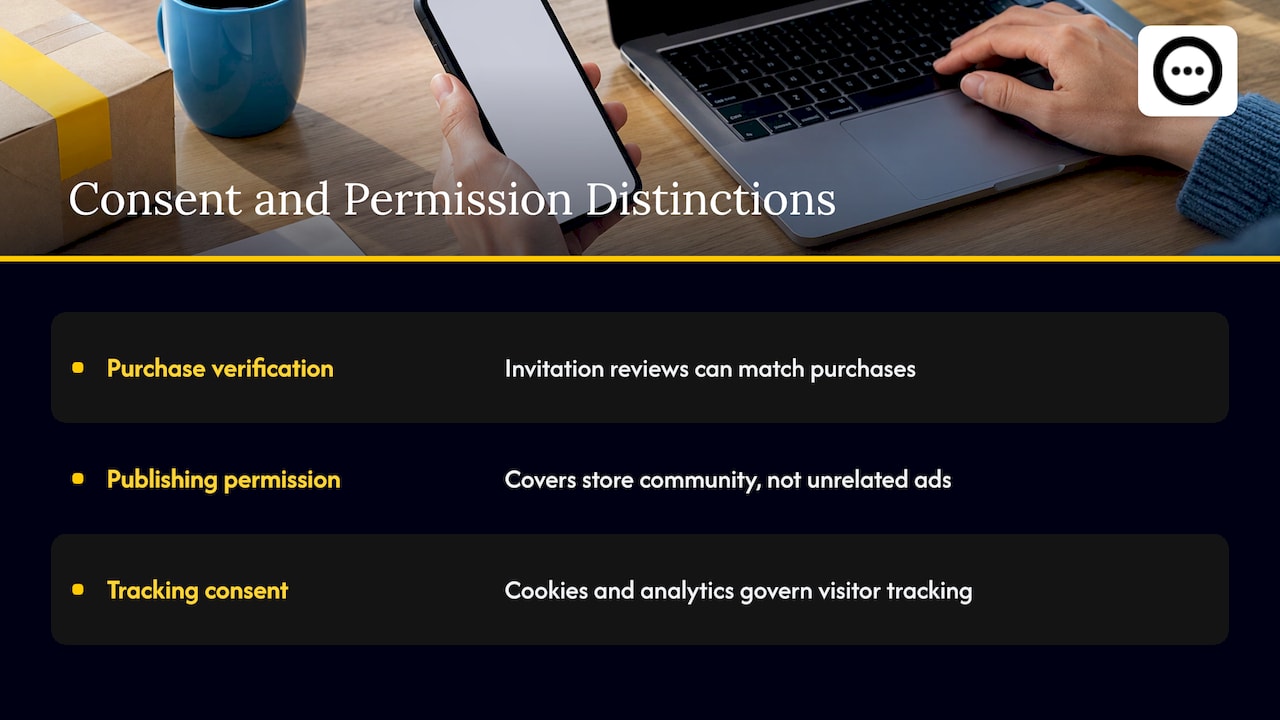
- Purchase verification, permission to publish and browser tracking consent are three separate things. Do not treat one as covering the others.
Table of Contents
- What public and private Q&A mean on a Shopify product page
- Who sees what
- When public Q&A is the right call
- When a question should stay private
- Moderation: the control behind public Q&A
- Three things people mix up: verification, permission and tracking consent
- Incentives and honest feedback
- Setting it up on Shopify
- A simple rule for deciding
- Our perspective
- Try it on your store
- FAQ
- Sources
What public and private Q&A mean on a Shopify product page
The phrase gets used loosely, so define it by who can read the exchange.
Public Q&A is a visible question-and-answer block on a product page. Any visitor can read the published questions and answers. The value is reuse: one good answer serves every shopper who has the same hesitation.
Private Q&A is a question that stays between one shopper and the store. It arrives through email, a contact form or a support inbox, and the reply goes back to that one person. Nobody else learns anything from it.
The difference is not a technical setting so much as a decision about each question: is the answer useful to other shoppers, and is the question safe to show? A question about whether a jacket runs small is public material. A question about where someone’s order is belongs in support.

There is a middle state worth naming. With a moderated tool, a shopper submits a question and it is not public yet. It sits in a queue until you review it. You can publish it with an answer, or you can deal with it privately and never publish it. That queue is what lets you run public Q&A without giving up control.
Who sees what
| Public Q&A | Private question | |
|---|---|---|
| Who reads it | Every visitor to the page, after you publish | The shopper and your team |
| Where it lives | Product page block | Inbox, helpdesk, email |
| Best for | Fit, size, ingredients, compatibility, shipping basics for that product | Orders, returns, account details, complaints |
| Benefit | One answer helps many buyers | Personal, fast, discreet |
| Main risk | Showing something that should not be public | Same answer written again and again |
In the Peers setup, submitted questions and videos are moderated and you publish selected content. Submission and publication are separate steps, which is the practical meaning of “public” on your store.
When public Q&A is the right call
Choose public when the question is about the product on that page. The Search Engine Journal advises that if a query concerns one product and does not apply to others, the content belongs on that specific product page. Its example questions are about how a garment fits or whether it suits a certain body shape.
Public Q&A also pays off at the moment of doubt. The same article says that answering questions on relevant pages helps visitors know the product will meet their needs, and that building confidence may make them more inclined to click add to cart. That is a possibility, not a promise, and no Q&A tool, Peers included, guarantees conversion or ranking results. What it does is put the answer where the hesitation happens.
If you want a broader view of how visible answers connect to buyer confidence and add-to-cart behavior, the Shopify SEO and AEO guides cover the search side of the same idea.
Good candidates for public publication:
- Sizing, dimensions and fit
- Materials, care and ingredients
- Compatibility with other products
- How a product is used day to day
- Questions that arrive more than once
Our guide to what shoppers ask before they buy lists the categories that come up most often, and Q&A strategy for Shopify shows how to turn them into a routine.
When a question should stay private
Keep it private when publishing would expose someone or help no one else.
- Order and account details. Order numbers, addresses, emails and payment questions never belong on a product page.
- Complaints and returns. Resolve these one-to-one first. If the lesson is general, you can later write a public answer that does not mention the person.
- Health, legal or other sensitive situations. A shopper describing a personal circumstance should get a careful private reply, from you or the right professional, not a public thread.
- Off-topic or promotional posts. Decline them in moderation. They never need to be published.
- Brand and company questions. Things like returns policy or company background fit better on your FAQ page. The Search Engine Journal draws that line: brand and company questions belong on the FAQ page, not on a product.
That last point is the Q&A versus FAQ distinction. FAQ is content you write in advance for the whole store. Q&A grows from real shopper questions on a specific product. We compare the two in Q&A vs FAQ on Shopify. If a shopper wants a live reply and you run chat, Q&A vs live chat explains how the roles split.
Moderation: the control behind public Q&A
The fear behind “private” is usually loss of control: spam, wrong answers, personal data, rude posts. Moderation answers that fear directly.
With Peers you moderate submitted videos and questions inside Shopify, then publish only what you choose. A workable routine:
- Check for personal data. Remove or decline anything with names, order numbers or contact details.
- Check the question is about the product. If it is not, answer it privately or point it to the right page.
- Write an answer you can stand behind. Be specific. If the honest answer is that the product is not the right fit, say so and name the product that is. The Search Engine Journal makes the same point: saying a product won’t work lets you link to a working solution.
- Publish. Only then does the content appear in the block on your product page.
- Review the queue on a schedule. Unanswered questions look worse than none.
On tone, on-page Q&A etiquette covers how to word replies, and replying to Q&A on Shopify covers instant answers and public video replies.
Three things people mix up: verification, permission and tracking consent
Once you publish customer content, three separate questions arise. Treat each on its own.
Purchase verification. Peers lets you send customer-specific post-purchase invitations, and reviews submitted through those invitation links can be matched to a purchase. Public questions, replies and merchant recordings are not automatically verified purchases. A visitor who asks a question on a product page may or may not have bought it, so do not describe public Q&A as verified buyers.
Permission to publish. This is whether the person agreed to have their words or video shown. Peers’ standard video permission covers its service and your store community. It does not cover unrelated advertising or model training, so do not reuse customer video in ads on the strength of it. Permission requirements depend on context, and a signed release is not a universal GDPR rule. If you plan anything beyond showing content on your store, ask your lawyer.
Browser tracking consent. Whether a visitor has accepted cookies or analytics is a different matter again. It governs how you track visitors, not whether a customer allowed their video to be published or whether they bought.
Keeping these apart prevents the common mistake of saying “verified” about something that is only “published with permission”.
Incentives and honest feedback
If you invite customers to share feedback, use neutral eligibility criteria, such as everyone who received an order in a given period, never a guess about who will be happy. Never condition a reward on positive or negative sentiment. Rewards are available in Peers on the Free plan too.
Disclose incentives wherever the content appears, and check the rules of any platform you republish to. The FTC publishes questions and answers on its Consumer Reviews and Testimonials Rule, a good starting point for your own review. Following any guidance does not guarantee legal compliance, so take specific questions to a lawyer.
Setting it up on Shopify
You can add product Q&A without touching code. For Peers, setup happens inside Shopify Admin: you add the app’s block to your product template through theme app blocks, or turn on the app embed. There is no separate merchant login to maintain and no snippet to paste into theme files. Our walkthrough, 4 ways to add product Q&A without theme edits, shows the options.
A few practical points:
- Preview on mobile. Check how the block and video playback look on a phone before publishing.
- Measure performance. Any added widget has some effect on page speed. Test your pages before and after and decide from your own numbers. We do not promise zero impact.
- Mind upload sizes. Customer uploads in Peers have a 150 MB control limit. It is separate from Shopify’s own product-media limits.
- Invitations and recording. Peers invitations and browser recording are both supported, so customers can respond to a post-purchase invitation or record in the browser.
- No generic packaging QR on its own. A QR code printed on every package needs a separate public landing page and a purchase-verification flow. Never publish a private customer invitation link or a merchant recording-session link as a public QR code, because anyone could use it.
The D2C Times describes an objection-handling module as a step in building a product page, using an FAQ section, comparison table or quiz to preempt the top reasons someone does not buy. It suggests mining service tickets, return reasons and post-purchase surveys to find those objections. Your private support inbox is therefore the best source for your public Q&A: answer once privately, then publish the general version.
For post-purchase wording ideas, see post-purchase Q&A prompts. For answers in video form, see Shopify video Q&A.
A simple rule for deciding
Ask three questions about each incoming question:
- Is it about this product? If not, FAQ or support.
- Would another shopper want the answer? If yes, public. If not, private.
- Is anything in it personal? If yes, answer privately, or rewrite the general part and publish only that.
Most stores find the bulk of their pre-purchase questions pass all three. That is the content that earns a place on the page. For how questions connect to results, read shopper questions and conversion, where we treat outcomes as something to measure, not assume.
Our perspective
Public and private are not rival camps. They are two jobs. Private handles the person; public handles the pattern.
We built Peers around that split. A shopper can ask a question on the product page, and nothing has to go live until you have read it. You decide what is public, you write the answer, and you keep the rest in your normal support flow. That keeps the page honest and keeps you in charge.
We also keep claims modest. Peers helps shoppers assess products using real customer experiences. It does not turn text reviews into video, and it does not guarantee sales or SEO results. What it gives you is a clean way to collect video reviews and questions, moderate them, and show the useful ones inside Shopify.
Our advice: start with the ten questions you answer most often by email, publish good answers to them, and watch what shoppers ask next.
Leo
Try it on your store
Peers is on the Shopify App Store with two plans. The Free plan costs $0 per month and includes moderation, widgets and up to 10 published video reviews per product. Rewards are available on Free too.
Peers Growth has a 14-day trial and costs US$6 per 30-day billing cycle for the first 12 cycles, then US$15 per cycle. Growth removes the video-review limit and the branding. Check the current listing for pricing before you subscribe.
Install it from Shopify, add the block to a product page with theme app blocks or the app embed, and start with your most common question.
FAQ
Is public Q&A the same as a product FAQ?
No. Q&A comes from real shopper questions on a specific product page, while an FAQ is content you write in advance, often for the whole store. Product-specific questions fit the product page, and brand or policy questions fit the FAQ page.
Can I choose which questions become public?
Yes, with moderation. In Peers, submitted questions and videos are reviewed in Shopify and you publish selected content. Anything you decline or answer by email stays off the page.
Are public questions verified purchases?
No. Public questions, replies and merchant recordings are not automatically verified purchases. Reviews that come through a customer-specific post-purchase invitation can be linked to an order, because the invitation is tied to that customer.
Do I need to edit my theme code to add Q&A?
Not for Peers. You add it in Shopify Admin with theme app blocks or the app embed. Preview it on mobile and measure page performance afterward.
Sources
- Should You Include FAQs On Product Or Category Pages? (Search Engine Journal)
- The Consumer Reviews and Testimonials Rule: Questions and Answers (FTC)