On-Page Q&A Etiquette for Shopify Product Pages

On-page Q&A etiquette is a short set of house rules for public questions on a product page. Invite questions in plain words. Answer fast, in the first sentence, with one specific detail. Label who is answering. Send order problems to private support. Remove anything stale, off-topic or unsafe. A Q&A block is a public promise that someone will answer, and every rule below protects that promise.
This guide is for Shopify store owners and e-commerce managers. It covers the rules, the workflow and the wording, and it includes sample answers you can adapt.
TL;DR
- Treat your Q&A section as a promise: an unanswered question looks worse than having no section, so only switch it on when someone owns it.
- Answer in the first sentence, add one concrete detail (size, timing, compatibility) and give a next step if more help is needed.
- Keep product questions public and keep order status, complaints and personal data in private support.
- Pair site-written FAQs with shopper-driven Q&A: Baymard’s testing found the hybrid performed best, yet few sites offer both.
- Moderate daily, label every answerer, merge duplicates and retire answers when the product changes.
Table of Contents
- What on-page Q&A is, and why etiquette matters
- The ground rules of good Q&A etiquette
- How to invite questions without pressure
- How to write an answer that actually helps
- Who should answer: brand, customers or both
- A daily moderation workflow
- Consent and privacy when you publish
- Where to place Q&A on the product page
- What good etiquette does for sales and returns
- Perspective: why public answers beat private ones
- Put these rules to work with Peers
- FAQ
- Sources
What on-page Q&A is, and why etiquette matters
On-page Q&A is a public question-and-answer area on an individual product page. Shoppers ask about the item in front of them, and the store, or other verified customers, answer where every later visitor can read it.
It differs from a FAQ. A FAQ is written by you in advance. Q&A grows from real shopper wording. If you want the longer comparison, we break it down in Q&A vs FAQ on Shopify.
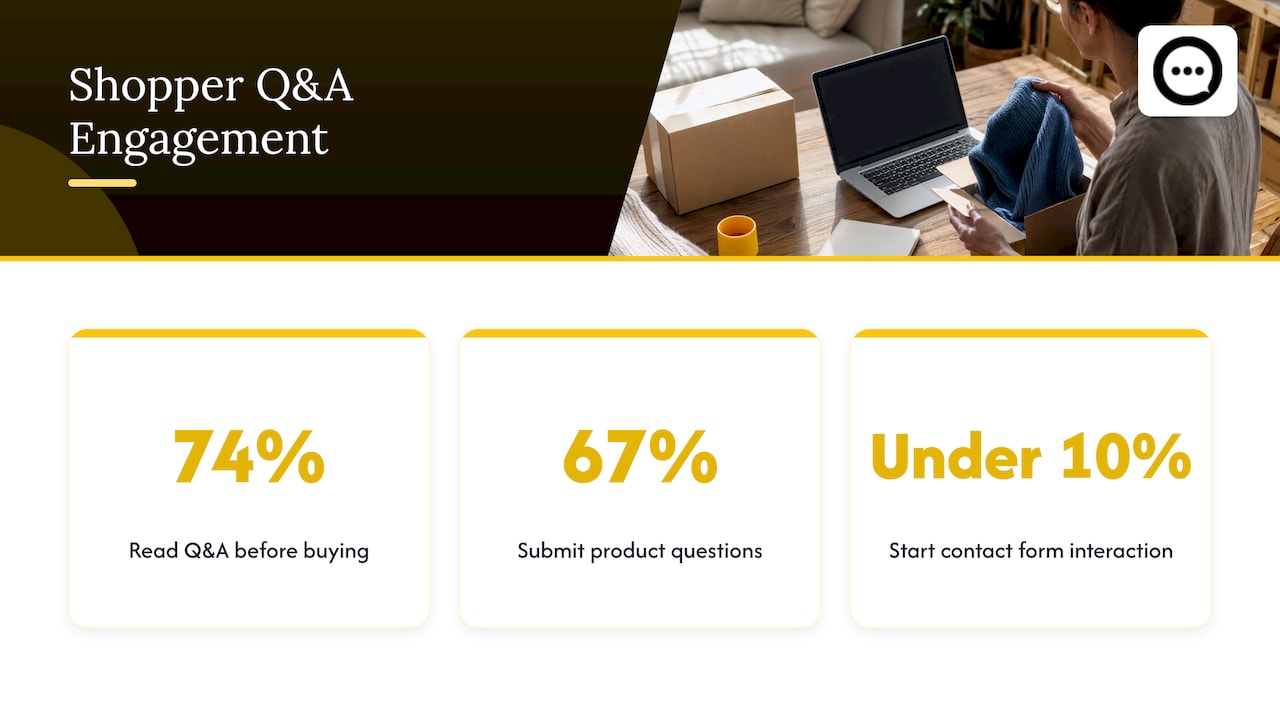
It also differs from a contact form. A contact form is private and one-to-one, so the answer helps one person. Zuko’s form benchmarking reports that under 10% of people who reach a contact form page start interacting with it. A public answer, by contrast, keeps working for every visitor who has the same doubt.
Shoppers do read this content. A 1WorldSync survey reported via PR Newswire found that 74% of online shoppers regularly read Q&A sections before committing to a purchase, and 67% of consumers have submitted product questions. If that many people read your answers, how you word and manage them is part of your brand.
The ground rules of good Q&A etiquette
These seven rules cover most situations.
- Only open the section if someone owns it. Name a person, not a team. Give that person a time slot each day.
- Answer every public question, including awkward ones. Silence reads as avoidance.
- Answer for the product on that page. Shipping policy, returns and company-wide topics belong in policy pages or a store-level FAQ. Search Engine Journal advises placing content on a specific product page when the query is about that product and does not apply to others.
- Be honest when the product is not the right fit. The same article notes that saying a product will not work lets you link to one that will. Pointing a shopper to the right item in your own catalog is good service.
- Label who is speaking. Brand, verified customer or staff expert. Shoppers judge credibility by the label.
- Keep private things private. Order numbers, addresses, phone numbers and emails never belong in a public thread.
- Retire what is out of date. When a product changes, review its answers the same day.
How to invite questions without pressure
The invitation sets the tone. A good prompt is short and specific to the product.
- Weak: “Questions?”
- Better: “Ask us about fit, ingredients or shipping times.”
- Best for high-doubt items: a prompt that names the worry, such as “Not sure about sizing? Ask before you order.”
Keep the form short. Name, email and the question are usually enough, since each extra field loses people before the question is sent. On mobile, make tap targets generous and test that any accordion opens cleanly.
Set expectations right beside the box: “We reply within one business day.” Then keep that promise. If you cannot, change the sentence, not the habit.
Seed the section too. Pull real questions from your support inbox and live chat transcripts, product reviews that show what confused buyers, and the search queries bringing people to the page. Search Engine Journal names chat transcripts and customer service emails as the first place to look. Publishing a handful of genuine questions with good answers shows new visitors what a useful question looks like. Our guide to what shoppers ask before they buy lists common themes by product type.
How to write an answer that actually helps
A useful answer follows a simple pattern:
- Open with the answer. Yes, no, or the number.
- Add one specific detail. Size, timing, material, compatibility.
- Give the next step if the shopper may need more help.
- Stop. No filler, no copy-paste language, no sales pitch.
Shopify’s own guidance on product descriptions warns that vague statements say nothing substantial and can breed skepticism, and that claims should be factual and backed up. The same applies to answers. NN/g’s ecommerce research adds that descriptions should be complete but not wordy, and that users read more at the beginning than the end. That is the case for putting the answer in the first sentence.
Keep most answers to three sentences or fewer. If a topic needs more, link to a dedicated page instead of stuffing a paragraph into the thread.
Before and after
Question: Does this jacket run small?
Weak answer: “Thanks for your question! Our jackets are designed for comfort and style. Please see our size chart.”
Strong answer: “Yes, it runs about half a size small through the shoulders. If you’re between sizes or plan to layer, order the larger one. Our size chart lists chest measurements in inches and centimeters.”
The strong version answers, gives a rule of thumb and points to the next step. (These are sample answers to show the pattern, not claims about any real product.)
Tone rules
- Use the shopper’s wording back to them, so they know you read the question.
- Skip “unfortunately” openers. State what is true, then what helps.
- Never argue. If a shopper is wrong, give the fact once and move on.
- Thank people sparingly. A useful answer is the thank-you.
Who should answer: brand, customers or both
Brand answers are best for facts, specifications and safety. Verified customer answers are best for lived experience: how it fits, how it holds up, how it compares with what they used before. Baymard’s usability testing found that Q&A lets niche segments of shoppers support each other with details a copywriter could not feasibly write in advance, which is the core argument for opening the thread to customers.

When customers answer, the brand still sets the standard. Verify the answerer where you can, label the reply, and correct factual errors politely with a brand answer underneath rather than deleting a well-meant response.
Post-purchase customers are your best volunteers, because they have the product in hand. That is the idea behind Peers: it lets Shopify brands put shopper Q&A and post-purchase video reviews on the product page, with moderation tools so you decide what appears. If you want to see how replies are handled, read about instant answers and public video replies.
A daily moderation workflow
Moderation is where etiquette becomes routine. Ten to fifteen minutes a day beats a weekly pile-up. A workable loop:
- Filter automatically. Block profanity, links, phone numbers and email addresses before anything is published. Our guide on preventing Q&A spam covers this layer.
- Triage each new question into one of four buckets: answerable now, needs an expert, not a product question, or spam.
- Route private matters. Order status and complaints go to customer service by email, with a short public note such as “We’ve emailed you directly.”
- Answer with attribution. Brand answers for facts and safety. Label customer replies as customer replies.
- Merge duplicates. One clean thread beats five near-identical ones.
- Close the loop. If the same question appears three times, put the answer into the product description so shoppers do not have to ask.
This workflow follows a widely shared practice: filter, triage, route, label, publish, feed back. The last step matters most. Q&A should make your product page better over time.
What to do with negative or awkward questions
| Situation | What to do | Sample wording |
|---|---|---|
| Honest concern about quality | Publish and answer plainly | “Good question. The seams are double-stitched, and here is the care guidance.” |
| Complaint about an order | Move to private support | “Sorry about that. We’ve emailed you to sort it out.” |
| Question about a different product | Answer briefly and link | “That’s covered on the page for our other model.” |
| Off-topic or promotional | Remove | No public reply needed |
| Medical or safety question | Answer only with verified facts, point to a professional | “Please check with your doctor. Our label lists every ingredient.” |
| Shopper asks for something you don’t make | Say so, suggest the closest fit in your catalog | “We don’t offer that size, but our wide fit is close.” |
Consent and privacy when you publish
Public Q&A shows shoppers’ words, and sometimes their names or faces. Ask before you republish a private email as a public question, strip personal details, and make sure customers know their reply will appear on the page. Our piece on publishing Q&A with consent lays out three practical ways to do it. Laws on personal data differ by country, so check the rules that apply to the markets you sell in.
Where to place Q&A on the product page
Place it near the decision. Put a few of the most important answers close to the buy button, and keep the full thread a short scroll below. For high-doubt categories such as apparel or electronics, one or two answers right under the button can do the most work.
Then combine formats. Baymard found that 70% of product pages do not provide both site-authored FAQs and community-driven Q&A, and that the hybrid solution, found at only 28% of benchmarked sites, performed best in usability tests. In practice:
- FAQ block: five or six questions you know every buyer asks, written by you.
- Q&A thread: live questions that surface what you did not think of.
- Policy answers (shipping, returns) in one place, linked from the product page rather than repeated everywhere.
If you are deciding how to add the block, our walkthrough of four ways to add product Q&A without theme edits covers the options.
What good etiquette does for sales and returns
Be careful with promises here. Q&A is not a guaranteed lift. What the evidence supports is narrower. NN/g found that when sites described products fully, users were more likely to buy the correct item and felt confident about their purchase. And a CRO case study from ONTRACK Digital reported that adding a compact FAQ on product detail pages lifted add-to-cart rate from 24.87% to 26.70% in that test. That is one store’s experiment, not a forecast for yours.
The mechanism is plain enough. A shopper with a doubt either finds the answer on the page or leaves to look elsewhere. Good etiquette makes the answer easy to find and easy to trust. For the sales side, see shopper questions and conversion, and for fewer wrong-size or wrong-item orders, reducing returns with Q&A.
Clear answers also help search and AI discovery, since they are real questions in real language. The Shopify SEO and AEO guide explains how this kind of content fits into product-page marketing.
Perspective: why public answers beat private ones
We built Peers around a simple observation: shoppers trust other shoppers more than they trust copy. A question answered in private helps one person. The same question answered in public, by a verified customer or by you, helps everyone who lands on that page afterwards.
That is why we focus only on Shopify and on the product page itself. Questions and video reviews sit where the doubt happens, not in a help center the shopper never opens. Moderation is part of the design, because etiquette needs control: you approve what is published, you keep the tone, and you can customize how it looks to match your theme.
Our advice to every store owner is the same. Do not collect questions you will not answer. Start with a handful of real ones, answer them well and label who answered. A small, honest Q&A thread does more for confidence than a large, neglected one.
Leo
Put these rules to work with Peers
If you would rather not build a Q&A system from scratch, Peers is a Shopify app that embeds post-purchase video reviews and shopper Q&A on your product pages. It includes moderation tools, customizable design, mobile compatibility and analytics for engagement tracking. There is a Free plan, and Peers Growth is $15 per month.
You can install Peers from the Shopify App Store and apply the workflow above from your first day.
FAQ
How fast should I answer a question on a product page?
As fast as your stated promise. Most stores can manage one business day if someone checks daily. Whatever window you choose, put it next to the question box and keep to it, because an unanswered public question tells every visitor that nobody is listening.
Should I delete negative questions?
No. Answer honest concerns plainly and publicly, because shoppers read them as a sign that the section is real. Remove only spam, personal data, abuse and off-topic posts. Complaints about a specific order are better moved to private support with a short public note.
Can customers answer other shoppers’ questions?
Yes, and it is often the most useful format, since buyers describe fit, quality and daily use. Label customer replies, verify the answerer where you can, and add a brand answer beneath any reply that gets a fact wrong. Brand answers should handle specifications and safety.
How long should an answer be?
Usually one to three sentences. Open with the answer, add one specific detail and give a next step if needed. If the topic needs more, link to a dedicated page rather than lengthening the answer.
What is the difference between a product FAQ and Q&A?
A FAQ is written by you in advance for questions you expect. Q&A is driven by shoppers and surfaces questions you did not predict. Using both gives the most complete product page.
Sources
- Baymard Institute: Product Page UX, Provide Both Site-Authored FAQs and Community Q&A (research article)
- Baymard Institute: Product Page UX, Provide Both Site-Authored FAQs and Community Q&A (blog)
- Search Engine Journal: Should You Include FAQs On Product Or Category Pages?
- Shopify Help Center: Writing engaging product descriptions
- NN/g: UX Guidelines for Ecommerce Product Pages
- PR Newswire: 74% of Online Shoppers Regularly Read Q&A Sections Before Committing to a Purchase
- Zuko: Benchmarking Data, Comparing Form Types
- ONTRACK Digital: Answer Questions Directly on the PDP
- Shopify SEO, AEO and GEO Academy