Multi-Language Reviews on Shopify: What Translates and What Doesn't

You translated your store into three languages, and your reviews still show up in English. That is the normal result, not a mistake in your setup: reviews from an app are usually stored in that app’s own database, so Shopify’s translation tools never see them. The practical answer is to decide how reviews should behave for each storefront language, then choose a review format that holds up in every market. Video reviews are a strong candidate, because shoppers see and hear a real customer. Below is how multilingual reviews work, what to check on mobile and for accessibility, and how Peers fits.
TL;DR
- Shopify’s built-in translation covers content stored in Shopify. Review text injected by an app widget at page load generally sits outside it.
- Decide per market whether reviews are shown in their original language, translated on the fly, or curated by hand. Each choice has a different cost in effort and quality.
- Test every language version on a real phone: label length, tap targets, layout shift and keyboard focus all change when text changes.
- Peers collects customer video reviews and moderated shopper Q&A inside Shopify. The Free plan includes moderation, widgets and up to 10 published video reviews per product.
- Keep review markup, visible text and page language consistent, and never promise a ranking or conversion result from any of it.
Table of Contents
- What “multilingual reviews” actually means
- Why Shopify’s translation tools skip most review content
- Three ways to handle review language
- Why video reviews suit a multilingual store
- Making the widget readable and usable on mobile
- Accessibility checks you can run yourself
- A test plan for every language and device
- Consent, permission and verification are three different things
- Setting up Peers inside Shopify
- Try Peers on your store
- FAQ
- Sources
What “multilingual reviews” actually means
The phrase covers three separate things, and mixing them up causes most of the confusion.
- The language of the store interface. Product titles, buttons, checkout and policies. Shopify’s Translate & Adapt app and the Translations API handle content that lives in Shopify.
- The language of the widget’s labels. “Write a review,” “Sort by,” “Read more,” star-filter names. These come from the review app, not from your theme.
- The language of the reviews themselves. What each customer actually wrote or said.
A shopper who picks Spanish on your store changes the first item automatically. The second depends on the app. The third is a content decision you make: show a Spanish shopper reviews written in Spanish, show every review in the original language, or machine-translate on display.
A store also needs the basics before any of this appears: a plan and theme that support multiple languages, a language selector in the theme, and the language-coded URLs that publishing a language creates. One Translate & Adapt guide notes that all free Shopify themes are compatible and most include a language selector you can activate. Confirm this in your own theme editor before you plan anything else.
Why Shopify’s translation tools skip most review content
Translate & Adapt works on resources Shopify knows about: products, collections, pages, menus and similar. Review widgets typically load text from the app’s servers when the page renders. The help1 team describes this as a consequence of how the API is designed: strings injected at render time never reach Shopify’s Translations API. Their advice is useful for any merchant: inspect the live page and work out whether a piece of text is rendered by your theme’s Liquid or injected by a script before you choose a fix.
The same limit shows up in a wider analysis by Simon Verwaal at InSpace. He lists third-party app content that isn’t a Shopify translatable resource among the things Translate & Adapt cannot reach, along with collection filters, tags and product images. His framing is worth keeping: it translates content, it is not a full localization layer. At five or more locales, the parts it misses become a second job.
A quick test takes two minutes:
- Open a product page in your secondary language.
- Right-click a review label and choose Inspect.
- See whether that text is in the page source or appears only after scripts run.
- Repeat for the review body, the sort menu and any question-and-answer block.
Whatever turns out to be script-injected is what you need a separate plan for.
Three ways to handle review language
Every approach falls into one of these patterns. They differ in effort, quality and what search engines see.
| Approach | How it works | Effort | Quality control | Watch for |
|---|---|---|---|---|
| Show originals | Every shopper sees each review in the language it was written | None | Full, nothing is altered | Shoppers may not read the language |
| Display translation | A widget or front-end tool rewrites text in the visitor’s language | Low | Basic machine translation | Markup language may not match the visible text |
| Curated copies | You store approved translations yourself, for example in metafields | High | Full | Time, and keeping copies in sync |
For a store with two or three markets and a modest review count, showing originals with well-localized surrounding text is a legitimate choice. Shoppers in many markets are used to reading reviews in another language, and an authentic review in the original beats a stilted translation. Curated copies make sense for your top few products in your biggest non-English market.
Keep markup and visible text consistent
If your theme outputs review structured data, the language of that data should match what the page shows. A review in one language on a page declared as another is the kind of mismatch worth fixing. Google’s own rule is that valid markup still has to meet its eligibility checks, so valid code is not a guarantee of star ratings in search. On Shopify, keep product markup mapped to the documented Liquid fields rather than hand-built values, and never describe markup as a way to force rich results.
If you run several language versions, the technical glue is the hreflang annotations that tell search engines which page serves which language. Teams that publish at scale can automate hreflang generation so that every language version references the others correctly.
Why video reviews suit a multilingual store
A text review is only as useful as the reader’s command of its language. A short video carries more: the customer’s face, their hands using the product, the size of the item next to them, the way they talk about it. A shopper can read those cues without a translation layer.
That is a reason to consider the format, not a promise of results. Peers does not turn text reviews into videos, and it does not guarantee sales or SEO outcomes. What it does is let your customers record honest video feedback and let shoppers ask questions on the product page, all managed inside Shopify.
Two practical points for multilingual stores:
- Ask for the language your customer speaks. An invitation to share feedback can go out in the language of your store communications. The customer records in whatever language they are comfortable with.
- Localize the text around the video. Section headings, button labels and any copy you write on the page belong to your theme and your translation workflow. Preview each language version, because longer words in German or Portuguese can break a layout that looked fine in English.
For a deeper look at running one set of reviews across several storefronts, see our guide to multi-storefront reviews on Shopify.
Making the widget readable and usable on mobile
Most multilingual stores sell to shoppers on phones, and translated labels are usually longer than English ones. That makes mobile testing the step that matters most.
Tap targets and text size
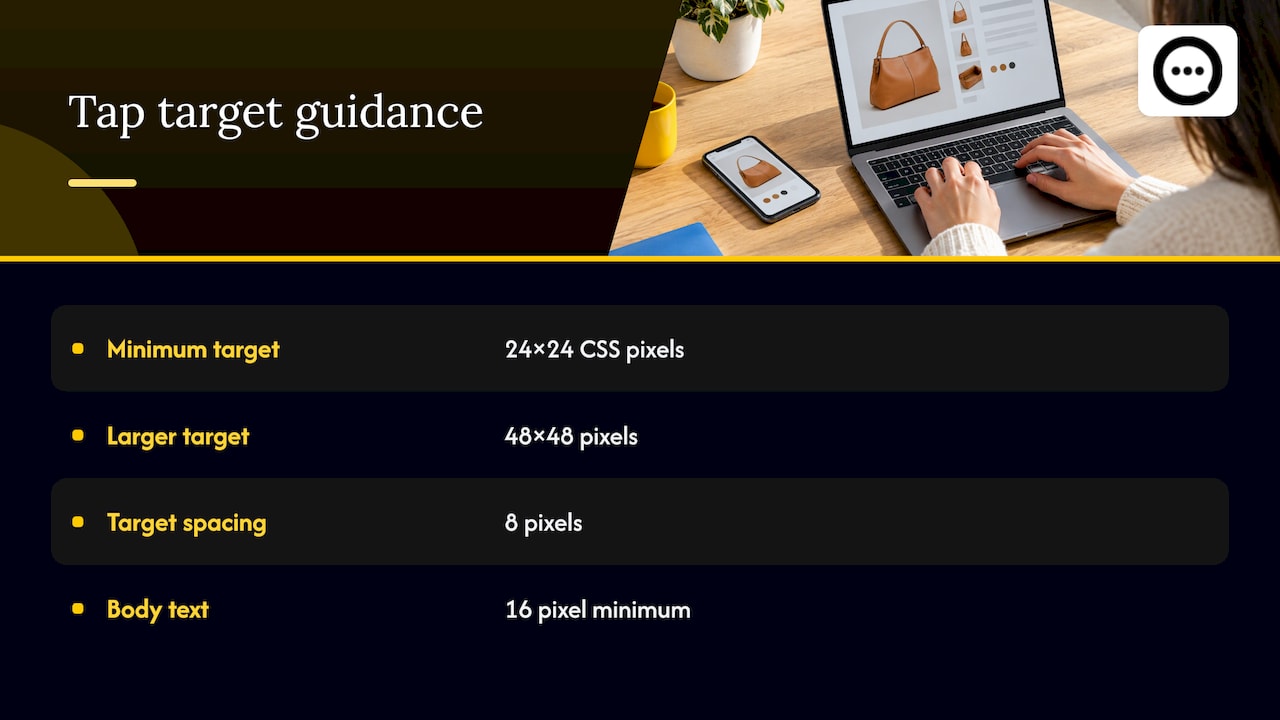
WCAG 2.2 Level AA sets a minimum tap target of 24×24 CSS pixels, according to Charle Agency’s mobile guide, which also recommends auditing every button in the Theme Editor’s mobile preview. A Talk Shop design guide points to the larger 48×48 pixel target with 8 pixels of spacing from Google’s accessibility guidance, and a 16 pixel minimum body size, noting Baymard Institute research that 16 pixels is the point where most people read without zooming. Aim for the larger figure on filters and sort controls, where a long translated label can crowd neighboring buttons.
Layout shift and loading
Charle Agency also notes that Google’s Core Web Vitals pass requires at least 75% of mobile visitors to see the largest content within 2.5 seconds, interaction responses under 200 ms and layout shift below 0.1. It names late-loading review widgets as a common cause of layout shift. So do not assume any widget is free of performance cost, including ours. Preview mobile playback of video reviews on a real device over a normal mobile connection, and measure the page before and after you add the widget.
A few habits help:
- Place the widget where the page already has room reserved, rather than letting it push content down as it loads.
- Check long-language versions for text that wraps awkwardly or clips.
- Keep video thumbnails sized consistently. Our guide to video review thumbnails covers choosing and fixing them.
- Decide where each piece belongs on the page using our review widget placement guide.
Accessibility checks you can run yourself
An accessible widget helps shoppers who use keyboards, screen readers or magnification, and it tends to improve the experience for everyone. You do not need specialist tools to catch the common failures. Run this routine on each language version, since translated text changes contrast, wrapping and reading order.
- Keyboard only. Put your mouse aside. Press Tab through the product page. You should reach the play button, the filters, the sort menu and the question form in a logical order, with a visible focus outline at each stop. Press Enter or Space to activate; Escape should close any video overlay.
- Zoom to 200%. Increase browser zoom and check that nothing is cut off or overlapping, and that you do not have to scroll sideways to read a review.
- Contrast. Check star colors, text on thumbnails and filter chips against their backgrounds with a contrast checker. If you changed colors to match your brand, repeat the check.
- Rating and filter controls. Each control needs a text label that makes sense out of context, such as “Show 4-star reviews,” not just an icon of stars.
- Screen reader pass. Turn on VoiceOver on an iPhone or TalkBack on Android and move through the widget. Listen for each control’s name and state.
- Reduced motion. If the widget autoplays or animates, confirm it respects a reduced-motion setting on the device.
For video specifically, make sure shoppers can pause and control playback, and that nothing starts with sound unexpectedly. If you change widget colors and layout, our guide to customizing a review widget walks through the options.
This list is merchant implementation advice. It describes what to verify on your own store, not features we claim for any product. Verify a specific accessibility feature against the released product on your own preview before you rely on it.
A test plan for every language and device
Translation work often ends when the text looks right on a desktop in one language. Use a small matrix instead.
| Check | English | Language 2 | Language 3 |
|---|---|---|---|
| Language selector works, URL changes | |||
| Widget labels match page language | |||
| Review text is in the intended language | |||
| No clipped or overlapping text on a phone | |||
| Keyboard focus visible on all controls | |||
| Video plays on iOS Safari and Android Chrome | |||
| Page speed measured before and after |
Fill in each cell for your top three products. Problems cluster: a label that wraps in one language usually does in the next. Test in a private browser window so cached language preferences do not hide issues.
Consent, permission and verification are three different things
When you collect reviews from customers in several countries, keep three questions apart:
- Purchase verification. Customer-specific post-purchase invitations from Peers can link a review to an order. Public questions, replies and merchant recordings are not automatically verified purchases.
- Permission to publish. Peers’ standard video permission covers its service and store community. It does not cover unrelated advertising or model training. What permission you need depends on context, and a signed release is not a universal GDPR rule, so confirm requirements for your markets with a qualified adviser.
- Browser tracking consent. Cookie and tracking consent on your storefront is a separate matter from either of the above.
Peers invitations and browser recording are both supported. One limit to plan for: customer uploads have a 150 MB control limit in Peers, which is separate from Shopify’s product-media limits.
If you want to put a QR code on packaging, a generic code needs its own public landing page and a purchase-verification flow. Never share a private customer invitation or a merchant recording-session link as a public QR code. Our guide to collecting video reviews from QR code to product page covers the routine.
On incentives: invite honest feedback using neutral eligibility criteria, such as “customers whose order was delivered,” never a prediction of who will be satisfied. Never tie a reward to positive or negative sentiment. Disclose incentives and check the rules of any platform where the content appears. This does not amount to a promise of legal compliance. Rewards are available on the Free plan too.
Setting up Peers inside Shopify
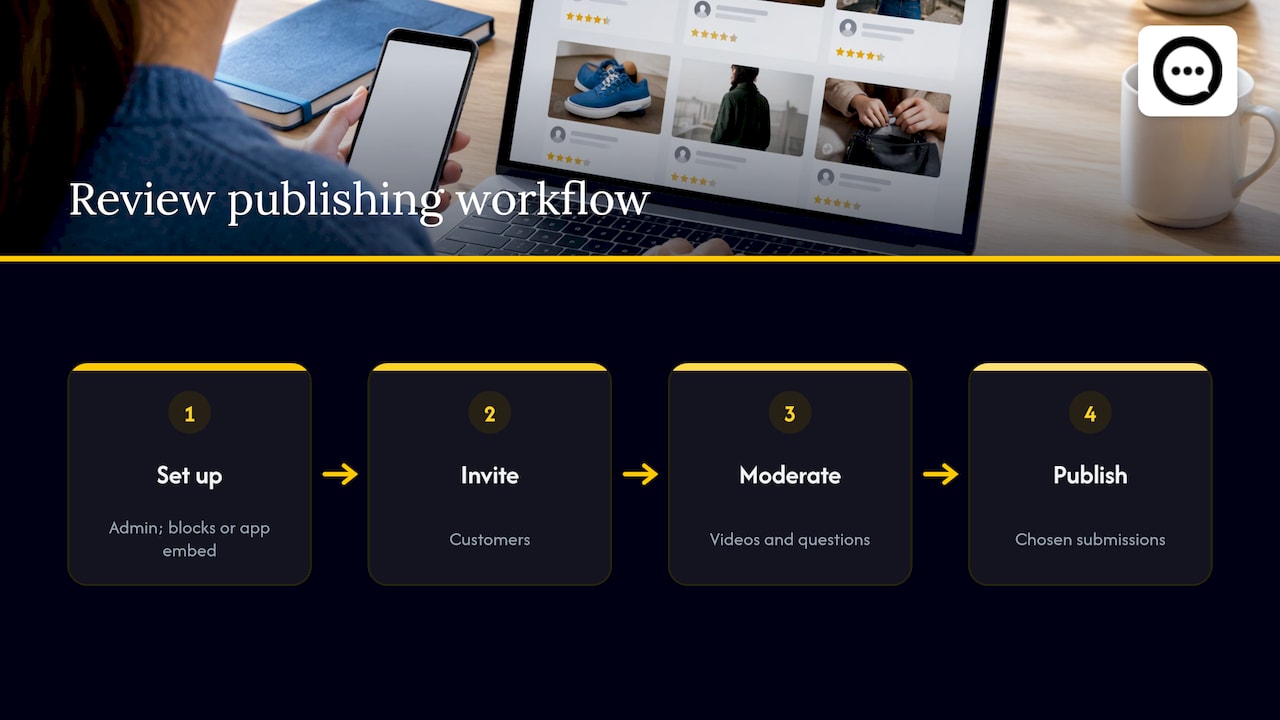
Merchants manage Peers inside Shopify Admin. You display content with theme app blocks or the app embed in the theme editor, so there is no standalone login to maintain and no code snippet to paste. Invite customers, moderate submitted videos and questions, then publish the ones you choose. If you prefer to avoid touching theme code, read how to embed post-purchase video reviews without theme code.
When you roll out video, position matters as much as language. Our piece on video review rollout explains why clips hidden below the fold go unseen. And if you want to know whether the change is paying off, use the approach in how to A/B test review widgets. For the broader evidence on why reviews matter, see what the evidence says about conversions, which attributes its statistics and notes their limits.
What we think
Multilingual reviews are a trust problem before they are a translation problem. A shopper in a new market wants to know that real people bought this, used it and would talk about it. Translating a paragraph of text rarely answers that as well as seeing a customer hold the product and speak plainly about it.
That is why we built Peers around customer video reviews and shopper questions that merchants moderate and publish from inside Shopify. You decide what goes live, where it sits, and how it looks on each language version of your store.
We are also careful about what we promise. We do not claim a conversion lift, a ranking or zero performance impact. We recommend you preview mobile playback and measure your own pages. Honest feedback, collected with neutral criteria and clear incentive disclosure, is the foundation. Everything else is a layout choice you can test.
Leo
Try Peers on your store
Peers is a Shopify app for collecting customer video reviews and answering shopper questions on product pages. The Free plan costs $0 per month and includes moderation, widgets and up to 10 published video reviews per product, plus Rewards. Growth has a 14-day trial and costs US$6 per 30-day billing cycle for the first 12 cycles, then US$15 per cycle. Growth removes the video-review limit and the Peers branding. You can install Peers from the Shopify App Store and see how the widget behaves in your own language versions.
Check the current listing for the latest plan details before you decide.
FAQ
Can Shopify’s Translate & Adapt translate my product reviews?
Usually not. Reviews that an app loads from its own servers generally sit outside the resources Translate & Adapt can reach. Inspect your live page to see whether review text is rendered by your theme or injected by a script, then choose between showing original-language reviews, a display translation tool, or curated copies.
Should I translate every review?
Not necessarily. Authentic original-language reviews carry trust on their own, and machine translation can read awkwardly. Many stores start by localizing the labels and surrounding copy, then curate translations for their best-selling products in their largest markets.
How do I check a review widget on mobile?
Open each language version on a real phone and in the Theme Editor’s mobile preview. Check tap-target size, text wrapping, video playback and whether the page jumps while the widget loads. Then measure page performance before and after adding it, rather than assuming either result.
Does a video review count as a verified purchase?
In Peers, a review submitted through a customer-specific post-purchase invitation can be matched to an order. Public questions, replies and merchant recordings are not automatically verified purchases, so keep that distinction clear when you describe content to shoppers.
Sources
- What Every Shopify Translate and Adapt Store Runs Into (help1)
- Everything Shopify store owners get wrong with Translate & Adapt (InSpace)
- Shopify Translate & Adapt: Free, but Skips 6 Content Types
- Mobile Responsive Shopify Web Design: 2026 Guide (Charle Agency)
- Mobile Responsive Shopify Theme Design (Talk Shop)