How to Encourage Q&A Participation on Your Shopify Store

Shoppers join product Q&A when asking is effortless, the block sits near the buy button, and the first questions already have honest answers. They keep joining when someone replies quickly. With Peers, you collect and moderate shopper questions from inside Shopify and publish them on product pages with theme app blocks or the app embed, so the work is mostly the routine below.
TL;DR
- Put Q&A close to the add-to-cart button and keep the ask form to the minimum fields.
- Seed it with real questions your team already gets, and answer plainly, including “no.”
- Reply fast: a PLOS ONE study links the response rate to future respondents’ willingness to take part.
- Any reward must be disclosed and never tied to what the customer says.
- Measure answered-question rate, time to answer and support contacts, not just question counts.
Table of Contents
- Why shoppers stay silent on most product pages
- Make asking take ten seconds
- Seed the block with real questions
- Prompt people at the moment they have something to say
- Reply quickly, and set a deadline you can keep
- Moderate so the block stays worth reading
- Rewards: what you can offer and what to avoid
- Give contributors a reason to come back
- Measure whether participation is growing
- Perspective
- Run it with Peers
- FAQ
- Sources
Why shoppers stay silent on most product pages
Most empty Q&A blocks are not empty because shoppers have no questions. They are empty because asking feels risky: the form is buried, nobody seems to answer, or the last visible question is months old. Participation is a loop. A question appears, a useful answer follows, the next shopper sees proof that asking works.
The research on this loop is consistent. The PLOS ONE study by Feng, Feng and Li (published 17 November 2023) recommends that retailers answer unanswered questions quickly, because the response rate affects how willing future respondents are to take part. An academic study in Frontiers in Psychology found that wanting to help others, enjoyment, perceived social pressure and external rewards all influence whether consumers share knowledge in Q&A. Feedback such as notifications, points and badges strengthened the effect of the wish to help. That study looked at consumers in China, so treat it as a pattern, not a U.S. benchmark.
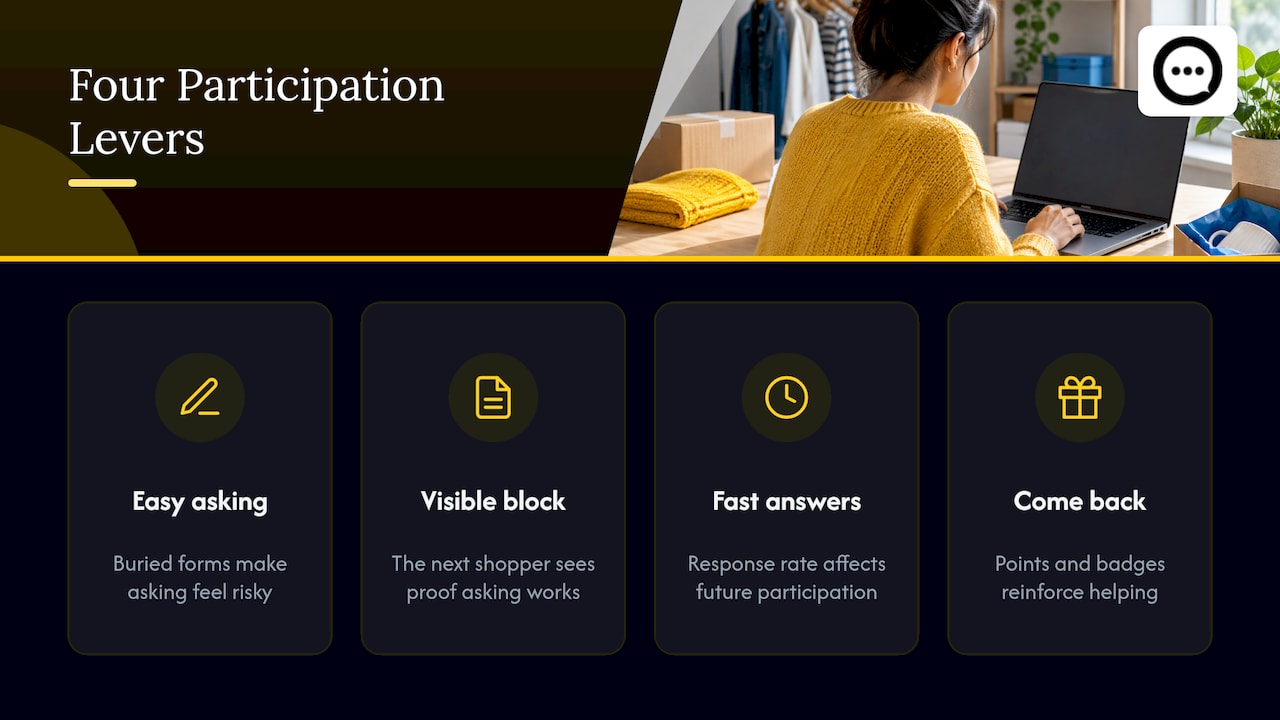
For a store owner, that translates into four levers: make asking easy, make the block visible, answer fast, and give contributors a reason to come back.
Make asking take ten seconds
Every extra field costs you questions. Ask for a name, an email so the shopper can be notified, and the question itself. Nothing else.
Two placement rules matter more than design:
- Keep it near the buy box. Shoppers comparing options should see the block while they are still deciding, not after a long scroll through the description. A compact block under the main button works for most products.
- Keep the invitation visible on mobile. Preview the page on a real phone. If the “Ask a question” button is below the fold or collides with a sticky cart bar, fix that first.
In Peers, setup happens inside Shopify Admin. You add the Peers theme app block to your product template in the theme editor, or turn on the app embed, then check the result on desktop and mobile. There is no separate merchant login and no code snippet to paste. If you want the walkthrough, see 4 ways to add product Q&A on Shopify without theme edits.
Any widget adds some load to the page. We do not promise zero performance impact: preview mobile playback and loading, then measure page speed before and after you publish.
Seed the block with real questions
A Q&A block with nothing in it looks abandoned, and the first shopper rarely wants to be the first. Seed it, but with real material. Studio Niza’s Shopify Q&A guide (23 June 2026) suggests drawing from questions you already receive: support email, social DMs, live chat logs and return reasons. It also says to label store answers as coming from the store and never to invent fake customers or questions.
The same guide makes a point worth acting on: answer hard questions straight. “No, this is not waterproof, and here is what it is rated for” earns more trust than a vague reply, and a block full of unanswered questions is worse than no block.
Search Engine Journal’s Adam Riemer (14 May 2024) adds a sorting rule: product-specific questions belong on the product page, while brand and policy questions (shipping times, returns) fit better on the homepage or an FAQ page. Keeping them apart stops the product block from filling with generic noise.
A seeding routine you can run in an afternoon
- Pull the ten most repeated pre-purchase questions from your inbox and chat history.
- Match each to the product it concerns.
- Write a direct first sentence, then one specific detail (a measurement, a material, a date).
- Publish them as store answers and label them clearly.
- Repeat quarterly, or whenever a size chart, material or shipping rule changes.
Baymard Institute’s product-page research (4 July 2017) found the strongest pattern was a hybrid of site-authored FAQs and community Q&A, present on only 28% of the e-commerce sites it benchmarked. Your seeded answers are the site-authored half. Shopper questions are the other half, covering niche details a copywriter would not think to research.
Prompt people at the moment they have something to say
Timing decides who participates. Three moments work:
- Before purchase, on the product page. The shopper has a doubt right now. A visible “Ask a question” link catches it.
- After delivery. The customer has real experience with the product. A post-purchase invitation can ask whether they want to answer a question other shoppers have posted. Our guide to post-purchase Q&A prompts covers what to ask and when.
- After an answer is posted. Notify the asker. Someone who gets a useful answer is more likely to ask again and to answer someone else.
Peers invitations can be sent to specific customers, and browser recording is supported for customers who prefer to show rather than type. An invitation tied to a specific customer can link the response to an order. Public questions, replies and merchant recordings are not automatically verified purchases, so do not describe them as such on the page.
If you want the same prompt to reach buyers who did not open an email, a packaging QR code can work, but a generic QR on a box needs its own public landing page and a purchase-verification flow. Never turn a private customer invitation or a merchant recording-session link into a public QR code.
Reply quickly, and set a deadline you can keep
The most cited case for speed is old but concrete. In a MarketingSherpa case study, an auto-parts retailer launched an ask-and-answer section in June 2007 and received more than 10,000 questions in the first two weeks. The team jump-started answers with product specialists, then committed two people to roughly 200 answers a week. About 70% of answers still came from staff when the case was written. The retailer also reported lower return rates on answered products and higher conversion. It is one retailer’s results from nearly two decades ago, so use it for the operating lesson, not as a forecast: plan staff time before you launch.
A workable standard for a small store:
- Name one owner for Q&A. Someone has to be accountable.
- Set a response target you can actually meet, such as one business day, and route anything unanswered after that to a product or support person.
- Answer with the specific detail first, then the next step (“Yes, it fits a 15-inch laptop. See the size chart under Details.”).
Our walkthrough on how to answer shopper questions on your Shopify store goes deeper on tone and length, and on-page Q&A etiquette covers what to do with awkward or critical questions.
Moderate so the block stays worth reading
Participation drops when a Q&A block fills with spam, duplicates or stale answers. Moderation is what keeps good contributors posting.
Zspace’s community UX guide recommends published guidelines, a report button on each post, automated spam filtering backed by human review, clear roles, consistent enforcement and honest disclosure of staff participation. Its 1 October 2026 update also suggests letting shoppers search existing questions before posting, showing the most helpful answers first and marking official brand answers.
In Peers, every submitted question and video goes through moderation before you publish it, and you choose what appears. Use that to:
- Merge duplicates into one clear question.
- Retire answers that are out of date.
- Keep genuine criticism visible when it is fair. Hiding every negative remark makes the block look staged.
- Fight spam early. We cover this in how to prevent Q&A spam on your Shopify product pages.
Rewards: what you can offer and what to avoid
Some stores want to thank people who answer. That can work, if the rules are clean. The motivation research above found external rewards matter, and one Shopify SEO guide from Tenten suggests discounting for answers while disclosing the incentive to other shoppers and featuring the best answers on the page.
The legal line is about conditions and disclosure. The FTC’s final rule on fake reviews and testimonials prohibits compensation or incentives conditioned on reviews expressing a particular sentiment, positive or negative. That rule is about reviews and testimonials; Q&A answers are not reviews, but the safe design is the same:
- Choose recipients with neutral criteria, such as “everyone who bought in the last 90 days,” never by who you think will be happy.
- Never make a reward depend on positive or negative wording.
- Disclose the incentive next to the content, and check the rules of any other platform where you republish it.
- Treat this as a design guide, not legal advice. If your program is large, ask your attorney.
Peers includes Rewards on the Free plan as well, so you can test a thank-you without upgrading.
Three separate permissions also get confused:
| Question | What it is about |
|---|---|
| Is this customer a verified buyer? | Purchase verification, available when the response comes from a customer-specific invitation |
| May you publish what they sent? | Permission to publish. Peers’ standard video permission covers use within its service and your store community, not unrelated advertising or AI model training |
| Can you track their browser? | Consent for cookies and tracking, handled by your own consent setup |
A signed release is not a universal legal requirement everywhere. What permission you need depends on context, so decide before you reuse a customer’s video in ads.
Give contributors a reason to come back
The Frontiers study found notifications, points and badges strengthen the effect of wanting to help. Practical versions that cost nothing:
- Email the asker when an answer is posted.
- Email past buyers: “Someone asked about sizing. Here is what other customers said.” Tenten recommends this kind of follow-up.
- Feature the best answer on the page.
- Say thank you in the reply itself.
If you want Q&A to feed a broader content and search plan, Shopify SEO automation tools can handle the publishing side while your Q&A supplies the real customer language. Do not expect Q&A alone to lift rankings.
Video can lower the bar for people who would rather talk than type. We cover that in Shopify video Q&A. Customer uploads in Peers have a 150 MB control limit, which is separate from Shopify’s own product-media limits.
Measure whether participation is growing
Counting questions alone misleads. Track the loop:
- Questions asked and answered, and the share answered.
- Median time to answer.
- Views of Q&A content on product pages.
- Support contacts about the same issue, which good answers should reduce.
- Add-to-cart rate and checkout start rate on pages with Q&A, compared before and after you changed something.
Zspace’s list of community metrics covers most of these. For conversion, compare like with like, change one thing at a time and be wary of big headline numbers. Vendor reports of triple-digit lifts come from their own data and rarely transfer to your store. Peers does not guarantee sales or SEO results. A Boston University working paper by Zuo and colleagues found that product Q&A complements ratings and reviews, with later ratings improving by roughly 0.1 to 0.5 stars after Q&A activity. Our look at shopper questions and conversion and the Q&A strategy for Shopify show how to read your own numbers.
Perspective
Stores often treat Q&A as a widget to install. We treat it as a conversation you run. The widget only makes the conversation visible.
What we have built Peers around is the part that stays with you after install: a place to receive questions, a moderation step so you decide what goes live, and shopper content that sits on the product page where doubts form. We think the stores that benefit most are the ones that answer honestly, including the awkward answers, and keep a person responsible for the block.
Start small. Seed ten real questions, answer within a day, and keep the incentive rules simple and disclosed. If shoppers can see that asking leads to a useful reply, participation follows.
Leo
Run it with Peers
Peers is a Shopify app for collecting customer video reviews and answering shopper questions on product pages. You manage it inside Shopify, moderate what comes in, and publish selected content with theme app blocks or the app embed.
The Free plan, at US$0 per month, includes moderation, widgets and up to 10 published video reviews per product, plus Rewards. Peers Growth has a 14-day trial and costs US$6 per 30-day billing cycle for the first 12 cycles, then US$15 per cycle. Growth removes the video-review limit and the branding. You can install from the Peers Shopify listing and confirm current pricing there.
FAQ
How many questions should I expect after adding Q&A?
It depends on traffic, product complexity and how visible the ask button is. Higher-consideration products such as electronics or apparel with fit issues tend to draw more questions. Rather than chase a number, watch the share of questions you answer and how fast you answer them.
Should I answer every question myself?
At launch, yes: store answers, clearly labeled, set the tone and show shoppers that asking works. As the block grows, invite past buyers to answer, and keep a staff reply for anything about safety, sizing or compatibility.
Are Q&A answers verified purchases?
Not automatically. In Peers, customer-specific post-purchase invitations can link a response to an order. Public questions, replies and merchant recordings are not automatically verified purchases, so label them accordingly.
Can I reward people for answering questions?
Yes, if the reward does not depend on what they say, recipients are chosen by neutral criteria, and you disclose the incentive. Check the rules of any platform where you republish the content, and ask your attorney about larger programs.
Sources
- PLOS ONE: Online reviews, customer Q&As, and product sales
- Frontiers in Psychology: Consumer online knowledge-sharing
- Studio Niza: Shopify Product Q&A vs Reviews
- Search Engine Journal: Should You Include FAQs On Product Or Category Pages?
- Baymard Institute: Product Page UX, FAQs and Q&A
- MarketingSherpa: Ask-and-answer section case study
- Zspace: Ecommerce Community UX
- Tenten: User-Generated Content for SEO
- FTC: Final rule banning fake reviews and testimonials
- Boston University: Interacting User-Generated Content Technologies