Customer Consent Video on Shopify: What to Get Before You Publish

A customer consent video on Shopify is any customer clip, such as a review, a testimonial or an answer to a shopper’s question, that you publish only after the person has clearly agreed to how it will be used. In practice that means a specific, recorded yes that names your store, the places the clip will appear and what you may do to it. Your cookie banner and marketing opt-ins do not do this job. They cover tracking and email, not a face and a voice on your product page.
This guide walks through what to ask, what to store, how to handle withdrawals, minors and people in the background, and how to build the whole thing into a post-purchase flow so it runs without manual chasing.
TL;DR
- Get explicit consent for each video before it goes live, and keep a record of when and how the customer gave it.
- Shopify’s cookie and marketing-consent settings govern tracking and messaging. They do not give you permission to publish someone’s face, voice or name.
- A good consent request names your store, the places the video will run, whether you may edit it, how long you may use it and whether any incentive is involved.
- Everyone identifiable in a clip needs to agree, and you need a simple way to take a video down when someone changes their mind.
- Collecting consent at the moment of upload, inside a post-purchase flow, is easier and cleaner than chasing releases by email later.
Table of Contents
- What consent for a video review actually covers
- Cookie banners and marketing consent are a different thing
- A tag or a mention is not permission
- What a good consent request says
- A sample consent statement you can adapt
- How to collect and document consent in Shopify
- Withdrawal, minors and other people on camera
- Rules that vary by country
- Build consent into a post-purchase flow
- Shopper questions need consent too
- Where to place consented videos so they work
- Our perspective
- Run it on your store with Peers
- FAQ
- Sources
What consent for a video review actually covers
When a customer records a review, they are handing you three different things: their image, their voice and their words. Each carries its own sensitivity. A person may be happy to type a first name under a text review and still not want their face next to your product for years.
So “consent” for a video is not one tick box labeled “I agree.” It is a package of answers to a handful of practical questions:
- Who is allowed to use this video? (Your store, by name.)
- Where will it appear? (Product pages, email, ads, social.)
- May you trim, caption or crop it?
- For how long, and in which regions?
- Was the customer paid, or given a discount or gift, for recording it?
If your request answers those, you have consent that is specific rather than vague, and specific is what protects both you and the customer.
Cookie banners and marketing consent are a different thing
The top results for this topic are mostly about consent management platforms and Shopify’s own privacy settings. Those matter, but they answer a different question. Under Shopify’s Customer privacy settings you can set up a cookie banner, and the platform collects marketing consent at checkout and on sign-in. That consent concerns analytics, marketing and preference cookies, and whether you may send marketing messages.
None of that says anything about publishing a customer’s video. A shopper who accepted your cookie banner has not agreed to appear in your ads. A subscriber who opted in to your newsletter has not agreed to have their face on your homepage. Treat video as its own consent event, with its own wording and its own record.
We cover the practical checks in more detail in our guide on video privacy for Shopify stores.

A tag or a mention is not permission
This is the mistake that catches the most merchants. A customer tags your brand in a post or a story, the clip looks great, and it goes straight onto the product page. But tagging or mentioning a brand on social media does not automatically give the merchant ownership or usage rights to that content for marketing, as Shopify’s own enterprise blog notes. The same point, framed around trust and engagement, appears in this piece on user-generated content and brand trust.
The fix is simple: ask first. A short message such as “We love this, may we feature it on our product page?” with a clear way to say yes is enough to start a clean paper trail.
What a good consent request says
A consent request should identify the business and the intended use, list the likely distribution channels, explain whether the video may be edited, state the term and territory, and document any compensation or incentives, according to guidance on local video testimonial consent. Here is how that translates for a Shopify store.
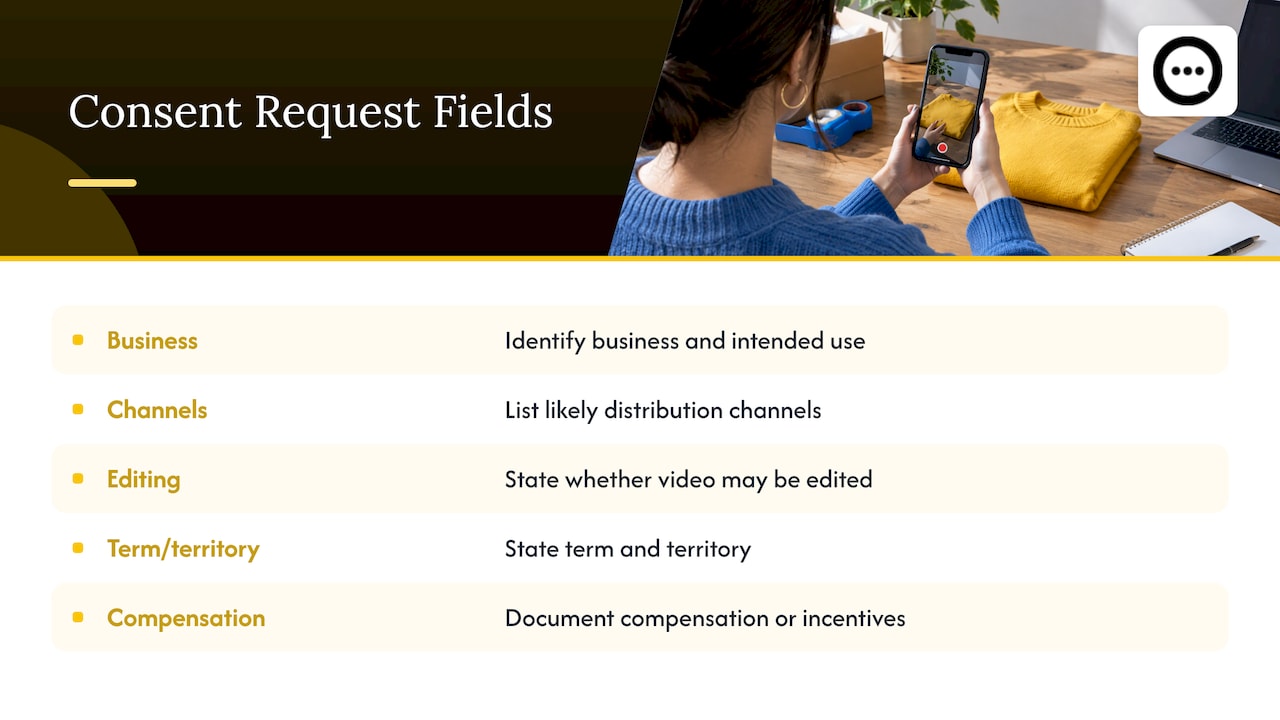
The business and the use
Name your store and say what the video is for. “Your video may be shown on [store name] product pages” is far better than “Your video may be used for marketing purposes.”
The channels
List where the clip might go. If you only plan to show it on product pages today but might use it in email or paid social later, say so now. Adding channels afterward means going back to the customer.
Editing
Tell people you may trim the clip, add captions or crop it for mobile. Customers rarely mind, but they should know, especially if you might cut a long answer down to its best fifteen seconds.
Term and territory
Say how long you intend to keep the video live (for example, until the customer asks you to remove it, or for a fixed number of years) and where it may be shown. If you sell internationally, “worldwide” is the honest answer for a product page.
Incentives
If you gave a discount code, store credit or a free product in exchange for the video, record that. A release should capture the customer’s name, signature, date and contact information, permission for image, likeness, voice and statements, the distribution channels, editing rights and any compensation, per the same consent requirements guide. Incentives can also trigger disclosure duties when the content is published, so read our walkthrough on FTC-aware one-click video testimonials before you launch a rewards program.
A sample consent statement you can adapt
You do not need legal language to be clear. Plain wording that a customer can actually read in a few seconds is the goal. Something along these lines works as a starting point:
I confirm that I recorded this video myself and that I am the person in it. I give [Store name] permission to show my video, my first name and my words on its product pages, emails, social channels and ads, and to trim or caption it. This permission lasts until I ask for removal. I understand I can ask for removal at any time by contacting [email]. [If applicable: I received a discount code for submitting this video.]
Have a lawyer in your state or country review the final wording, particularly if you plan to run the clip in paid ads or sell in regions with strict privacy law. The sample above is a template to adapt, not legal advice.
How to collect and document consent in Shopify
The best consent record is the one created at the exact moment the customer submits their video, not a spreadsheet you assemble afterward. Here is a practical process.
- Put the consent text on the upload step. The customer sees the wording and must actively agree before the submit button works. Pre-ticked boxes are weak evidence of anything.
- Store the record with the video. Keep the timestamp, the wording version they agreed to, their name and their email alongside the file.
- Moderate before publishing. Review each clip for the customer’s identity, anyone else on camera, background items such as mail or screens, and anything that makes a claim you cannot support.
- Track usage rights. Shopify’s guidance for user-generated content recommends using a centralized digital asset management system or a dedicated review tool to store approved media, metadata and expiration dates for usage rights, as described on the Shopify enterprise blog. If your permission has an end date, you want a system that remembers it for you.
- Keep one removal route. A visible email address or a form, monitored by a real person.
If you are setting this up from scratch, our five-step video testimonial consent checklist breaks the workflow into a printable sequence.
Withdrawal, minors and other people on camera
When a customer changes their mind
Some customers will ask you to take their video down. Honor the request promptly: remove it from the product page, pull it from any ad sets and email templates you control, and delete the file if you have no other lawful reason to keep it. Reply to confirm. In Europe, the GDPR treats the ability to withdraw consent as part of valid consent, and even outside those rules, a fast and polite removal protects your reputation far more than any contract clause.
What withdrawal cannot do is recall a video that has already been seen, so be honest in your request wording that removal applies going forward from the moment you act.
Children and teenagers
If a clip features a child, a parent or legal guardian should give the consent, not the child. Rules differ by country and state, so when your products are aimed at families or kids, set a policy: either require a parent’s confirmation at upload or decline to publish clips where a minor is the main speaker. When in doubt, speak with a lawyer in your jurisdiction.
Partners, kids and friends in the background
Videos shot at home often include other people. If multiple individuals appear on camera, a signed release is required from every identifiable person to legally use the footage in public-facing marketing, according to this guide to using customer-made content. Your moderation step is where you catch it. If someone else is clearly on screen and the uploader cannot vouch for their agreement, either ask for it or leave the clip off the page.
Rules that vary by country
Because our readers sell across borders, one caution: image and privacy rules are not universal. In the United States, protections for a person’s name and likeness are set largely state by state, and advertising endorsements are also subject to federal disclosure expectations. In the European Union and United Kingdom, a face and a voice are personal data, which brings in the GDPR and its consent and withdrawal requirements. Other countries, including Canada, Australia and Brazil, have their own privacy laws. Before you run customer videos in a market, check the official guidance from that country’s regulator, and ask a local lawyer about any clip you plan to use in paid advertising.
Build consent into a post-purchase flow
The cleanest time to ask is right after delivery, when the customer is happy and the product is in their hands. A post-purchase request has three advantages: the person is a verified buyer, the consent is captured at upload with no later chasing, and the clip is recorded in context, in their own home with the real product.
A few practical notes on the flow:
- Send the request a few days after delivery, not at checkout.
- Keep recording simple: a link or a QR code that opens on a phone, no app to install. Our QR-code-to-product-page walkthrough shows the steps.
- Tell people how long the video should be and what to talk about. A good prompt is “Show us how you use it and what surprised you.”
- Keep file limits generous. Our note on clip size and formats for video reviews covers what customers’ phones typically produce.
For the bigger picture on why a verified-buyer flow works, see our practical guide to post-purchase video reviews on Shopify.
Shopper questions need consent too
Video is not the only customer-generated content that needs permission. When shoppers ask questions on a product page and verified buyers answer, you are publishing their words, and sometimes their names. Decide up front what is shown (first name only, or initials), tell people before they post and moderate before anything goes live. We go through three workable approaches in publishing shopper Q&A without overstepping.
Where to place consented videos so they work
Consent is the gate, not the goal. Once a clip is cleared, it should be where hesitant buyers will see it. Stores often bury video reviews far below the fold, where nobody scrolls. Put clips near the buy button or directly under the product description, and keep them mobile friendly. Our guide on keeping video reviews out of the below-the-fold trap has layout ideas, and the comparison of video testimonials and text reviews explains where each format earns its place.
Our perspective
We built Peers only for Shopify, and consent is the reason that focus matters. A video review is a person’s face, voice and opinion, and treating it as a casual file upload is how stores end up in awkward emails and takedown requests.
Our view is simple: the best consent process is the one the customer barely notices because it is clear, short and built into the moment they record. Post-purchase video reviews and verified shopper Q&A, with moderation before anything is shown on the product page, let a store collect real customer voices while keeping control of what goes live.
We also believe consent should be visible to the shopper. When people know their clip is being shown with their agreement, they record more honestly, and honest video is what actually reassures the next buyer.
Leo
Run it on your store with Peers
If you want video reviews and shopper Q&A on your product pages without building the process by hand, Peers is a Shopify app made for this. It collects post-purchase video reviews and customer Q&A, gives you moderation tools so you approve what appears, lets you customize the design to your theme, works on mobile and includes analytics on engagement. There is a free plan, and Peers Growth is $15 per month.
You can install Peers from the Shopify App Store or look at the demo store to see how video and Q&A look on a real product page.
FAQ
Do I need written consent for every customer video?
Yes, as a working rule. Get an explicit, recorded agreement for each clip before it is published, ideally at the moment of upload. A checkbox with clear wording plus a stored timestamp is a practical way to document it, though your lawyer can tell you whether your use needs a signed release.
Does my Shopify cookie banner cover customer videos?
No. Cookie and marketing-consent settings deal with tracking and messaging. Publishing someone’s face, voice or name is a separate permission that you need to request and record yourself.
Can I reuse a video a customer posted on social media?
Not automatically. A tag or mention does not hand you usage rights for marketing. Message the customer, say where you want to use the clip, and keep their written reply.
What should I do if a customer asks me to remove their video?
Take it down from your product page and from any email or ad assets you control as soon as you can, delete the file if you have no reason to keep it, and confirm by email. Make the request route easy to find so customers do not have to hunt for it.
Sources
- Yotpo User Generated Content: UGC Strategy Guide, Shopify
- Customer Consent Requirements For Local Video Testimonials
- Using content your customers made
- User-Generated Content: Boost Brand Trust and Engagement